Microsoft has baked several gaming utilities directly into Windows 11, aiming to bridge the gap between console-style convenience and PC flexibility. If you are looking to optimize your setup, these three core features are worth knowing.
The Xbox app ecosystem
At the center of the experience is the pre-installed Xbox app. This serves as your primary hub for managing game libraries, whether they come from the Microsoft Store or third-party platforms. It handles updates and social connectivity in one place.
The app also integrates with third-party stores, allowing you to launch titles from external sources without leaving the Windows environment. This centralization helps keep your desktop clutter-free while maintaining access to a wide range of software.
Game Bar overlay
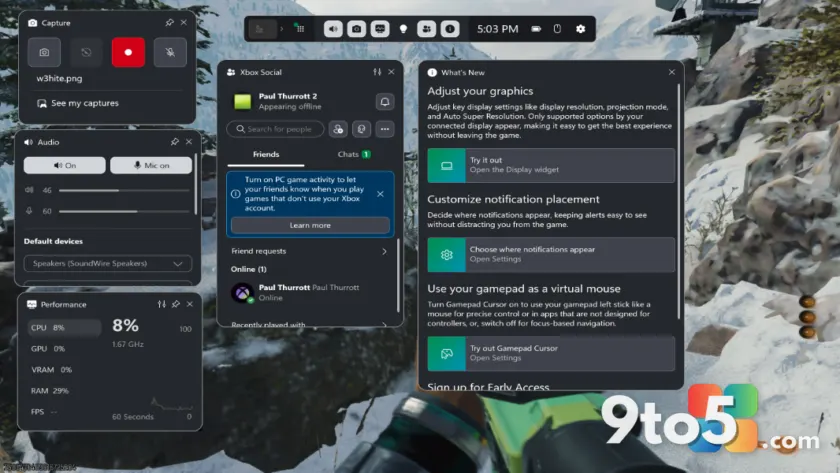
For quick access during gameplay, Windows 11 features the Game Bar. Activated via a keyboard shortcut, this overlay lets you record clips, check performance metrics, and communicate with friends without minimizing your game.
You can customize which widgets appear in the overlay to suit your needs. Whether you want to monitor CPU usage or grab a screenshot, the tool is designed to stay out of the way until you need it.
Controller-optimized Xbox Mode
If you prefer playing with a controller rather than a mouse and keyboard, Windows 11 offers an Xbox Mode. This setting optimizes the interface for navigation using buttons and joysticks, making it easier to browse menus and launch games.
This mode is particularly useful if you treat your PC like a living room console. It reduces the reliance on precise cursor movements, providing a more streamlined experience for controller users.
What this means for you: These built-in tools reduce the need for third-party software to manage your gaming library or capture moments. By leveraging the Xbox app and Game Bar, you can streamline how you play on Windows 11 right out of the box.
Source: Thurrott
Over to you: Do you prefer using the Xbox app as your main game launcher, or do you stick with third-party clients like Steam?