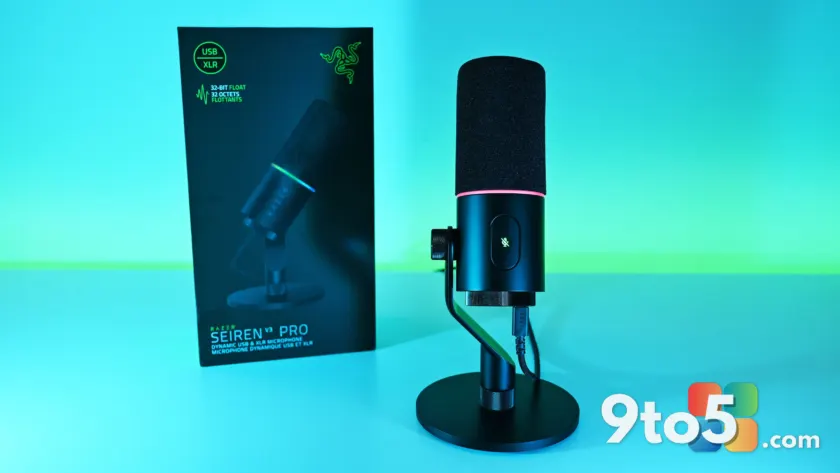
Razer has long been associated with flashy RGB peripherals, but the Razer Seiren V3 Pro ($249.99 / €289.99) marks a shift toward serious audio hardware. This hybrid dynamic microphone bridges the gap between plug-and-play USB convenience and professional XLR flexibility, aiming to satisfy both casual streamers and content creators who demand studio-grade fidelity.
After testing the Seiren V3 Pro extensively, it’s clear that Razer has prioritized completeness. The unit arrives with everything you need out of the box, including a desktop stand, integrated shock mount, and removable pop filter. Unlike some competitors that force you to buy accessories separately, this setup is frictionless from unboxing.
Hardware: Built for durability and versatility
The core of the Seiren V3 Pro is a custom 30 mm dynamic capsule, designed to capture broadcast-style depth while rejecting background noise better than typical condenser mics. The housing features a resonance-resistant zinc unibody frame, giving it a premium, heavy feel that resists vibrations.
A standout feature is the dual-connectivity design. You can plug in via USB-C for immediate digital audio or use the XLR output to route into an audio interface or mixer. Interestingly, you can keep both cables connected simultaneously and switch between them on your Windows PC. While there’s no noticeable tonal difference between the two outputs, the USB connection is essential for unlocking the mic’s full software potential.
The top of the mic features a Razer Chroma RGB lighting ring that serves as more than just aesthetic flair. It acts as a real-time status indicator, changing color to show when the microphone is muted. The mute function itself is handled by a large, tactile tap-to-mute button on the side, allowing you to silence yourself without grabbing the mic or disturbing its position on the mount.
Software: Synapse DSP changes the game
Where the Seiren V3 Pro truly separates itself from rivals like the HyperX Flipcast is in software integration. While HyperX’s NGENUITY app offers basic controls, Razer Synapse provides deep, granular audio customization powered by an onboard hardware engine.
Key features available via Synapse include:
- 32-Bit Float Support: Captures a wider dynamic range to prevent digital clipping and distortion, even if you speak too loudly or sit too close to the mic.
- Advanced Audio DSP: Includes a parametric EQ, noise gate, compressor, limiter, and an AI noise remover.
- Synapse Advanced Mixing: Allows for multi-channel stream routing directly within the application interface.
The setup process is notably user-friendly. Synapse guides you through a 10-second environment noise test and asks about your usage goals (streaming, podcasting, etc.). Based on this data, it automatically suggests tuning settings. In testing, the AI noise remover effectively silenced background hums and room reflections, though aggressive settings occasionally cut off quieter speech moments. A little manual tweaking of the noise gate threshold may be necessary for perfect results.
What this means for you
If you’re a Windows user looking to upgrade your audio setup, the Seiren V3 Pro offers significant value through its versatility. You can start with a simple USB connection and transition to an XLR-based studio setup later without buying a new microphone. The inclusion of 32-bit float recording is particularly valuable for creators who want to avoid re-recording lines due to accidental clipping.
However, this flexibility comes at a premium. At $249.99, the Seiren V3 Pro is more expensive than the HyperX Flipcast (currently around $179.99) and lacks full feature parity on macOS without Windows Synapse. If you prefer a pure, software-free XLR workflow or are on a tight budget, there are more affordable options available. But for those invested in the Razer ecosystem or seeking an all-in-one solution with robust DSP tools, the Seiren V3 Pro is a mature, highly capable choice.
Source: Windows Central
Over to you: Do you prefer the simplicity of USB mics or the flexibility of XLR connections for your streaming setup?