Microsoft has rolled out a significant update to the Photos app for Windows Insiders in the Experimental channel, finally addressing long-standing complaints about interface clutter. The update removes promotional shortcuts from the toolbar and streamlines the right-click menu, resulting in a noticeably faster experience. However, the release also introduces a new “Photos (Preview)” app that relies on WebView2, drawing comparisons to previous auto-installed gallery wrappers.
#1 The Photos app gets a major clean-up
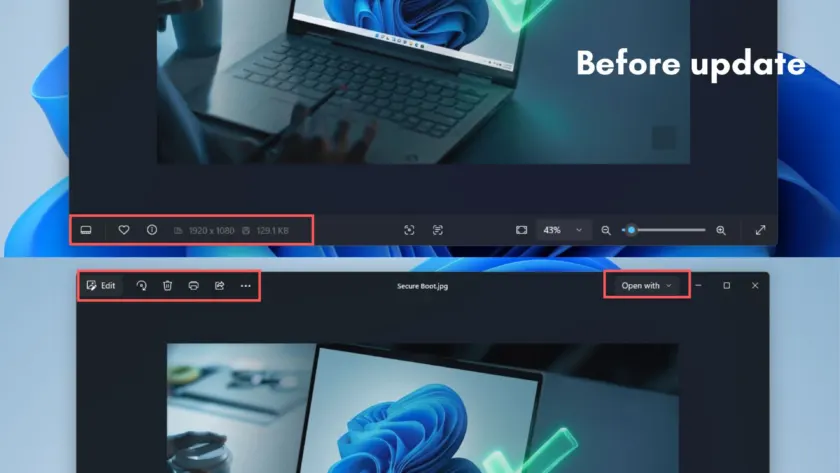
The most immediate change users will notice is the removal of several icons from the top toolbar. Previously, the viewer included shortcuts for Designer, Clipchamp, and OneDrive alongside standard actions like Edit, Print, and Share. These additions often distracted from the primary function of viewing and managing photos.
The right-click context menu has undergone a similar reduction. Entries for “Edit with Designer,” “Create a video with Microsoft Clipchamp,” and “Visual search with Bing” have been removed. The menu now focuses on essential file actions such as Save as, Open with, Copy as path, Resize image, Set as, Show filmstrip, and Start slideshow.
This simplification aligns with Microsoft’s broader push to reduce unnecessary Copilot entry points and promotional content across Windows 11 apps, a commitment first highlighted in March. The company has stated that the refreshed design aims to put the focus on content and top actions like edit, print, and share.
#2 Performance and format improvements
Beyond the visual changes, the update introduces technical improvements that enhance performance. Microsoft credits a new WASDK multi-process architecture for significantly faster launch times, claiming a roughly 2.1 times improvement in viewer load speed. This change means the app performs less background work, resulting in a snappier experience when opening photos and zooming in.
The update also expands format support. HEIC files can now be edited without being converted to a different format, and SVG files are finally supported for direct viewing in the photo viewer. These additions address common user requests for better compatibility with modern image standards.
Additional changes include a richer file info pane that surfaces quick actions like Resize Image and Copy Path at the top, along with expanded metadata and file path details. A dedicated section for Microsoft apps groups Clipchamp and OneDrive shortcuts together, moving them out of the main toolbar. New device import controls allow users to choose when Photos begins pulling images and videos from connected devices, rather than triggering automatically.
#3 The “Photos (Preview)” complication
Despite the clean-up efforts, the update introduces a new app called “Photos (Preview)” that has raised concerns among users. Listed in the July changelog, this separate app features its own Gallery, People, Albums, and Favorites sections. On paper, it appears to be a next-generation Photos app, but it is built on WebView2 technology.
WebView2 apps are essentially web pages wrapped in a native container, which can be heavier and slower than fully native applications. This mirrors the approach taken with the OneDrive Photos app, which was recently reported to auto-install on Windows 11 PCs. Both apps share a similar sidebar structure and rely on web technologies rather than native code.
The introduction of Photos (Preview) undermines the debloating efforts in the main Photos app. While Microsoft is removing bloat and promotional content from the primary viewer, it is simultaneously adding another web-based gallery app to the system. This contradiction highlights a tension in Microsoft’s strategy between streamlining existing apps and experimenting with new, web-based alternatives.
#4 Why this matters for Windows 11
The coexistence of a debloated native Photos app and a WebView2-based Photos (Preview) app raises questions about Microsoft’s long-term direction for media management on Windows 11. The company has acknowledged that Windows 11 is a memory hog and has promised optimization for 8GB RAM PCs by the end of 2026. Adding more background web apps complicates this goal.
Photos (Preview) is currently labeled as experimental, and Microsoft is soliciting user feedback within the app. This suggests the project is still in a testing phase and could be scrapped, folded into the main Photos app, or integrated with OneDrive. However, the auto-installation behavior mirrors that of OneDrive Photos, which may indicate a more permanent presence.
For users, the immediate takeaway is positive: the main Photos app is now cleaner, faster, and more focused on core functionality. The removal of promotional shortcuts and the improved context menu make the app more efficient for everyday use. However, the introduction of Photos (Preview) serves as a reminder that Microsoft’s approach to app development can be inconsistent.
What This Means for You
If you are currently using the Photos app, you will likely appreciate the streamlined interface and improved performance. The removal of clutter and the faster load times make the app more pleasant to use for viewing and managing photos. The expanded format support for HEIC and SVG files is also a welcome addition for users who work with these standards.
However, be aware that Photos (Preview) may auto-install on your system. If you prefer to avoid additional apps, you can monitor your installed applications and provide feedback within the Photos (Preview) app to influence its future. Microsoft’s experimental status for this app suggests that user input can play a role in its development.
Overall, the update represents a step in the right direction for the Photos app, but the introduction of Photos (Preview) highlights ongoing challenges in balancing innovation with simplicity. Users should enjoy the immediate improvements while keeping an eye on how Microsoft’s strategy evolves in future updates.
Source: Windows Latest
Build details:
- 2026.11070.23001.0
Over to you: Do you think the new Photos (Preview) app will eventually replace the main Photos app, or will it be phased out?