Windows Insiders on the Beta and Experimental channels received new Windows 11 Preview builds on 30 October 2026, and the headline change is a significant expansion of the redesigned Windows Search that launched earlier this month.
Alongside the software updates, Microsoft introduced a new Intune policy letting commercial customers keep Feedback Hub submissions private to their organization. Here is everything you need to know about this week’s changes.
What’s new in this week’s builds
Microsoft confirmed via the Windows Insider Blog that it released fresh preview builds across multiple channels. The main Beta channel moved to Build 26220.9836, while the Experimental channel jumped to Build 26340.9843.
For Insiders on other preview tracks, today’s builds are:
- Beta (26H1): Build 28020.3382
- Experimental (26H1): Build 28120.3393
- Experimental (Future Platforms): Build 29698.1000
Each build ships with its own release notes on Microsoft Learn, so the exact set of changes varies by channel. The Experimental builds are where the new Windows Search features are being tested before they flow down to the more stable Beta channel.
Windows Search gains inline actions
The centerpiece of this week’s update is a further expansion of the new Windows Search experience, which first began rolling out on 7 October 2026 according to Microsoft’s earlier announcement.
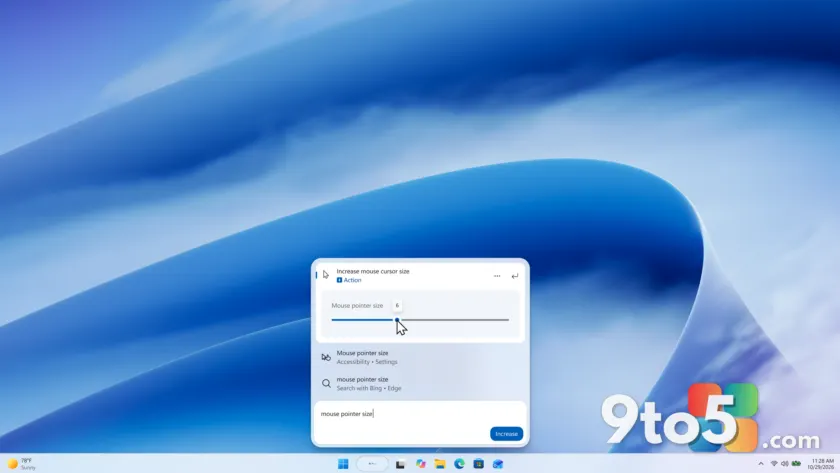
The most useful addition is inline actions. You can now adjust common settings directly from a search result using sliders for volume, screen brightness, and cursor size. Microsoft says these actions are more clearly labeled than before, and it is adding suggested actions to help you discover things you can do without digging through Settings.
In practice, this means you can drop the volume or dim the screen without closing Search or opening the quick-settings panel — a small convenience that adds up if you tweak these settings often.
Control your phone straight from Search
Also new are phone actions. If you have a supported phone connected through Phone Link, Windows Search can now let you call or text a contact and toggle features like Do Not Disturb without unlocking your device.
Android support is available now, with iPhone support coming early next year. That keeps Microsoft’s cross-platform promise intact while it works to bring the same convenience to Apple users.
Richer results and filters
The redesigned search is also returning more detailed results. You can now preview files inline and see metadata such as a file’s last modified date, location, and author. Web-style answers for weather, stock prices, and facts are surfacing alongside local results.
Apps and games from the Microsoft Store are also appearing in results, and you can toggle those Store results on or off in Settings > Privacy & security > Search.
Scrolling now reveals additional result filters, letting you narrow by Files & Folders, Settings, Actions, and more. So if you search for something like “outlook,” you can quickly filter down to just the app, a setting, or a matching file.
Feedback controls land in Search
Microsoft is also giving you more direct control over the search experience. You can right-click any result or suggestion to give it a thumbs up or thumbs down, helping shape future results.
Even more handy, you can remove unwanted items from the initial Search view before you even start typing — useful for clearing out stale recent searches. The company also noted small polish changes to the look and feel of Windows Search based on user feedback.
Private feedback for commercial customers
Separate from the consumer-facing changes, Microsoft is introducing a new Intune policy for commercial tenants. When enabled, feedback submitted through Feedback Hub stays private within the organization.
With this policy active, feedback can no longer be posted to the public community or shared with users outside the organization. Submissions remain accessible only to Microsoft and to users within the same tenant.
For IT admins, this addresses a common concern: employees who want to report bugs or suggestions no longer risk surfacing internal details on a public forum. Details are documented in the Feedback Hub release notes for October 2026.
What This Means for You
For most Windows users, the standout change is the maturing of the new Windows Search. The inline sliders and phone controls turn search from a simple lookup tool into a quick command center, which is exactly the direction Microsoft has been pushing with its “from searching to doing” redesign.
One caveat worth noting: Microsoft says the new search currently opens at the bottom center of the screen, and it is still working to adapt it to different taskbar positions and to search launched from the Start menu. If your taskbar sits on the left, right, or top, expect some refinement before it feels fully native.
How to Get It
To try the expanded Windows Search, join the Beta or Experimental channel and request the latest build. Head to Settings > Windows Update > Windows Insider Program, select your channel, and download the newest preview. Commercial customers wanting the private Feedback Hub policy should deploy the new Intune policy to their tenant.
As always, preview builds can contain bugs, so keep a system restore point handy and only install them on machines where you can afford to experiment.
Source: Windows Blog
Over to you: The new Windows Search opens at the bottom center of your screen — do you prefer that spot, or would you rather it follow your taskbar position?