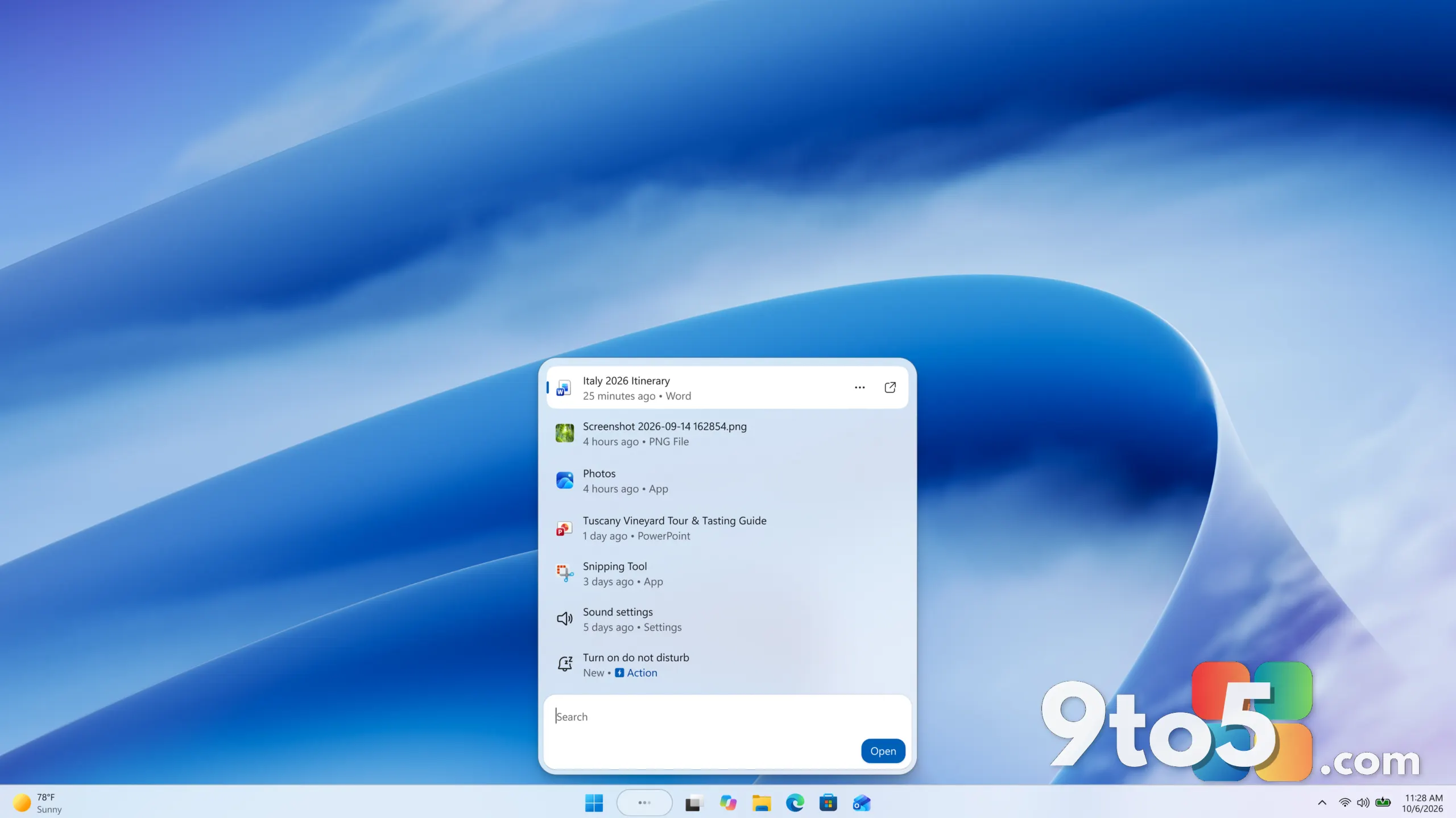
Microsoft is redesigning Windows Search to take on a more proactive role. According to a report from Neowin, the company is overhauling the experience so it can perform actions on your behalf rather than merely locating files and toggling Settings — a shift that positions the revamped search closer to an AI agent.
What’s changing in the Windows Search redesign
For years, Windows Search has done exactly what its name suggests: it indexes your files, apps, and system settings so you can find them quickly. You type a query, receive a list of matches, and then open whatever you were looking for. The search box on the taskbar and the dedicated Search app in Windows 11 have functioned as a discovery layer, not an execution one.
According to Neowin, Microsoft is now reworking that model so the search interface can do things for you instead of just surfacing results. In practice, that means the line between “searching for” something and “doing” something could start to blur — for instance, rather than only pointing you toward a Settings page, the redesigned search might take the steps needed to actually change the setting. The specific actions remain unconfirmed, so treat this as a direction rather than a finished feature list.
What “acting like an AI agent” actually means
The term AI agent has become common across the software industry, and it generally refers to a program that can carry out multi-step tasks with varying degrees of autonomy, rather than waiting for a single command and a single reply. Unlike a straightforward chatbot that answers one question at a time, an agent can reason about a goal, break it into steps, and act on them.
Applying that concept to Windows Search would transform it from a lookup tool into something closer to an assistant. Instead of simply answering “where is this?”, it could attempt to “do this.” That is a meaningful change in scope, though it is worth noting that the specific capabilities Microsoft has in mind have not been detailed.

The bigger picture: Microsoft’s AI push
This redesign fits neatly into Microsoft’s wider strategy of weaving AI throughout Windows. The company has already integrated Copilot into the operating system, added AI-driven features such as Recall, which was later paused and revisited, and pushed generative AI into Office products. Giving Search agent-like behavior would be another step in making Windows a place where AI helps you get work done, not just find it.
From an editorial standpoint, it is worth remembering that Microsoft has a history of previewing ambitious features and refining them over time. The initial reports about a smarter Search experience should be treated as an early signal of direction rather than a finished product with a confirmed feature set, and users should expect the final behavior to evolve before it reaches a general release.
What this means for you
For everyday users, the promise here is convenience: fewer clicks and hand-offs when you want to accomplish a task that starts with a search. If the redesign delivers on that, a common workflow — searching for a setting, navigating to it, and adjusting it — could collapse into a single interaction, saving time on repetitive system tasks.
There are also natural concerns around trust and control. A tool that takes actions on your behalf raises questions about transparency, permissions, and the ability to undo changes. Microsoft has not yet explained how it plans to handle these, so users should expect some guardrails to become part of the conversation as the feature develops, and should watch for how it handles confirmation prompts and rollback options.
How to get it
Because Microsoft has not announced a specific release date, build, or channel for this change, there is nothing to update to today. The redesign appears to be in development, so users will most likely encounter it through a future Windows 11 update or Insider preview rather than an immediate patch.
Until Microsoft confirms details, the safest approach is to keep your system updated and watch official channels — such as the Windows Insider Blog and Microsoft’s support pages — for an announcement. As with any feature that can act on your behalf, it is wise to wait for concrete details on permissions and safety before expecting a major change to your daily workflow.

Source: Neowin
Over to you: If Windows Search could take actions for you, what’s the first task you’d want it to handle?