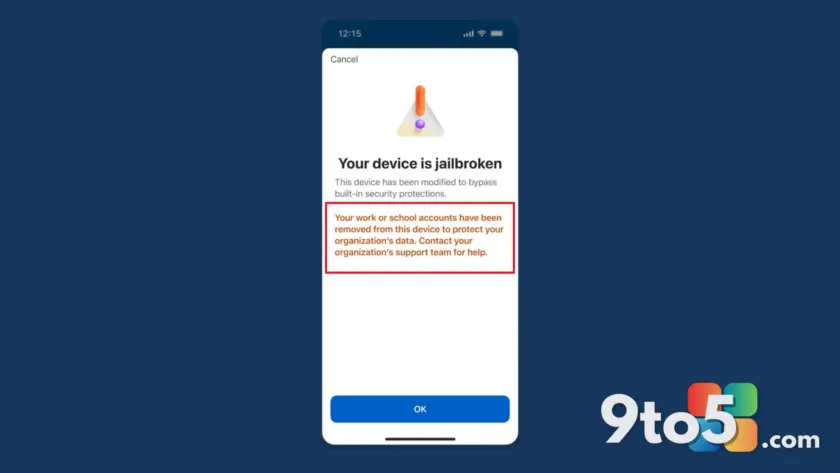
Microsoft has clarified how its new security enforcement in Microsoft Authenticator works, confirming that the app will block access to work or school accounts on devices with compromised operating systems. If you use a rooted Android phone or a jailbroken iPhone to approve sign-ins for your organization, you will soon lose access unless you reverse those modifications.
Who is affected by the new restrictions
The restriction applies specifically to Microsoft Entra credentials, which cover work and school accounts. This includes logins for Microsoft 365, Teams, Outlook for Business, Azure, and Intune. If your organization uses these services, Authenticator will detect if your device is rooted or jailbroken and block the account to protect organizational security.
However, this does not mean your entire Authenticator app becomes useless. Third-party two-factor authentication (2FA) codes stored in the app—such as those for GitHub, Facebook, Instagram, or Cloudflare—will continue to work on modified devices. The block only targets accounts tied directly to your enterprise Microsoft login.
There is one exception to keep in mind. If a third-party service uses “Sign in with Microsoft” and links back to your company’s Entra account, that specific path may be blocked. But standard 2FA codes for unrelated services remain safe from this enforcement.
The phased rollout timeline
Microsoft originally planned to introduce jailbreak and root detection in February 2026, but the full impact is still rolling out gradually. The company states that the deployment will finish by mid-2026, with most users seeing changes by the end of July. This means not everyone is affected immediately.
The process happens in phases rather than an instant lockout. First, you will see a warning banner on the Authenticator home page stating that your device is rooted or jailbroken. You can choose to ignore this warning and click “Continue,” but the alert will persist to ensure you are aware of the risk.
In the final phase, approximately one month after the initial warning, you will be blocked from creating new credentials or signing in via Authenticator for your work accounts. At this point, you must either remove root access/jailbreak status from your device or use a different, compliant device to regain access.
No opt-out available
Microsoft has made it clear that this feature is “secure by default” and enabled for all customers. There is no option to opt out of these security checks. The company emphasizes that these measures are necessary to protect organizational data from potential vulnerabilities associated with modified operating systems.
If you rely on a modified device for your daily work logins, you should verify your status now. While personal accounts and third-party 2FA codes are safe, your ability to access corporate resources through Authenticator is at risk if the rollout reaches your account before you address the device modification.
Source: Windows Latest
Over to you: Do you use a rooted or jailbroken device for work, and will this block cause issues for your daily login routine?
You may also like
 Microsoft Edge calls itself the ‘best browser’ after Mac users defend its performanceWindows 11 turns five: A look back at the anniversary, plus Starlink mobile and Ford’s EV stumbleMicrosoft launches Azure Linux 4.0: A free, cloud-only distro built for scaleItaly probes Microsoft over M365 Copilot price hikes and auto-upgrades