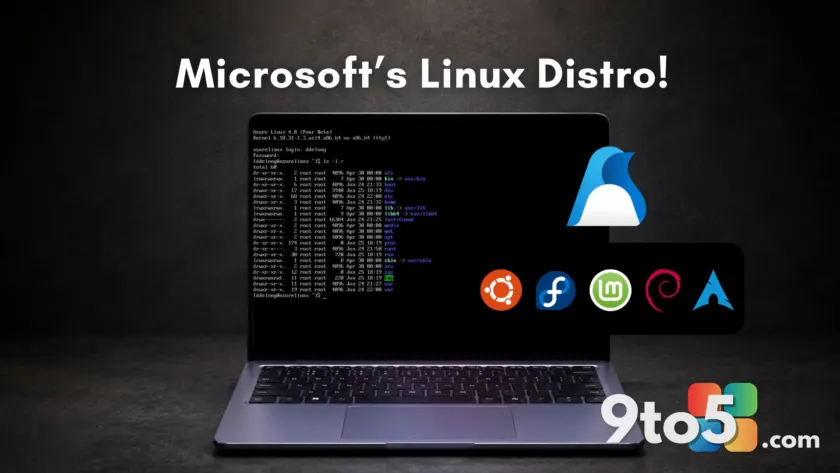
Twenty-five years ago, Microsoft CEO Steve Ballmer famously described Linux as “a cancer that attaches itself in an intellectual property sense to everything it touches.” Today, the company has fully embraced the open-source ecosystem by shipping its own free Linux distribution: Azure Linux 4.0.
Announced at Build 2026 and previously previewed at the Open Source Summit North America on May 18, 2026, this release marks a significant shift in how Microsoft manages its cloud infrastructure software. While Azure Linux has powered internal services like Azure Kubernetes Service (AKS) and Azure SQL for years under the name CBL-Mariner, version 4.0 is now available to the public as an open-source project.
What this means for you
If you are a desktop user running Windows, Ubuntu, or Fedora on your personal laptop, Azure Linux 4.0 is not relevant to your daily workflow. It does not include a graphical user interface (GUI), audio drivers, or desktop environments. It is strictly a server-grade operating system designed for cloud virtual machines.
However, if you are a developer using Windows Subsystem for Linux (WSL), this matters. Microsoft positions Azure Linux as a way to eliminate environment mismatches between local development and production deployment. By using the same OS base locally via WSL as you do in the cloud on Azure VMs, you can reduce bugs caused by differing system libraries or configurations.
From CBL-Mariner to Azure Linux 4.0
Azure Linux originated in 2019 as an internal Microsoft project called CBL-Mariner (Common Base Linux Mariner). By 2022, it was already supporting massive production workloads for companies like LinkedIn and Databricks, which migrated over 100,000 virtual machines to the platform without customer-facing incidents.
Microsoft officially renamed the project Azure Linux in March 2024. The jump to version 4.0 represents a fundamental architectural change. Previous versions (1 through 3) were assembled package-by-package by Microsoft engineers writing custom specification files. Version 4.0, however, is built as a set of declarative overlays on top of a Fedora 43 snapshot.
This approach means every deviation from the upstream Fedora codebase is documented in the public GitHub repository. It also switches the package manager from Microsoft’s custom tdnf to dnf5, the same tool used by Fedora and Red Hat Enterprise Linux (RHEL). DNF5 is written in C++, making it faster and more memory-efficient than its Python-based predecessor.
A minimal, cloud-only design
The most distinct feature of Azure Linux 4.0 is what it lacks. Unlike Ubuntu or Fedora, which ship with desktop environments and broad hardware support, Azure Linux is stripped down to the bare essentials required for cloud servers.
- No GUI: There is no graphical installer, no desktop environment, and no audio stack.
- Minimal Footprint: The base image is approximately 300 MB, significantly smaller than the 500–600 MB+ typical of other server distributions.
- Cloud-Only Support: While you can technically run it on local hardware or VirtualBox, Microsoft does not support it outside of Azure virtual machines and VM Scale Sets.
This minimalism reduces the attack surface and simplifies security patching. For enterprise customers, a smaller OS means fewer vulnerabilities to manage and faster update cycles. The system drops users directly into a Bash console upon boot, with no optional user account creation step that could lead to login issues.
Technical stack and security features
Azure Linux 4.0 ships with modern, enterprise-grade components tailored for high-performance cloud workloads. The technical specifications include:
- Kernel: Linux 6.18 LTS, optimized for Azure with enhanced Hyper-V integration and support for GPU/AI accelerators.
- Package Manager: dnf5 for faster dependency resolution.
- C Library: glibc 2.42.
- Init System: systemd 258.
- Python: Python 3.14, including the new JIT compiler.
- OpenSSL: Version 3.5, featuring post-quantum cryptography support for CRYSTALS-Kyber and CRYSTALS-Dilithium algorithms standardized by NIST.
Security is a primary focus. Every package is cryptographically signed, and Software Bill of Materials (SBOM) documents are published for every release. This allows enterprise teams in regulated industries to hold a single vendor—Microsoft—accountable for the entire OS layer. Note that FIPS 140-3 certification is still in progress and will not be available until general availability later in 2026.
Azure Container Linux: The immutable companion
Alongside Azure Linux 4.0, Microsoft also highlighted Azure Container Linux, a separate but related product. While Azure Linux is mutable (you can install packages and change settings), Azure Container Linux is immutable.
In an immutable OS, the system image is read-only. You cannot modify it on a running system. Instead, updates are applied by swapping the entire disk image for a new one, with automatic rollback if the update fails. This model has been used quietly under AKS since 2023 and is now generally available as a standalone product for Kubernetes nodes and container workloads.
Why Microsoft built its own distro
The strategic motivation behind Azure Linux mirrors moves by Amazon (Amazon Linux) and Google (Container-Optimized OS). Linux is the most popular operating system on Azure, running more instances than Windows Server. Currently, when customers run Red Hat or Ubuntu on Azure, those vendors collect support subscription revenue while Microsoft provides only the infrastructure.
By offering a first-class, free alternative, Microsoft aims to control the entire software stack. This reduces dependency on third-party OS vendors and simplifies supply chain security for enterprise customers. With WSL Containers arriving soon in Windows 11, developers will be able to build, test, and deploy Linux containers locally using Azure Linux, creating a seamless end-to-end workflow within the Microsoft ecosystem.
Source: Windows Latest
Over to you: Would you trust a cloud-only Linux distro for your production workloads, or do you prefer established options like Ubuntu and RHEL?
You may also like
 Microsoft admits Outlook’s most critical feature is currently broken
 Microsoft to auto-install Microsoft 365 Copilot app on eligible Windows PCs starting June 2026
 Microsoft kills Edge Drop, Collections, and Sidebar to clear the way for Copilot
 Secure Boot deadline passed: What happens to your Windows 11 PC if you missed the update