A leaked video from 2024 offers a rare glimpse into Project Aion, Microsoft’s internal codename for a proposed Copilot-focused operating system designed specifically for AI PCs. The footage, shared on the BetaWiki Discord forum and highlighted by Microsoft watcher Gareth, shows an interface that looks nothing like Windows 11. Most notably, it completely removes the traditional Start menu in favor of an AI-centric launcher.
While the project appears to have been canceled or shelved following recent leadership changes at Microsoft, the leak provides clear insight into how the company once envisioned a fully ‘agentic’ computing experience. Here is what Project Aion looked like and how it differed from standard Windows.
#1 The Start menu is gone, replaced by a Copilot launcher
In Windows 11, your desktop experience revolves around the Start menu, taskbar icons, and desktop shortcuts. Project Aion strips all of that away. Upon booting, there are no desktop icons. Instead, the interface centers on a taskbar that resembles ChromeOS more than traditional Windows.
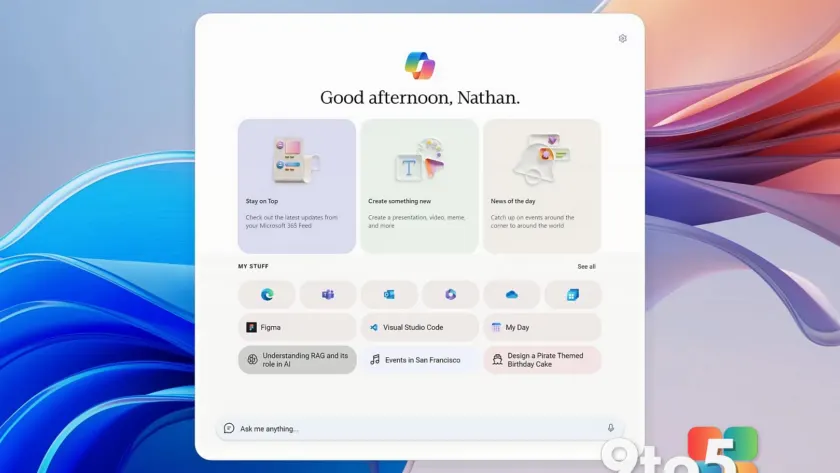
The Start button is replaced by a Copilot button. Clicking it opens a dashboard rather than an app grid. This launcher greets the user by name and displays dynamic widgets such as ‘Stay on Top’ (linked to Microsoft 365 feeds), ‘Create something new,’ and ‘News of the day.’ The ‘My Stuff’ section functions similarly to the Recommended feed in Windows 11, but it primarily surfaces web apps like Microsoft Edge, Teams, Word, Excel, and Microsoft To Do.

#2 Everything runs inside Microsoft Edge
Project Aion is built entirely on the Microsoft Edge browser engine. When you type a query into the ‘Ask me anything’ box, the system uses autocomplete to suggest websites or apps. If you select a website like TechCrunch, it opens in a clean Edge window. If you select an app like Microsoft To Do, it runs as a web app in a floating, picture-in-picture style window.
Interestingly, these web-based sessions get their own dedicated icons on the taskbar, mimicking native applications. This approach allows the OS to remain lightweight while providing access to familiar productivity tools without installing traditional executables.
#3 AI-driven multitasking and dynamic icons
Microsoft described Project Aion as an ‘agentic’ operating system powered by an engine called Silverstone. Instead of grouping open windows by application type (e.g., all Word docs together), the OS groups items by user goals. For example, if you ask for dining options in Maui and then check your Monday meetings, the system creates separate chat windows for each task.
The taskbar dynamically generates custom icons for these active AI sessions based on their context, rather than showing generic Copilot logos. The interface also features ‘Context IQ,’ triggered by typing a forward slash (/), which allows users to tag coworkers or files from Microsoft 365 directly into prompts. This suggests the project was heavily optimized for enterprise workflows, securely routing queries to either Enterprise or Consumer Copilot versions as needed.

#4 Win32 apps run via Windows 365 handoff
Since Project Aion is web-based, it cannot natively run legacy Win32 applications. To solve this, the OS includes a ‘handoff’ feature. If you encounter a file or task that requires heavy desktop software, the system detects the need and allows you to seamlessly remote into a Windows 365 Cloud PC. Your content loads automatically in the cloud environment, bridging the gap between web-based simplicity and traditional Windows power.
The OS also supports interactive plugins within the chat interface. For instance, asking Copilot to send a summary can generate an interactive email control directly in the chat window, allowing you to draft and send messages without opening Outlook.
What this means for you
For everyday Windows users, Project Aion remains a curiosity rather than a threat. The leak indicates that Microsoft likely canceled or paused development on this radical shift away from the traditional desktop model. Current focus appears to be on refining Windows 11 fundamentals rather than replacing them with an Edge-based OS. However, elements of this vision—such as deeper AI integration in the Start menu and improved cloud app handling—may gradually trickle into future Windows updates.
Source: Windows Latest
Over to you: Would you prefer an AI-first OS like Project Aion, or do you value the traditional Start menu and desktop icons too much to let them go?
You may also like
 Rumor: GTA 6 may hit 60 FPS on Xbox Series S with dual performance modes
 Xbox reportedly pulled funding from Assassin’s Creed creator’s new game
 Cyberpunk 2077: Edgerunners 2 trailer drops, confirms Fall 2026 Netflix release
 Assassin’s Creed Black Flag Resynced: Xbox Series X hits 60 FPS, Series S stuck at 30