The Razer Naga V3 Pro at a Glance
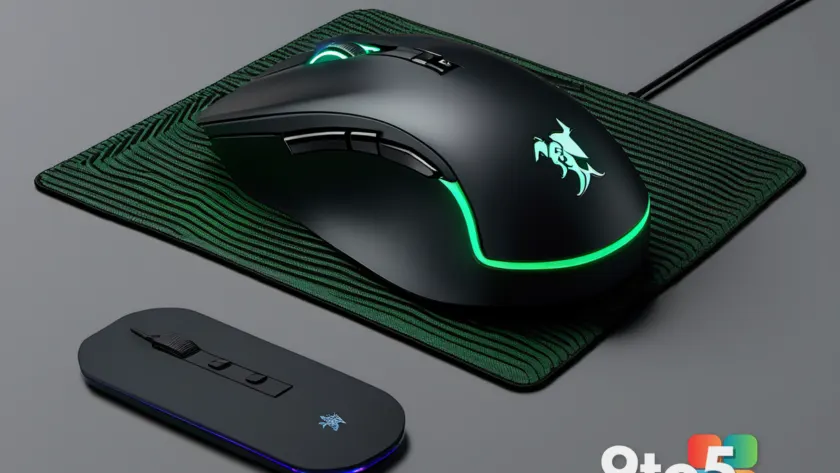
The Razer Naga V3 Pro arrives as the latest iteration of a peripheral line that has defined the MMO mouse category for over a decade. By combining a fully modular side-plate system with a next-generation scroll wheel and support for 8,000Hz polling, Razer has pushed the hardware envelope significantly. The mouse features up to 23 programmable buttons, a Focus Pro 50K optical sensor, and a 155-hour battery life. It retails for $179.99 USD and becomes available worldwide on August 11, 2026.
In this Razer Naga V3 Pro review, we break down how the new hardware performs across MMO, MOBA, and RTS titles, examine the durability improvements, and determine whether the premium price point aligns with the functionality offered. The core promise of the V3 Pro is straightforward: give players maximum control over complex game inputs without forcing them to abandon their keyboard.
A New Era for the Naga Lineage
Razer first introduced the Naga series to address a specific gap in the gaming peripheral market. Traditional mice offered two to six buttons, which proved insufficient for players managing extensive ability rotations in games like World of Warcraft or Heroes of the Storm. The original Naga introduced a honeycomb side plate with 12 buttons, establishing a template that Razer has refined with every subsequent release.
The V3 Pro represents a generational leap rather than a minor refresh. Previous models relied on standard mechanical switches and fixed polling rates, but the new iteration integrates Gen-4 Optical Switches rated for 100 million actuations. This shift eliminates the physical contact point that causes double-clicking issues in older mice, a problem that affected many long-time Razer users. The reinforced molding processes mentioned in Razer’s specifications suggest a focus on structural longevity alongside switch durability.
From a market perspective, the Naga V3 Pro positions itself at the intersection of two growing trends: modular hardware and high-frequency polling. While 8,000Hz polling was once exclusive to racing wheels and professional sim rigs, it has gradually migrated to mice. The V3 Pro supports this natively when paired with the HyperPolling Dongle, placing it in direct competition with other high-end wireless gaming peripherals that prioritize raw responsiveness.
Modular Design: The Heart of the Naga V3 Pro
The defining feature of the Naga V3 Pro remains its magnetic side-plate system. The base mouse weighs 117 grams, and Razer includes three interchangeable plates that alter both the button count and the overall weight. The 12-button MMO plate adds 20 grams, the 6-button MOBA/BR plate adds 17 grams, and the 2-button FPS plate adds just 15 grams.
Razer has increased the magnetic force in this generation to ensure the plates feel permanently attached during intense gameplay. In practice, the connection is secure enough that lateral movements and rapid clicks do not cause the plate to shift. Each button on the plates can be mapped independently through Razer Synapse, and the system supports HyperShift modifiers. This means a single physical button can trigger two completely different commands depending on whether a ring-finger modifier is held down, effectively doubling the available input space.
The modularity addresses a long-standing complaint about MMO mice: the inability to adapt to different game genres. Players who switch between World of Warcraft, Age of Empires, and competitive shooters no longer need to own multiple specialized mice. The 6-button plate strikes a practical balance for most users, offering enough inputs for complex rotations while maintaining a comfortable thumb reach. The 12-button plate, while impressive on paper, requires significant memorization and may feel cluttered for players who do not maintain extensive keybind lists.
Performance Specs: 50K DPI and 8,000Hz Polling
At the core of the Naga V3 Pro sits the Razer Focus Pro 50K Optical Sensor Gen-3. This sensor supports 50,000 DPI, 930 IPS tracking speed, and 90 G of acceleration. For the vast majority of MMO and RTS players, the native 1,000Hz polling rate is more than sufficient. However, the mouse features an upgrade path to true 8,000Hz polling when connected to the compatible HyperPolling Dongle.
It is important to note the distinction between native and upgraded polling rates. The mouse communicates at 1,000Hz by default over its standard HyperSpeed Wireless dongle. To achieve 8,000Hz, users must purchase the separate HyperPolling Dongle, which utilizes a different wireless protocol to reduce input latency. This tiered approach allows Razer to keep the base price competitive while offering cutting-edge performance for users willing to invest in the full ecosystem.
The sensor also includes Frame Sync, Smart Tracking, and a Sensitivity Matcher. Frame Sync synchronizes the sensor polling with the display refresh rate to eliminate micro-stutters, while Smart Tracking adjusts sensitivity based on movement speed. These features are particularly relevant for players using high-refresh-rate monitors, as they help maintain consistent cursor behavior during rapid flicks and precise aiming sequences.
The HyperScroll Tilt Wheel Gen-2
Razer has redesigned the scroll wheel entirely for the V3 Pro, introducing the HyperScroll Tilt Wheel Gen-2. The wheel supports four distinct modes: Free-Spin, Tactile, Precision Tactile, and Smart-Reel. The Free-Spin mode allows the wheel to rotate continuously with minimal resistance, which is useful for scrolling through long code files or chat logs. The Tactile mode provides standard step feedback for general navigation.
The Precision Tactile mode is the most notable addition. It shortens the actuation distance and introduces haptic feedback, giving players a physical confirmation when scrolling through ability bars or weapon wheels. This is particularly beneficial in fast-paced MOBAs where rapid hotbar switching is critical. The wheel also tilts left and right, adding two more programmable inputs without occupying any side buttons.
Beneath the wheel, the Gen-4 Optical Switches replace traditional mechanical contacts. Because the switches use a light beam to register actuation, there is no physical wear from friction. Razer rates these switches at 100 million clicks, which should comfortably exceed the lifespan of the mouse itself for most users. The combination of durable switches and a multi-mode wheel represents a significant improvement over the previous Naga generation.
Battery Life and Charging Options
Wireless performance is a critical factor for modern gaming mice, and the Naga V3 Pro addresses this with a 155-hour battery life on HyperSpeed Wireless. This figure is measured at the native 1,000Hz polling rate. If users enable 8,000Hz polling via the HyperPolling Dongle, battery consumption will increase proportionally, though Razer has not published exact figures for the high-frequency mode.
Charging flexibility is another area where Razer has expanded its ecosystem. The mouse features a USB-C port for direct wired charging and is compatible with the new Mouse Dock Pro. It also supports the HyperFlux V2 charging mousepad, which generates power through the user’s physical mouse movements. This means that for users who already own HyperFlux V2 hardware, the mouse can theoretically operate indefinitely without plugging in.
The inclusion of five onboard profiles allows players to switch between configurations without relying on software. This is useful for tournament play or for users who want to maintain a clean desktop environment. The mouse also supports Bluetooth Low Energy, though this connection mode is intended for productivity tasks rather than competitive gaming due to higher latency.
Software and Smart Features
All configuration for the Naga V3 Pro is managed through Razer Synapse. The software allows users to map every button, adjust DPI steps in 1-DPI increments, customize RGB lighting across three zones, and create game-specific profiles. Synapse remains a robust platform for peripheral management, offering cloud sync and macro recording capabilities.
The V3 Pro also introduces an AI assistant key by default. This button can be bound to Microsoft Copilot prompts, allowing users to trigger AI assistance without leaving their game. While the concept aligns with broader industry trends toward integrated AI, the practical utility for gaming remains limited at present. The key can be disabled entirely in the software, which is advisable for players who do not intend to use the feature.
Macro functionality is available but comes with a caveat. Many competitive online games classify macros as automation tools and will ban accounts that use them. Players should exercise caution when programming complex sequences and ensure they comply with the terms of service for their chosen games.
Ergonomics and Real-World Comfort
The Naga V3 Pro features a right-handed ergonomic design with a pronounced palm hump. The dimensions are 119.5 x 75.5 x 43.5 mm, which places it in the medium-to-large category. Users with smaller hands may find the height uncomfortable during extended sessions, as the palm rest forces a higher wrist angle. The design appears intentionally shaped to encourage a palm-grip posture, which stabilizes the hand when reaching for side buttons.
In practice, the 6-button plate offers the best compromise between reachability and button density. The buttons are slightly raised and spaced to allow distinct tactile identification. The 12-button plate, while impressive, requires users to memorize button positions quickly, as the keys are closer together and more difficult to differentiate by touch alone.
The mouse ships with 100% PTFE feet, which provide a smooth glide across most mousepads. The base weight of 117 grams is relatively light for a mouse with this many inputs, reducing hand fatigue during long gaming sessions. The overall build quality feels solid, with no noticeable flex in the shell or side plates during normal use.
Price, Availability, and Final Verdict
The Razer Naga V3 Pro launches on August 11, 2026, at $179.99 USD, £179.99 GBP, and €199.99 EUR. This price point places it in the premium segment of the gaming mouse market. When compared to standard wireless mice, the cost is higher, but it is competitive when weighed against other modular or high-performance peripherals.
For hardcore MMO, MOBA, and RTS players who rely on extensive keybinds, the Naga V3 Pro is currently unmatched in versatility. The combination of swappable plates, an 8,000Hz polling upgrade path, and a next-generation scroll wheel addresses the specific needs of control-heavy gameplay. The 100-million-click optical switches and reinforced molding also suggest a device built to last through multiple gaming seasons.
However, the mouse is not designed for casual users. The configuration process requires time and patience, and the premium price may not justify the investment for players who only need a standard two-button mouse. Those who prioritize simplicity or have smaller hand sizes should test the ergonomics before purchasing.
Overall, the Razer Naga V3 Pro successfully evolves a proven formula. It delivers the modular flexibility that the Naga series was known for while integrating modern wireless performance and durable switch technology. For players who demand maximum control over their inputs, this is the definitive choice in 2026.
Source: Latest from Windows Central
Over to you: Which side plate size do you think offers the best balance of control and comfort for MMO gameplay?
You may also like
 ASUS ROG Strix OLED XG32UQWMS Review: Why This 32-Inch Gaming Monitor Changes the OLED Conversation
 Mammotion Spino E1 Review: A Compact Pool Robot That Tackles Big Messes
 GMKtec EVO-T2S Review: Intel’s Panther Lake Mini PC Pushes Performance Boundaries
 HP OmniBook X Flip 14 Review: A Premium 2-in-1 Held Back by Integrated Graphics