Microsoft has pushed a fresh Windows 11 build to its Beta channel, and the headline change is one that many users have been waiting a long time to see: a long-overdue mouse pointer upgrade. Build 26220.9568 arrives with the updated cursor as its centerpiece, along with a handful of smaller improvements that round out the release.
For anyone who hasn’t noticed, the classic Windows arrow cursor has looked essentially the same for well over a decade. Microsoft calling this a “much-needed” upgrade signals that the company finally wants to touch one of the most-used visual elements in the entire operating system.
What’s in Build 26220.9568
Build 26220.9568 is a development build running under the Windows 11 Beta channel, which targets users who want to try new features earlier than the general public. The Beta channel sits above the Canary channel in Microsoft’s testing ladder, offering a slightly more stable experience while still being far from production-ready.
According to Microsoft’s release notes, this build bundles the new mouse pointer upgrade alongside several other improvements. While the pointer is the star of the show, the changelog also lists additional refinements that touch on the overall desktop experience.
The Mouse Pointer Upgrade
The pointer is arguably the single most-used visual element in Windows, yet it has barely changed since the classic arrow design was refined in the Windows 95 and Windows XP eras. Microsoft’s decision to revisit it suggests the company wants the cursor to feel more modern and consistent with the rounded, refined aesthetic it has applied to other parts of Windows 11.
As of now, the exact shape and behavior of the new pointer is what Beta testers will be evaluating. The upgrade is notable less for any dramatic redesign and more for the fact that Microsoft is finally touching a system element that has been left untouched for years.
The “And More” Improvements
The release frames this update as a mouse pointer upgrade and more, which points to a set of smaller tweaks bundled alongside the cursor change. Microsoft typically uses these Beta builds to test incremental refinements to things like system menus, settings pages, and background services.
Because the Beta channel is meant for early feedback, these additional changes are often subtle and subject to change before they ever reach a stable release. Users should treat them as work-in-progress rather than finalized features.
What This Means for You
For the average Windows 11 user, the most practical takeaway is that the familiar cursor you click with every day is finally getting an update. You won’t see it automatically unless you opt into the Beta channel, and even then, Microsoft may roll it out gradually to a subset of testers.
If you’re not chasing the latest preview, there’s no rush. This build is not for everyone — it’s designed for enthusiasts and IT environments that want to vet new changes before they land in a stable update. The pointer upgrade will eventually reach the broader Windows 11 population through normal update channels, though the exact timing hasn’t been confirmed.

How to Get Build 26220.9568
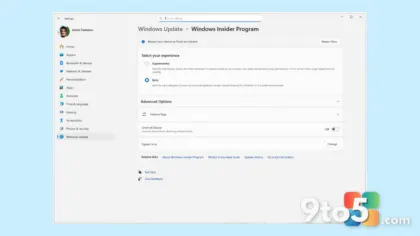
To try this build yourself, you’ll need to join the Windows Insider Program and switch to the Beta channel. Open Settings, navigate to Windows Update, and select “Windows Insider Program.” From there, choose the Beta channel and check for updates. Your PC will then download and install build 26220.9568 if you’re eligible.
Keep in mind that joining the Beta channel means your PC will receive changes before most users, which can occasionally introduce bugs or instability. It’s a good idea to back up important data before switching, and you can always roll back to a previous build if something doesn’t work as expected.
Why the Beta Channel Matters
Microsoft uses the Beta channel as a critical checkpoint in its release strategy. Changes that prove stable here typically move toward the Release Preview channel and eventually to the general public, while problematic updates get caught and fixed early. This is exactly how the new pointer will be stress-tested before it reaches your machine.
By testing the mouse pointer upgrade in the Beta channel, Microsoft is gathering real-world feedback on how the new design feels and performs. That feedback loop is what allows the company to refine the cursor before it becomes the default for hundreds of millions of users.
Source: Neowin
Over to you: Will you opt into the Beta channel to try the new pointer, or wait for it to reach a stable update?