It has been five years since Windows 11 officially launched, and while Microsoft initially expected a rapid migration, the reality on the ground tells a different story. Despite aggressive nudges, hardware requirements, and the eventual end of standard support, a significant portion of the Windows ecosystem remains anchored to the previous generation. This is not just a consumer phenomenon; it is deeply embedded in enterprise infrastructure, healthcare systems, and manufacturing floors.
Recent data from IT asset management firm Lansweeper, combined with statements from HP executives and Microsoft’s own financial disclosures, paints a clear picture: the Windows 10 holdouts are not going anywhere soon. In fact, the remaining users are often the most difficult to migrate, whether due to legacy hardware constraints, specialized software dependencies, or sheer organizational inertia.
#1 The Lansweeper Enterprise Snapshot
Lansweeper provides one of the most reliable views into enterprise Windows usage because it actively scans hardware assets across thousands of organizations, rather than relying on web analytics or sampling. Their latest report confirms that Windows 10 still commands approximately 16.9% of the Windows client base in the enterprise sector. To put that in perspective, roughly one in six business PCs worldwide is still running an operating system that Microsoft has officially declared unsupported.
This figure represents a significant decline from early 2025, when Windows 10 held around 40% of the market. However, the rate of decline has slowed considerably. The easy migrations are complete. The organizations that could move quickly due to modern hardware and flexible IT policies have already transitioned. What remains are the deeply entrenched holdouts.
The vulnerability gap between the two operating systems is widening with every Patch Tuesday. Lansweeper’s data shows that Windows 10 devices currently harbor an average of 1,903 active Common Vulnerabilities and Exposures (CVEs), compared to just 652 on Windows 11. This creates a 2.9x risk multiplier. Every month that passes without a Windows 10 security update adds new vulnerabilities to the tally, while Windows 11 continues to receive patches, further isolating the legacy estate.
#2 Industry Breakdown and Hardware Constraints
Not all sectors are holding onto Windows 10 for the same reasons. The data reveals distinct patterns based on industry verticals. Healthcare and pharmaceutical companies lead the list with 23.0% of their endpoints still on Windows 10. This is largely driven by specialized medical devices, laboratory equipment, and compliance-heavy applications that were certified only for older Windows versions. Upgrading the OS could break critical workflows or require expensive re-certification processes.
Consumer retail follows closely at 22.7%, often due to point-of-sale systems and inventory management terminals that are not designed for frequent hardware replacement. Small and medium-sized businesses (SMBs) sit at 21.4%, where IT resources are often stretched thin, making large-scale OS migrations a low priority compared to daily operations.

One of the most telling metrics is the percentage of devices that physically cannot run Windows 11. This is not a matter of willingness but of hardware capability. Consumer and retail environments report that 7.8% of their Windows 10 devices lack the necessary TPM 2.0 chips, CPU generations, or firmware support required by Microsoft’s baseline. Transport and logistics follow at 6.1%, where ruggedized devices often have long lifecycles and proprietary drivers that do not translate well to newer operating systems.
Even in large enterprises, 3.8% of devices are hardware-locked to Windows 10. Manufacturing and healthcare report 3.0% and 1.1% respectively. These figures underscore that a portion of the Windows 10 estate is permanently stranded, destined to be replaced by new hardware rather than upgraded in place.
#3 HP’s Installed Base Reality
While Lansweeper looks at the broader market, OEMs provide ground-level confirmation of these trends. In May 2026, HP’s Executive Vice President and CFO Karen L. Parkhill revealed to investors that approximately 30% of HP’s installed base remains on Windows 10. This figure is notably higher than the enterprise average, suggesting that consumer and hybrid devices are lagging even further behind.
HP’s perspective is particularly interesting because it highlights the dual nature of the Windows 10 holdout problem. On one hand, these devices represent a security risk. On the other, they represent a massive opportunity for hardware refreshes. HP President Ketan Patel explicitly stated that the remaining 30% is a tailwind for future sales, as these devices will eventually need to be replaced.
However, the transition is not as simple as buying new machines. HP noted that Windows 11 growth is now being driven by the AI PC transition. The company reported double-digit growth in both consumer and commercial Personal Systems, but this growth is tied to the adoption of Copilot+ PCs and devices with dedicated Neural Processing Units (NPUs). This means the migration is no longer just about moving from Windows 10 to 11; it is about moving to a fundamentally different class of hardware that supports on-device AI workloads.
For many holdouts, the cost of upgrading is not just the OS license but the entire workstation. In sectors like manufacturing and logistics, where devices must withstand harsh environments, the total cost of ownership for an AI PC refresh may outweigh the immediate need for Windows 11 features.
#4 Microsoft’s Financial Admission
Microsoft itself has indirectly confirmed the slowing momentum of the Windows 11 migration in its recent earnings reports. The company continues to report that Windows is active on 1.6 billion devices globally, a number that has remained relatively stable. However, the revenue dynamics tell a different story.
During the FY 2026 Q4 earnings call, Microsoft disclosed that Windows OEM and Devices revenue decreased by 7%, with Windows OEM revenue specifically down 5%. The company attributed this decline to lower PC market demand and a high prior-year comparable that benefited from the initial Windows 10 end-of-support surge.
This admission is significant. It suggests that the initial wave of forced migrations, driven by the October 2025 end-of-support deadline, has largely exhausted its impact. The remaining users are not responding to standard support deadlines. They require either hardware replacements, extended security updates, or compelling new features that justify the disruption of a major OS migration.
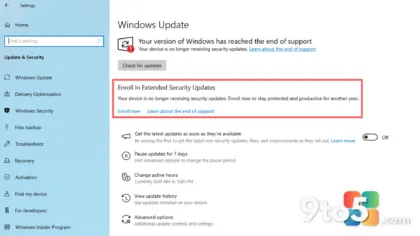
Microsoft’s strategy has clearly shifted from forcing a migration to managing the risk of the remaining estate. The Extended Security Updates (ESU) program, which provides critical security patches for a fee, has become the primary tool for this. Lansweeper data indicates that about 14% of the remaining Windows 10 devices are receiving ESU patches. However, roughly 2% of the estate has refused even ESU, leaving them completely exposed to unpatched vulnerabilities.
What This Means for You
If you are currently running Windows 10, the data suggests you are part of a stubborn but manageable minority. The immediate risk is not that Windows 10 will suddenly stop working, but that the security gap will continue to widen. With 1,903 active CVEs on average, your device is significantly more vulnerable to zero-day exploits and ransomware than a Windows 11 machine.
For enterprise IT administrators, the Lansweeper data provides a clear roadmap. Focus on the 7.8% of devices in retail and 6.1% in logistics that cannot physically run Windows 11. These require hardware refreshes, not software upgrades. For the remaining holdouts, evaluate the cost-benefit of ESU versus migration. In many cases, the cost of testing and deploying Windows 11 across thousands of specialized endpoints may exceed the cost of extended support for the next 12 to 18 months.
What You Should Do
First, verify your device’s compatibility. If you are on Windows 10, check whether your hardware meets the TPM 2.0 and CPU requirements for Windows 11. You can use the PC Health Check app or third-party tools like WhyNotWin11 to assess this.
Second, if you are in an enterprise environment, engage with your IT department about the ESU program. It is not a long-term solution, but it buys time for proper planning. Ensure your devices are patched regularly and that endpoint protection is configured to mitigate the higher CVE count.
Finally, monitor the AI PC transition. As Microsoft continues to push Copilot+ features and on-device AI, the value proposition of Windows 11 will only grow. The holdouts of the future may not be those who refuse to upgrade, but those who cannot afford the new hardware required to run the next generation of Windows features.
Source: Windows Latest
Over to you: Are you still on Windows 10, and if so, is it because of hardware limitations or a deliberate choice to stick with the familiar interface?