Windows Search has long been a mixed bag for many users. You type a query looking for a local file or setting, but the results are often cluttered with Bing web suggestions you didn’t ask for. While users in the European Economic Area (EEA) have had the ability to disable these web results for some time due to Digital Markets Act compliance, Microsoft appears to be testing this control for everyone.
In the latest Experimental experience build for Windows 11 version 26H2, specifically build 26300.8697, a new setting has surfaced that allows users to turn off Bing-powered web results in the Search experience. This suggests Microsoft is moving toward a more streamlined, user-centric search interface across all markets.
1. New toggles for Web Searches and Microsoft Store
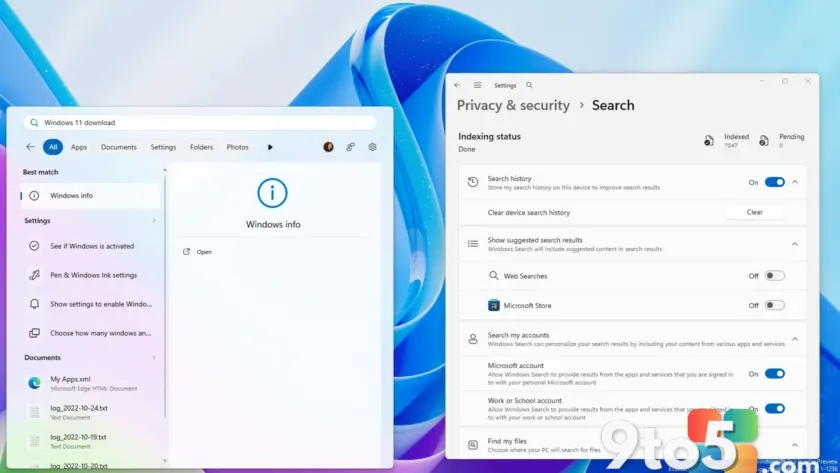
The new controls are currently hidden within the Settings > Privacy & security > Search menu in build 26300.8697. Under the “Show suggested search results” section, you will find a toggle labeled “Web Searches”. Turning this off removes Bing web results from your Start menu and Taskbar search queries.
Microsoft is also testing a separate toggle for “Microsoft Store” items. This allows users to prevent Store apps from appearing in their search results, further decluttering the interface. Together, these options give you significantly more control over what surfaces when you press the Windows key or click the Search icon.
2. Reorganized Privacy & security settings
Beyond search customization, this preview build includes a refreshed “Privacy & security” page. Microsoft has reorganized these settings into clearer categories to improve navigation. A new header provides quick access to Windows Security and offers glanceable status indicators for location, camera, and microphone permissions.
The update also adds direct entry points for features like Passkeys and the Custom Dictionary, making it easier to manage specific privacy-related tools without digging through sub-menus.
3. How to access these features right now
It is important to note that this feature is not officially available in the standard Settings UI for most users yet. It was discovered by insider @PhantomOfEarth and currently requires enabling via ViveTool feature IDs. This indicates that Microsoft is still actively developing and testing the experience before a wider release.
If testing proceeds as planned, expect to see these toggles refined in future 26H2 preview releases. For everyday users, this means you may soon have the option to make Windows Search faster and more predictable by filtering out online noise that doesn’t help you find local files or settings.
What this means for you: If you’ve ever felt frustrated by Bing results dominating your local file searches, relief is on the horizon. While currently limited to specific Insider builds and requiring manual activation via ViveTool, this change signals a shift toward giving all Windows 11 users the same level of control previously reserved for EEA residents.
Source: Windows Central
Over to you: Would you disable Bing web results in Windows Search if the option became available globally, or do you find them useful?