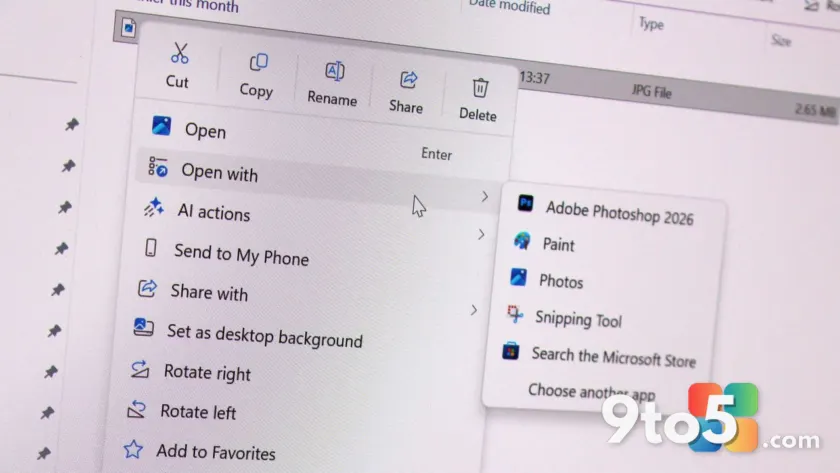
Microsoft is preparing a significant update to one of Windows 11’s most frequently used interfaces: the right-click context menu. According to a recent report from Windows Central, the company is developing a major overhaul aimed at resolving long-standing performance and reliability issues while giving users greater control over what appears in their menus.
The update introduces a new compact menu design that prioritizes speed and responsiveness. Additionally, Microsoft is rolling out a dedicated customization feature that will allow users to show, hide, and reorder actions and applications within the right-click menu across the system.
The Problem with Current Context Menus
Since the launch of Windows 11, users have expressed frustration with the modern context menu’s tendency to become cluttered and slow. The current design aggregates actions from both Microsoft and third-party developers, many of which can add themselves to the menu without explicit user consent.
In practice, this results in noticeable delays when right-clicking in File Explorer or on the desktop. Systems with numerous installed applications often experience a one-to-two-second lag before the menu appears, as it attempts to load all registered actions simultaneously. This performance hit is particularly noticeable for users who rely on quick file management workflows.
A New Compact Menu Design
To address these issues, Microsoft is developing a streamlined context menu that focuses on the most common actions first. The new design intentionally avoids loading all third-party actions upfront, which should significantly reduce initialization time.
The compact menu is built to be more reliable and instantly responsive. By prioritizing frequently used commands, the interface aims to minimize the cognitive load and physical delay associated with scrolling through lengthy lists of rarely used options.
User Customization Coming Soon
Beyond performance improvements, Microsoft is introducing a new customization layer for the context menu. During a recent Windows Insider Meetup in London, the company demonstrated a feature that allows users to configure exactly what appears in their right-click menus.
Users will be able to toggle specific actions and applications on or off, as well as change their order within the menu. A new “Customize” option will be permanently available at the bottom of the menu, providing quick access to these settings at any time.
This level of control addresses a common pain point where third-party software forces its way into the context menu, cluttering the interface with unwanted options.
Part of the Windows K2 Initiative
These changes are part of Microsoft’s broader Windows K2 initiative, which has been focused on modernizing and stabilizing the Windows 11 experience. The company has confirmed plans to migrate more system components to WinUI for consistency and performance reasons.
While context menus are already powered by WinUI, this overhaul represents a deeper integration aimed at optimizing rendering and interaction speeds. Other areas, such as File Explorer file properties and the Start menu, are also expected to receive similar treatment in the near future.
What This Means for You
For everyday Windows 11 users, this overhaul promises a noticeably faster and less cluttered right-click experience. If you frequently use File Explorer or the desktop, you can expect menus to appear instantly without the previous lag.
The customization options will also reduce the need for third-party tools like RightClickFix or Winaero Tweaker, which many users currently rely on to manage context menu clutter. This native solution aligns with Microsoft’s goal of providing a more polished out-of-the-box experience.
How to Get It
Microsoft has not announced a specific release date for these changes. However, the demo shown at the Windows Insider Meetup was described as working code, suggesting that these features may arrive in the Windows Insider Preview program sooner rather than later.
Users interested in testing these updates early should keep an eye on the Windows Insider Blog for announcements. The company is expected to roll out these improvements gradually, with a broader release likely targeted before the end of the year.
Until then, users experiencing significant context menu delays may need to rely on manual cleanup methods or third-party utilities to manage the clutter.
Source: Latest from Windows Central
Over to you: Will you use the new customization options to trim your context menu, or do you prefer the current setup?
You may also like
 Microsoft Releases Windows 11 KB5101684 Preview Update With 42 Fixes
 Outlook Classic Copilot Gets a Ribbon Button and Compose Box Integration
 Microsoft Is Finally Fixing One of Outlook Calendar’s Most Frustrating Quirks
 Still Waiting for Updated Windows Secure Boot Certificates? Here’s What You Need to Know