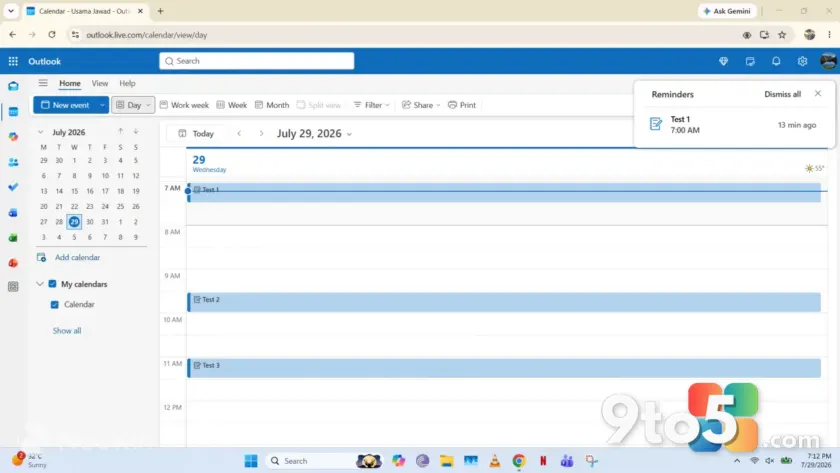
Microsoft is rolling out a meaningful shift to how Outlook Calendar handles daily planning, and the change targets one of the platform’s most persistent pain points. According to a recent report from Neowin, the company is removing a long-standing annoyance that has complicated time management for years, with a straightforward adjustment that could make organizing your day feel significantly less friction-heavy.
While the exact technical specifications of the tweak haven’t been fully detailed in official release notes yet, the direction aligns with Microsoft’s broader push to streamline the new Outlook experience across Windows and the web. For users who have spent years wrestling with cluttered scheduling views or rigid time-block behaviors, this Outlook Calendar update signals a clear step toward a more intuitive interface.
What’s Actually Changing?
Outlook Calendar has long been criticized for forcing users into a rigid grid system that doesn’t always match how modern work actually flows. Tasks frequently run over, meetings get pushed, and manually dragging events across time slots often triggers unwanted conflicts or formatting quirks. The upcoming adjustment appears to soften those hard edges, allowing for smoother interactions when you’re rearranging your schedule on the fly.
In practice, this means you will likely notice fewer pop-ups interrupting your workflow when you try to shift a meeting, along with a cleaner visual representation of your day. Microsoft has historically rolled out similar refinements through its regular preview channels, but this particular change is being positioned as a core improvement rather than a niche tweak. The focus is squarely on reducing the number of clicks and mental steps required to plan your hours.
Contextually, this update fits into Microsoft’s ongoing effort to unify the legacy Outlook desktop app with the newer Outlook for Windows and Outlook on the web. By smoothing out calendar interactions, the company is closing the gap between the classic experience and the modern, cloud-first version that many enterprise and personal users have already migrated to.
Why This Matters for Daily Planning
Calendar management is rarely a one-time task; it is a continuous loop of scheduling, rescheduling, and adjusting. When the underlying mechanics feel clunky, even small planning decisions become tedious. A smoother drag-and-drop experience, better conflict resolution, or a cleaner time-block layout directly impacts how quickly you can respond to changes during a busy workday.
For remote and hybrid workers, this refinement is particularly relevant. When your office is split between a home desk and a co-working space, your calendar needs to adapt instantly to shifting priorities. Removing friction from the scheduling process means less time spent fighting the tool and more time focused on the work itself.
It is worth noting that Microsoft has historically tested these kinds of interface adjustments in its Insider builds before rolling them out to the general public. If you are not seeing the change immediately, it may be rolling out in waves based on your region, account type, and current client version. Patience during the deployment phase is usually the best approach.
What This Means for You
For everyday users, the practical takeaway is straightforward: your calendar should feel less rigid and more responsive to how you actually work. You will likely spend less time manually adjusting time slots and dealing with unexpected scheduling conflicts. The update also reinforces Microsoft’s commitment to keeping the new Outlook experience competitive with third-party productivity tools that have long offered more fluid calendar interfaces.
If you are currently using the legacy Outlook desktop client, you may notice that some of these improvements are already available in the web version. Microsoft continues to prioritize feature parity between platforms, so desktop users can expect the refined calendar behavior to reach their primary workspace sooner rather than later.
How to Get It
The update is being distributed through Microsoft’s standard delivery channels. If you are on the current channel, the changes should appear automatically as part of your next routine update. Users on the semi-annual enterprise channel may see a slightly delayed rollout, as Microsoft staggers these releases for enterprise stability.
To ensure you are ready, open Outlook and navigate to File > Office Account. From there, you can check for updates manually or verify that your current build is set to receive the latest feature drops. If the new calendar behavior does not appear immediately, restarting the application or signing out and back into your Microsoft account can help trigger the fresh configuration files.
As Microsoft continues to refine the Outlook ecosystem, calendar improvements like this serve as a reminder that even small UX adjustments can have a noticeable impact on daily productivity. Keep an eye on your update notifications, and you should be up to speed with the smoother scheduling experience shortly.
Source: Neowin
Over to you: Which Outlook Calendar feature do you find yourself using most often in your daily workflow?
You may also like
 Still Waiting for Updated Windows Secure Boot Certificates? Here’s What You Need to Know
 Windows 11’s Optional July 2026 Preview Update Brings Start Menu Speed Boost and File Explorer Tweaks
 Windows 11 July 2026 Optional Updates Are Now Available
 Windows 11 August 2026 Update Rolls Out August 11 With AI Uninstall and Touchpad Tweaks