- Status: Resolved with update
- Affected versions: Windows 11 24H2, 25H2, and 26H1
- Error message: ‘GIF service is not available’
- Fix KBs: KB5095093 (24H2/25H2), KB5095091 (26H1)
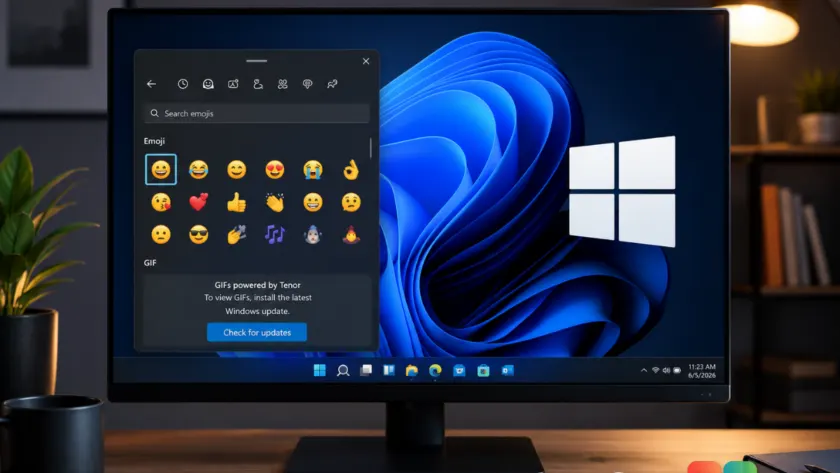
If you opened the emoji panel on your Windows 11 PC recently and tried to search for a GIF, you may have been greeted with an error message stating that the ‘GIF service is not available.’ This issue affects users running Windows 11 versions 24H2, 25H2, and 26H1 who have not yet installed specific updates released in late June.
Microsoft has confirmed the root cause: Google retired the Tenor API on June 30, 2026. Since the Windows emoji panel relied on this external service to fetch animated GIFs, the feature broke for anyone still using older builds. The solution is already available in recent preview updates and will arrive broadly with July’s Patch Tuesday.
Why your GIF search stopped working
The Windows 11 emoji panel, which you can open by pressing Windows key + period (.), has long used Google’s Tenor API to provide GIF search results. On June 30, 2026, Google officially discontinued this API.
Without access to the Tenor backend, Windows could no longer retrieve animated content. Microsoft’s release health dashboard notes that devices which did not receive a specific update prior to this date will continue to display the error message until the fix is applied. This highlights how even built-in OS features can depend on third-party services that may change or disappear.

How to restore GIF support immediately
To fix the issue, you need to install the update that switches the provider from Tenor to GIPHY. Microsoft included this change in preview updates released on June 23, 2026. If you are on a supported version, check for these specific KB articles:
- KB5095093 for Windows 11 versions 24H2 and 25H2
- KB5095091 for Windows 11 version 26H1
If you prefer to wait for the standard monthly release, the fix will be included in the July 2026 Patch Tuesday cumulative update. For those who need the feature back now, you can enable the toggle for ‘Get the latest updates as soon as they’re available’ in Settings > Windows Update, then click ‘Check for updates.’
Once installed, restart your device if prompted. The emoji panel will automatically begin pulling results from GIPHY without requiring any manual configuration.
What changes with the switch to GIPHY
While the functionality remains the same, the underlying library has changed. You may notice differences in search rankings, animation styles, or available content compared to what you saw under Tenor. GIPHY covers most common categories like reactions and pop culture, but niche memes unique to Tenor might yield different results.
Microsoft has not specified whether this integration is permanent or if future updates might switch providers again. For now, keeping your system updated ensures you avoid service disruptions caused by external API changes.
Source: gHacks
Over to you: Do you use GIFs frequently in chats, or do you prefer sticking to standard emojis?
You may also like
 Microsoft extends Windows Server 2022 hotpatching support to October 2027
 Intel drops major Wi-Fi and Bluetooth driver updates for Windows 11
 Intel’s new Wi-Fi and Bluetooth drivers bring stability to Windows 11 under Microsoft’s quality push
 Critical Microsoft Defender bypass ‘RoguePlanet’ affects Windows 10 and 11