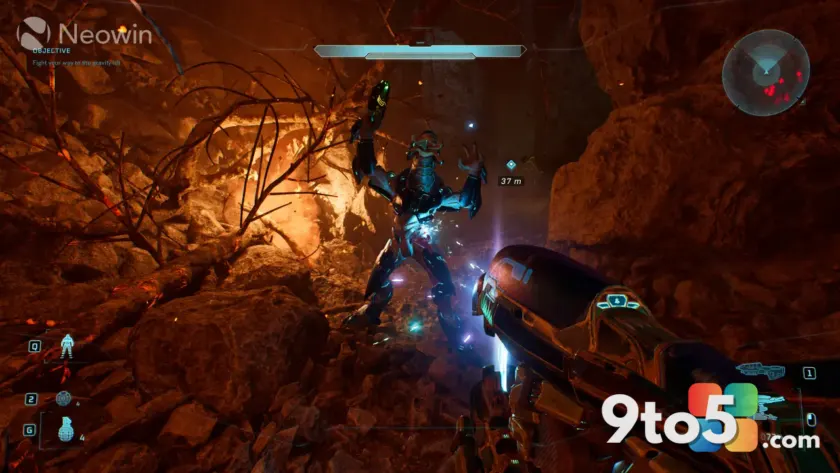
PC gamers relying on Nvidia graphics hardware have a new certified release to install before jumping into two of the most anticipated Xbox-to-PC ports of the year. According to the official Nvidia update channel and reported by Neowin, the Nvidia 610.88 driver has landed with dedicated support for Halo: Campaign Evolved and the Gears E-Day beta. If you are planning to play either title at launch, this update should be your first step before firing anything up.
What Changed in the Nvidia 610.88 Driver
Nvidia packages its game-focused releases under the Game Ready banner, and version 610.88 follows the same structure as previous iterations. The update does not introduce major architectural shifts or new rendering features. Instead, it delivers a curated set of driver profiles, shader cache adjustments, and rendering pipeline tweaks tuned specifically for the two supported titles. Nvidia typically validates these builds against developer-provided test branches, which is why beta support for Gears E-Day appears alongside the full launch optimization for Halo: Campaign Evolved.
Why Driver Certification Matters for PC Ports
When a game moves from Xbox to Windows, the underlying rendering stack often changes. Titles built on Unreal Engine or proprietary Microsoft toolchains frequently require specific driver-level adjustments to handle texture streaming, frame pacing, and API translation correctly. Without a certified profile, players can experience stuttering, missing visual effects, or unexpected crashes during heavy combat sequences. Nvidia’s certification process runs alongside the game developer’s QA cycle, ensuring that the final driver release aligns with the game’s shipped build. That alignment is exactly what makes the Nvidia 610.88 driver worth installing before your first session.
Optimizing Halo: Campaign Evolved
Halo: Campaign Evolved represents a significant return to the franchise’s roots on PC, focusing on the original trilogy’s campaign structure with modernized lighting, geometry, and input handling. The Nvidia 610.88 driver includes a dedicated profile that adjusts how the GPU handles volumetric fog, dynamic shadows, and the game’s specific draw call patterns. Players running high-refresh-rate displays will notice smoother frame delivery during large-scale battles, while those on lower-tier cards will benefit from the driver’s resource allocation tweaks that prevent sudden memory spikes. The certification also covers the game’s native DirectX 12 implementation, ensuring compatibility with Nvidia’s latest ray tracing and DLSS pipelines.
Stabilizing the Gears E-Day Beta
Gears E-Day is entering its open beta phase on PC, and early access titles often expose driver-level quirks that only surface under heavy multiplayer load. Nvidia has included beta-stage support in the Nvidia 610.88 driver to address rendering inconsistencies and network synchronization bottlenecks that can cause texture pop-in or input lag. The update includes a temporary profile that remains active until the developer ships the final build, at which point Nvidia will either merge the changes into a permanent profile or remove them if the game’s engine changes require a different approach. For beta testers, this means fewer unexpected crashes and a more consistent visual experience across different GPU tiers.
What This Means for You
If you own an Nvidia GPU and plan to play either title, the Nvidia 610.88 driver is effectively required for the best experience. You will see faster load times, more stable frame rates, and fewer rendering artifacts compared to running the games on a generic or outdated driver. The update also maintains backward compatibility with older supported titles, so installing it will not break your existing game library. Nvidia typically rolls out these updates to both GeForce Experience and the manual download portal, meaning you can choose your preferred installation method without losing functionality.
How to Get It
Open GeForce Experience, sign in with your Microsoft or Nvidia account, and navigate to the Drivers tab. You should see the 610.88 release listed under Available Updates. Click Download and Install, and the installer will handle the clean installation process automatically. If you prefer a manual approach, visit Nvidia’s official driver download page, select your GPU architecture and operating system, and pull the latest Game Ready release. After installation, a system restart is recommended to ensure all driver profiles load correctly before launching your game.
Source: Neowin
Over to you: Will you be playing Halo: Campaign Evolved on day one, or saving your GPU upgrade for the Gears E-Day beta?
You may also like
 Windows 11 August 2026 Patch Tuesday: Top Changes and New Features
 Windows 11 In-Box App Updates Roll Out to Insiders for Calculator, Clock, Media Player, and Notepad
 Microsoft Rolls Out a New Windows 11 Experimental Build for Insiders
 Windows 11 Future Platforms Build 29634 Adds Voice Isolation and Instant Braille