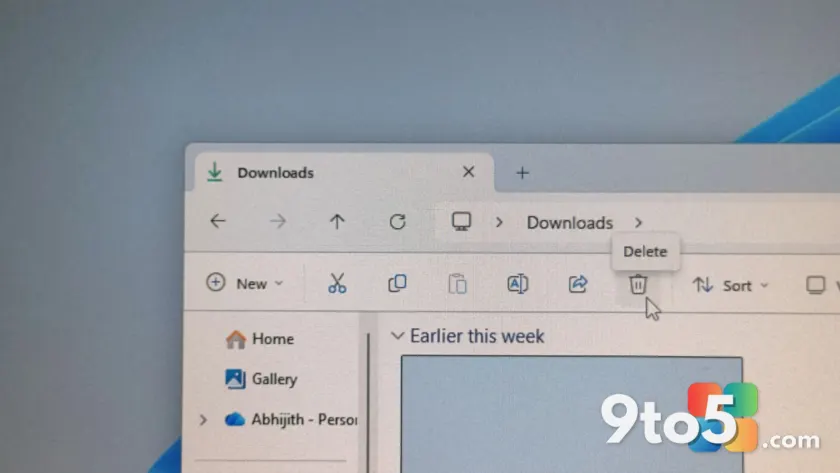
If you have ever watched the “Calculating” progress bar stall while trying to delete a massive folder, you are not alone. That decades-old frustration is finally getting a serious overhaul. Microsoft confirmed via the Windows Insider Blog that the latest Windows 11 Insider Experimental Preview Build 26300.8935, released on July 20, delivers a tangible speed boost to File Explorer, specifically targeting the deletion of large, fragmented files.
This update marks the first time a version of Microsoft’s June announcement regarding bulk delete performance has landed in an Insider build. The company’s changelog notes that “File deletion in File Explorer is now faster in certain scenarios when deleting large, fragmented files,” a change that addresses one of the most persistent pain points for power users managing heavy workloads.
Why large file deletion was so slow
To understand the impact of these File Explorer speed improvements, it helps to look at how the NTFS file system handles storage. When a drive has plenty of contiguous free space, files are written in single, unbroken blocks. However, as a drive fills up, free space breaks into smaller, scattered gaps. Large files, such as virtual machine disks, database logs, or video project archives, get split into thousands of fragments across the physical storage medium.
On traditional hard drives, deleting these files requires the read/write head to physically seek every fragment, a process that adds up to significant delays. Even on solid-state drives, which lack moving parts, the file system still must perform extensive bookkeeping to locate and clear every fragment from the free space records. This lookup process is what triggers the infamous “Calculating” dialog, leaving users staring at a frozen interface while the system processes the metadata.
While Microsoft has not disclosed the specific code changes behind this optimization, the performance gain likely stems from a more efficient method of processing fragment-by-fragment cleanup. This is particularly noticeable on drives nearing capacity, where fragmentation is most severe.
Home tab and Recommended section enhancements
Beyond file deletion, Build 26300.8935 continues a broader push to make the File Explorer Home tab more responsive. Microsoft previously targeted this area with update KB5095093 in June, which improved launch speeds and address bar reliability. This latest build builds on those foundations, reducing the lag many users experienced when switching to the Home view.
Additionally, the Recommended section on the Home tab, which displays a carousel of recently used items, now supports touch scrolling. This is a welcome addition for the growing number of Windows 11 laptops with touchscreens, although the overall touch experience in File Explorer remains inconsistent compared to the rest of the operating system.
A broader overhaul of File Explorer
These performance tweaks are part of a much larger initiative to modernize File Explorer, which has historically lagged behind its Windows 10 counterpart due to its hybrid architecture. The app still relies heavily on legacy Win32 components, which contributes to the sluggishness and inconsistent scrolling behavior that has plagued Windows 11 since its launch.
Looking ahead, Microsoft is working on several other major updates. Search functionality across “This PC” is receiving a dedicated speed and relevance overhaul, leveraging the improved Windows Search infrastructure. Furthermore, the Properties dialog is being rebuilt from the ground up with a native WinUI design that supports dark mode, moving away from the Windows 95-era property sheet that has remained largely unchanged for decades.
These changes, combined with refreshed right-click menus and improved file size readability in Details view, signal a clear shift in Microsoft’s strategy. The company is finally addressing the core architectural debt that has made File Explorer feel slower and less polished than it should be.
What This Means for You
For everyday users, these File Explorer speed improvements mean less waiting time when cleaning up large projects or removing old backups. If you frequently manage terabytes of data on a nearly full drive, the difference in deletion speed will be immediately noticeable. The faster Home tab and touch scrolling also contribute to a smoother daily workflow, making the app feel more integrated with the rest of Windows 11.
How to Get It
To access these updates, you need to be enrolled in the Windows Insider Program and switched to the Experimental Preview channel. Microsoft is rolling out changes gradually, so not all users in this channel will see the improvements immediately. You can check for updates by navigating to Settings > Windows Update > Check for updates. If you are not ready to switch channels, these changes will eventually trickle down to the Release Preview and stable channels in future cumulative updates.
Source: Windows Latest
Over to you: Have you noticed File Explorer getting sluggish on your Windows 11 machine, or does it feel snappy enough for your workflow?
You may also like
 Windows 11 July Update Adds Touchpad Right-Click Zone Resizing, Beating macOS
 Outlook Classic Gets Always-Visible Copilot Button, Microsoft 365 Copilot Required
 NVIDIA Hotfix Driver Resolves Halo: Campaign Evolved RTX 50 Issues and Path of Exile 2 Pauses
 Windows 11’s “Get Updates Early” Toggle Is Auto-Installing Out-of-Band Patches You Don’t Need