Dave W. Plummer is a name that echoes through the history of Microsoft, even if many users today don’t recognize it. The Canadian programmer is responsible for some of the most enduring features in Windows history, including the original ZIP file support, Space Cadet Pinball on Windows NT, and, most notably, the Windows Task Manager itself. Since shipping in 1996, Task Manager has become an essential tool for millions of PC users, yet it has remained largely unchanged in its core design for decades.
Now, Plummer has returned to the concept with a modern twist. After teasing a cyberpunk-inspired mockup earlier this year, he has officially released a working version called Task Manager OG (or TMOG). While the project is a labor of love and a nod to his legacy, there is one significant detail that will frustrate the average Windows enthusiast: it is not yet available for Windows.
The Creator Returns with ‘Task Manager OG’
Plummer’s journey with Task Manager began long before he left Microsoft in 2003 to start his own software company. According to his own accounts, he initially developed the tool at home before bringing it into the fold at Microsoft. The result was a utility that provided users with a way to view running processes, manage startup items, and monitor system resources—a feature that quickly became indispensable.
For years, Plummer has remained active in the tech community, sharing stories and insights about the early days of Windows via social media and his YouTube channel, Dave’s Garage. Earlier this year, he shared a concept design for what Task Manager might look like if he had never left Microsoft. The design was heavily influenced by neon aesthetics and synthwave culture, capturing a distinct cyberpunk vibe.
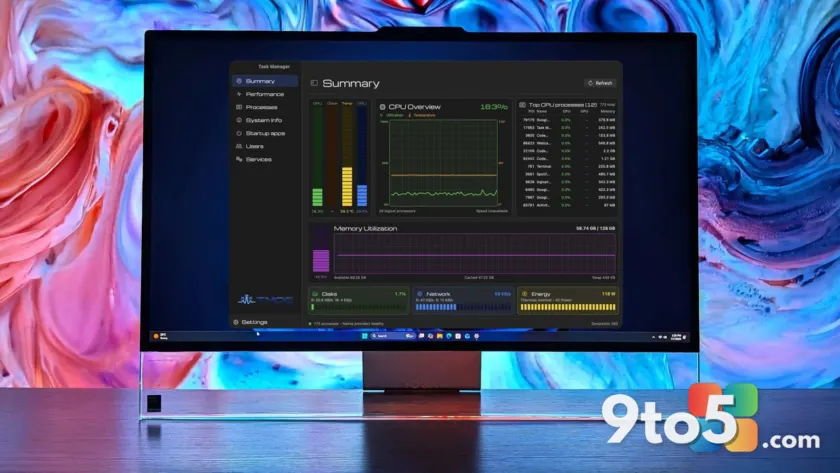
Fast forward about six months, and that concept has evolved into a fully functional application. Plummer describes TMOG as a hybrid that combines “the clarity of Activity Monitor” from macOS with “the depth of Task Manager” from Windows. The interface presents CPU, GPU, RAM, storage, and temperature data upfront, with more detailed diagnostics accessible just below the fold.

Cyberpunk Aesthetics Meet Modern Performance
Visually, Task Manager OG is a departure from the utilitarian design of the current Windows Task Manager. While the original mockup featured intense neon lighting and a heavy synthwave soundtrack, the final release has toned down the visual intensity. The neon elements remain, but they are more subtle, and the audio has shifted from synthwave to classic rock tunes.
Beyond the aesthetics, Plummer highlights a key technical advantage: TMOG is roughly half the size of the current Windows Task Manager. This reduction in footprint suggests a more efficient use of system resources, which could be appealing to users who prioritize performance alongside functionality. The app includes detailed metrics for network activity, energy consumption, and process management, all presented in a dark-themed layout that is easy on the eyes.
Plummer has set up a dedicated website for the project where users can download the beta version for free. He has also hinted at a potential Pro version in the future, though he emphasizes that the current release is fully functional without any paywall.
The Catch: Windows Support Is Coming ‘Shortly’
Despite the excitement surrounding the release, there is a major hurdle for the intended audience. Task Manager OG is currently available only for macOS. Plummer has stated that Windows support will follow “shortly,” but he has not provided a specific timeline for the native Win32 release.
For Windows users, this delay is a letdown, especially given the app’s design philosophy. Plummer’s vision for TMOG was clearly aimed at enhancing the Windows experience, and the native Win32 build will not require a browser shell, ensuring a seamless integration with the operating system.
Until the Windows version lands, Plummer’s creation will primarily serve Mac users who are looking for a more robust alternative to the built-in Activity Monitor. The macOS version offers a compelling blend of visual appeal and detailed system monitoring, making it a worthy contender in the third-party utility space.
What This Means for You
For Windows users, the release of Task Manager OG serves as a reminder of what a modernized system monitor could look like. While you cannot download it just yet, the project highlights the demand for more customizable and visually engaging system tools. The emphasis on a smaller footprint and detailed diagnostics aligns with what many power users have been requesting for years.
In the meantime, if you are looking for a capable Task Manager alternative on Windows, there are other options available. Apps like AppControl have gained popularity for their ability to replace the stock Task Manager with a more feature-rich interface. These tools offer a glimpse into the kind of functionality that TMOG aims to bring to Windows once it is fully released.
How to Get It
If you are a macOS user, you can download the beta version of Task Manager OG for free from Plummer’s official website. The app is designed to run natively on Mac, providing immediate access to its cyberpunk-inspired interface and detailed performance metrics.
For Windows users, the wait continues. Keep an eye on Plummer’s social media channels and his website for updates on the native Win32 release. When it arrives, expect a seamless, browser-free experience that brings a fresh perspective to system monitoring on Windows.
Source: Latest from Windows Central
Over to you: Will you switch to Task Manager OG once the Windows version lands, or stick with AppControl for now?