The pre-built PC market is currently navigating significant supply chain pressures, but the Acer Nitro 65 arrives with a competitive price tag and performance that holds up well against custom builds. After spending two weeks with the system, I found it to be a solid option for gamers who want high-end specs without the hassle of assembly, provided you are willing to overlook a few specific component choices.
Price and configuration
The review unit features an AMD Ryzen 9 9900X CPU, an NVIDIA GeForce RTX 5070 GPU with 12GB of VRAM, 32GB of DDR5 RAM, and a 1TB NVMe SSD. At Best Buy, this configuration is listed for $2,304.99, though frequent sales often drop the price closer to $2,100 or lower.
When compared to building a similar system from scratch using current market prices, the Nitro 65’s value becomes clearer. A comparable DIY build using a HYTE X50 case, a mid-range motherboard, and similar components costs approximately $1,961 to $2,061 before adding accessories like RGB fans. The pre-built option saves time and effort for a relatively small premium.
For those needing less power, Acer offers configurations with an AMD Ryzen 7 8700F paired with either an NVIDIA RTX 5060 or an AMD Radeon RX 9060 XT. These models range from $1,100 to $1,600 depending on current discounts.

Build quality and internal components
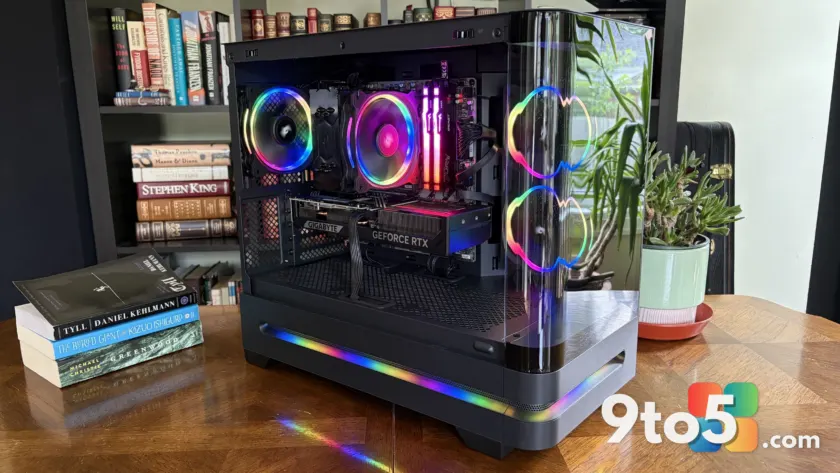
The Nitro 65 uses a custom 35-liter case with rounded tempered glass panels that showcase the internal hardware. The design includes an embedded RGB light strip along the base of the glass, which syncs with the internal lighting from the fans, RAM, and CPU cooler. While aesthetically pleasing, the front I/O is limited to two USB-A 3.2 Gen 1 ports and one USB-C 3.2 Gen 1 port, all operating at 5Gbps. A 10Gbps connection would have been a welcome upgrade here.
Inside, Acer has mostly used standard, recognizable components. The system ships with Kingston Fury Beast DDR5-6000 RAM in a dual-channel setup, a Gigabyte WindForce RTX 5070 graphics card, and a Lexar NQ7A1 M.2 PCIe 4.0 NVMe SSD. The motherboard is a Gigabyte B850M C, which provides Wi-Fi 7 and Bluetooth 5.4 connectivity alongside a 2.5Gb Ethernet port.
However, the power supply unit (PSU) is a point of concern. It is an unnamed brand rated at 850W with 80+ Gold efficiency. Crucially, it is non-modular, which makes cable management more difficult and limits future upgrade flexibility. Given that PSUs are critical for system longevity, replacing this unit before the one-year warranty expires is a prudent step for any owner planning to keep the PC long-term.
Cooling and performance
Despite the compact case size, the Nitro 65 manages thermals effectively. During stress testing with the side panel removed, the Ryzen 9 9900X maintained temperatures between 60.8°C and 61.6°C, while the RTX 5070 hovered around 68°C to 70°C. With the glass panel reinstalled, CPU temperatures rose slightly to 63°C–65°C, and GPU temps increased to 70°C–72°C. These figures are well within safe operating limits for sustained gaming loads.
The stock air cooler does its job, though it can become noticeably loud under heavy load. The single fan design is adequate for the 9900X but lacks the thermal headroom of an all-in-one (AIO) liquid cooler. If you plan to push the CPU harder or prefer quieter operation, upgrading to a compatible AIO is recommended, as the case supports larger coolers.
In benchmark tests, the Lexar SSD delivered read speeds of 6,052 MB/s and write speeds of 5,063 MB/s. While not class-leading for PCIe 4.0 drives, these speeds are more than sufficient for fast game loading times and general system responsiveness. The 32GB of RAM ensures smooth multitasking alongside gaming sessions.

What this means for you
If you are looking to jump into high-end PC gaming without dealing with component compatibility or assembly, the Acer Nitro 65 is a viable choice. The price is competitive enough that you aren’t paying a massive premium over DIY costs, and the use of standard parts makes future upgrades straightforward—except for the power supply.
The main trade-off is the non-modular PSU and the stock air cooler’s noise profile under load. If you are comfortable swapping out the PSU yourself or hiring someone to do it, this system offers a clean, powerful foundation. However, if you prioritize silent operation or plan to heavily overclock, building your own system might offer better long-term flexibility.
Source: Windows Central
Over to you: Would you replace the stock power supply immediately, or wait to see how it performs over time?