Windows 11 is currently undergoing its most aggressive interface cleanup in years, yet traces of decades-old design patterns remain embedded in the operating system. The reason dates back to a 2003 blog post by Microsoft engineer Raymond Chen, and it explains exactly why the platform cannot fully shed its past. Chen documented how Microsoft handled the introduction of a new task-switching model, revealing a corporate philosophy that prioritized enterprise stability over immediate modernization. That same philosophy still shapes how Redmond approaches the legacy Windows UI today, though the execution has shifted from a temporary bridge to an unfinished migration.
The 2003 precedent: giving users an escape hatch
On October 20, 2003, Chen published a detailed breakdown of how Alt+Tab ordering relies on window Z-order. The post highlighted a deliberate design choice made years earlier: when Windows 3.1 introduced a faster task-switching mechanism, Microsoft refused to force every user into the new behavior overnight. Instead, the company shipped a Control Panel toggle that restored the older, Z-order-based switching from Windows 3.0 and earlier. The legacy behavior functioned much like Alt+Esc, automatically restoring minimized windows when a user switched to them. Microsoft even exposed the SPI_SETFASTTASKSWITCH registry setting so third-party applications could enforce the older pattern. According to Chen, enterprise customers eventually stopped requesting the toggle, allowing Microsoft to quietly remove the old task-switching system and make the modern version the permanent default. The underlying motivation was straightforward. Chen noted that corporations employing tens of thousands of workers cannot absorb the cost of sudden interface changes, since every modification triggers millions of dollars in retraining and productivity loss. By offering a transitional escape hatch, Microsoft managed that enterprise risk responsibly.
Why the old interface stopped disappearing
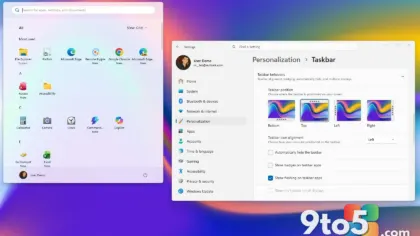
The temporary-bridge model worked while Microsoft moved at a measured pace. Today, however, the legacy Windows UI persists in Windows 11 not as a courtesy, but because the replacements are simply not finished. Pulling the plug too early would risk breaking integrations that enterprise IT departments still depend on. Administrators managing large fleets already rely on the Group Policy Editor to soften the impact of new interface changes, but that workaround does not erase the underlying technical debt. The migration of the classic Control Panel to the modern Settings app illustrates the problem clearly. March Rogers, Partner Director of Design at Microsoft, confirmed in April that the team is still moving Control Panel controls over, and the pace remains slow specifically because of network and printer drivers. Rogers stated the migration is being handled carefully to avoid breaking the wide variety of network and printer devices that businesses still run. Unlike macOS, which can deprecate older hardware support more aggressively, Windows carries decades of driver compatibility requirements. That history is precisely why the Control Panel refuses to disappear.
The framework whiplash and WebView2 dependency
Another structural reason the legacy Windows UI lingers is Microsoft’s repeated decision to abandon a UI framework before it reached maturity. The operating system cycled through Win32, MFC, .NET-era toolkits, XAML-based designs with hardware acceleration, a cross-platform detour that never gained traction, UWP during the Windows 8 and 10 era, and finally WinUI 3. Each transition left behind a layer of legacy code that applications and system components continued to rely on. Somewhere along the way, the default response to an incomplete framework became wrapping content in WebView2 rather than finishing the native implementation. That habit has measurable consequences. Windows 11’s default Weather app now runs as a WebView2 wrapper that consumes over 1.2GB of RAM at idle, nearly five times the footprint of the macOS equivalent. The pattern extends to third-party software as well, with WhatsApp on Windows idling at roughly 600MB and Electron-based Discord climbing past 4GB. The legacy Windows UI is not just a visual artifact; it is the byproduct of a development model that repeatedly prioritized speed over stability.
What this means for you
If you are running Windows 11 in a home or small business environment, the practical takeaway is straightforward. The interface you interact with daily is being rebuilt piece by piece, and that process will continue to take years. You will notice the new File Explorer Properties dialog, which Microsoft rebuilt in WinUI 3 to replace a layout dating back to Windows 95. The redesigned Run dialog also shows measurable improvements, with telemetry indicating it loads in 94 milliseconds compared to 103 milliseconds for the legacy version. These changes will roll out gradually through Windows Update, and you do not need to take any action to receive them. However, if you rely on older peripherals or specialized network hardware, the lingering Control Panel dependencies mean some settings will remain in their traditional location for the foreseeable future. Microsoft has confirmed that performance, fundamentals, and bug stabilization take priority over new features, which explains why the migration proceeds at a deliberate pace.
How to get it and what to do
Microsoft is currently investing in Windows 11 to address the backlog of unfinished interface work, with leadership confirming in July that the company is prioritizing the best quality and fundamentals across the platform. You can expect the WinUI 3 rebuilds to expand beyond the Properties and Run dialogs into the Start menu, where shared UI infrastructure is already being shifted from React Native to native components. The Start menu’s Recommended section and All Apps list were originally built in React Native to accelerate iteration, but the WinUI team has indicated that memory usage and compositor integration must be resolved before the full rewrite can proceed. For now, you should keep Windows 11 updated through Settings > Windows Update to receive the incremental UI improvements as they become available. If you manage enterprise devices, monitor the Group Policy templates for the Settings app migration, since those policies will eventually replace the older Control Panel redirection options. The legacy Windows UI is not disappearing overnight, but the pace of replacement is finally accelerating.
Source: Windows Latest
Over to you: Are you noticing the new WinUI 3 dialogs in your daily workflow, or does the old Control Panel still feel like home?