- Status: Confirmed by Microsoft
- Affected Versions: Windows 11 (various builds)
- Related Update: KB5095093 (July 2026 Patch Tuesday)
If your C: drive seems to be filling up for no apparent reason, you might be the victim of a silent storage bug in Windows 11. Microsoft has officially acknowledged an issue where a specific system file, CapabilityAccessManager.db-wal, can grow exponentially, consuming anywhere from tens to over 500GB of disk space.
This file is part of the Capability Access Manager service, which handles privacy permissions for apps accessing your camera, microphone, location, and screen. Under normal circumstances, this database log should only take up a few megabytes. However, due to this bug, it fails to truncate or manage its size correctly, silently eating away at your available storage until your drive is nearly full.
How to check if you are affected
The tricky part about this issue is that Windows Storage settings do not explicitly flag the culprit. The bloat appears under “System & Reserved” or “System files,” making it look like standard OS overhead rather than a malfunctioning file.
To verify if your PC is affected, you need to inspect the specific file size directly. You can use third-party disk analysis tools like WizTree, TreeSize, or WinDirStat (run as Administrator) to scan your drive and sort by file size. Look for C:\ProgramData\Microsoft\Windows\CapabilityAccessManager\CapabilityAccessManager.db-wal.

If you prefer not to install new software, you can use the Command Prompt to check the file size without modifying permissions. Open Command Prompt as Administrator and run the following command:
robocopy "C:\ProgramData\Microsoft\Windows\CapabilityAccessManager" "%TEMP%\CAMCheck" /L /B /R:0 /W:0 /BYTES /NP
Look for the CapabilityAccessManager.db-wal entry in the output. On a healthy system, this file should be roughly 1.6MB to 3MB. If it is several gigabytes or larger, your system is affected by this bug.
The fix and immediate workarounds
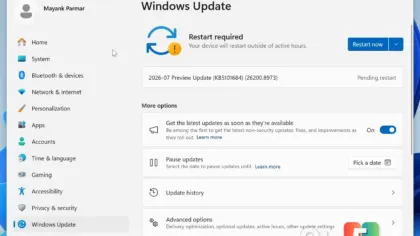
Microsoft has confirmed that a patch for this issue will be included in the next major update cycle. The fix is scheduled to ship on July 14, 2026, during Patch Tuesday. This update corresponds to the optional release previously identified as KB5095093.
Unlike some gradual rollouts, Microsoft indicated this fix will be available for all users simultaneously on that date. The release notes for KB5095093 specifically state: “[Storage] This update improves disk space usage for the CapabilityAccessManager.db-wal file.”
If you cannot wait until mid-July, there is a manual workaround. You can rename the bloated CapabilityAccessManager.db-wal file (for example, to CapabilityAccessManager.db-wal.old). Windows will regenerate a fresh, small-sized version of the file upon reboot or service restart. Do not delete the file entirely, as this could potentially cause errors with the privacy permission services.
What this means for you
For most users, this bug manifests as sudden low-storage warnings despite having plenty of free space on paper. If you have been puzzled by disappearing gigabytes on your system drive, this is likely the cause. While waiting for the July 14 patch, monitoring the file size periodically can help you reclaim space before your drive becomes critically full.
Source: Windows Latest
Build details:
- kb5095093
Over to you: Have you noticed unexplained storage bloat on your Windows 11 PC, or are you waiting for the July patch?