Microsoft has pushed new updates to the Windows 11 Insider Preview program, specifically targeting users on the Experimental channel. These builds introduce significant changes to system recovery options and desktop customization.
New build numbers
The latest releases are identified as Build 26300.8772 and Build 28120.2387. These versions are now available for download via the Windows Update settings for those enrolled in the Experimental channel.
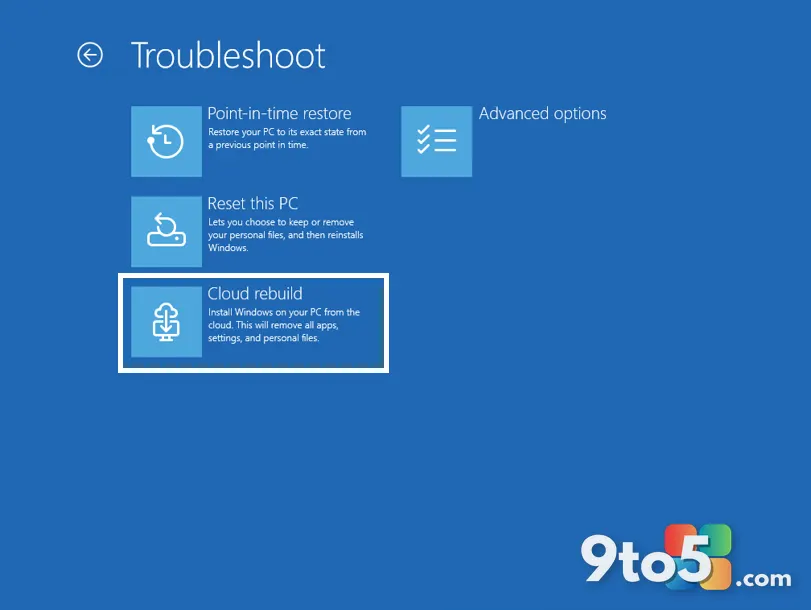
Cloud Rebuild recovery option
A major addition in these builds is the introduction of a Cloud Rebuild recovery option. This feature allows users to reinstall Windows directly from Microsoft’s servers rather than relying on local recovery partitions or external media. It aims to simplify the process of restoring a system that has encountered critical failures, ensuring a clean slate without needing physical installation tools.

Movable taskbar customization
Another notable change is the ability to move the taskbar. While Windows 11 initially restricted the taskbar to the bottom of the screen, this update returns flexibility for users who prefer having it on the left, right, or top edges of their display. This adjustment caters to long-time Windows users accustomed to customizable interface layouts.
These features are currently experimental and may undergo changes before reaching stable releases. Users interested in testing these functionalities should ensure they have backed up important data before installing Insider Preview builds.
What this means for you: If you rely on Windows 11’s stability, stick with the Release Preview or Stable channels. However, if you enjoy early access to potential future features like cloud-based recovery and flexible taskbar placement, these Experimental builds offer a glimpse into upcoming capabilities.
Over to you: Would you trust a Cloud Rebuild option for your primary PC, or prefer traditional local recovery methods?
You may also like
 Link to Windows beta finally lets you delete ‘ghost’ PCs from your Android phone
 Microsoft plans a major redesign for a beloved Windows 11 free tool
 Is Microsoft Edge safe out of the box? Why you should tweak settings before browsing
 Windows 11 builds for July 6: Cloud rebuild fixes unbootable PCs, new Account Control UI