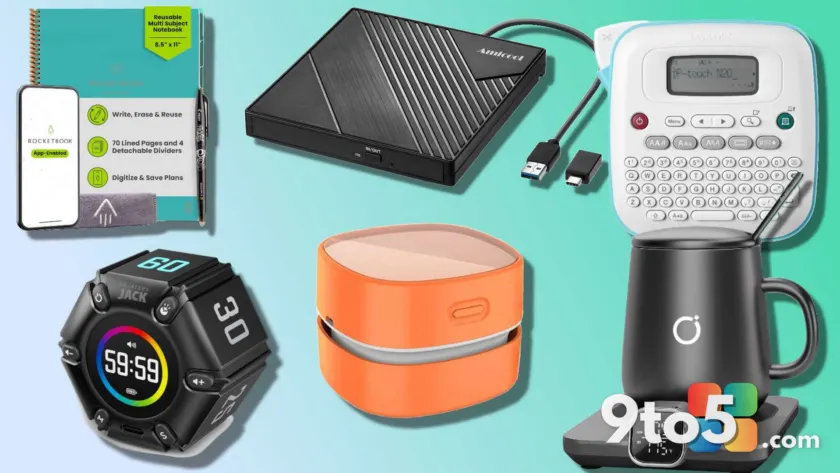
Whether you are shopping for a fellow remote worker, a student, or simply treating yourself to a workspace upgrade, the right accessories can fundamentally change how you interact with your desk. After years of testing peripherals and organizing home offices, I have found that the most impactful upgrades are rarely the most expensive. In fact, some of the best desk gadget gifts under $50 solve genuine friction points like cable clutter, poor lighting, or the temptation to check your phone constantly.
Below, I have compiled a list of ten highly-rated, budget-friendly gadgets that genuinely earn a permanent spot on a working desk. Each item addresses a specific need, from keeping beverages at the perfect temperature to reclaiming focus during deep work sessions. These are not novelty trinkets; they are functional tools designed to streamline your daily routine.
#1 Brother P-Touch PT-N20 Label Maker
Organization often starts with identification, and this compact label maker from Brother delivers exactly that without taking up much real estate. It features a full QWERTY keyboard, which makes typing out long filenames or folder names significantly faster than scrolling through menus on smaller devices. The unit supports three distinct fonts, fifteen decorative frames, and a library of 250 symbols, allowing you to personalize cables, storage bins, or monitor setups with professional-looking results.
At roughly thirty dollars, the cost-per-label is incredibly low, and the device runs on standard AA batteries, meaning you can keep it in a drawer and pull it out whenever a new project requires labeling. It is an ideal gift for anyone who manages a home server, organizes media libraries, or simply wants to stop guessing which cable connects to which port.
#2 Anker 9-in-1 Charging Station
Cable management is one of the most persistent pain points for desktop users, and this Anker charging station consolidates power delivery into a single, tidy unit. Instead of relying on a traditional power strip with exposed prongs, you get three AC outlets alongside four USB-C and two USB-A ports, all housed in a compact chassis that sits neatly behind your monitor.
The standout feature here is the 100-watt power delivery output on the primary USB-C port, which is fast enough to top off a laptop or smartphone in under an hour. Built-in surge protection adds a layer of safety for connected electronics, and the flat profile prevents the station from tipping over when cables are plugged in at awkward angles. It effectively replaces three separate chargers and a power strip.
#3 USB Mini Cooler
Temperature control for beverages is a surprisingly effective productivity hack, and this six-can desktop cooler delivers consistent cooling without the noise of a compressor-based refrigerator. It operates at under 25 decibels, which is quieter than a standard library, making it suitable for open-plan offices or quiet home workspaces.
The unit supports both USB-C and AC power inputs, giving you flexibility depending on where your desk is positioned relative to outlets. When temperatures rise or you are pulling long coding sessions, having a cold drink within arm’s reach reduces the number of trips to the kitchen, keeping your workflow uninterrupted. It frequently goes on sale, often dropping below forty-five dollars.
#4 Jack Pomodoro Timer
Digital distraction is a major barrier to deep work, and this physical Pomodoro timer addresses the issue by removing your smartphone from the equation entirely. The cube-style device lets you set intervals for three, five, ten, twenty-five, thirty, or fifty minutes, with customizable haptic feedback and sound options to signal when a work block ends.
Unlike phone apps that require you to unlock your device and navigate multiple screens, this timer sits on your desk and uses a magnetic base to stick to metal surfaces or stand freely. The USB-C charging port ensures it stays powered through the workweek, and the mute mode allows you to work in shared spaces without disturbing colleagues. It is a tactile, analog solution to a digital problem.
#5 Amicool USB CD/DVD Drive
While optical drives have been absent from modern laptops for years, physical media still holds a place in many workflows, from installing legacy software to viewing archived home videos. This external USB drive plugs directly into a Type-A or Type-C port via an included adapter, requiring no internal installation or driver downloads.
The aluminum casing helps dissipate heat during extended reading sessions, and the slim profile makes it easy to store in a laptop bag. For anyone who still maintains a local media collection or works with older hardware that requires optical installation media, this drive is a practical, no-fuss solution that rarely makes it onto gift lists despite its utility.
#6 LED Monitor Light Bar
Proper lighting reduces eye strain and eliminates screen glare, which is why this monitor light bar is a standout upgrade for any dual-monitor or ultrawide setup. It clips securely to the top of your display and projects light downward onto your keyboard and desk surface without reflecting back into your eyes.
The auto-dimming sensor adjusts brightness based on ambient room lighting, while the adjustable color temperature lets you shift from cool white during the day to warmer tones in the evening. This helps maintain your circadian rhythm if you work late, and the absence of blue light emission during night hours makes it easier to fall asleep afterward. It is a subtle change that noticeably improves workspace comfort.
#7 Ikago Mug Warmer Set
For those who rely on coffee or tea to power through long workdays, a temperature-controlled mug warmer prevents the frustration of cold beverages. The Ikago set includes a ceramic mug and a heating base with adjustable temperature settings, allowing you to keep your drink at the exact consistency you prefer.
Safety is built into the design with an auto-shutoff feature that triggers after fifteen minutes without a mug or two hours of inactivity, preventing accidental burns or energy waste. The base is compact enough to fit beside a keyboard, and the included coaster keeps the desk surface dry. It is a thoughtful gift for anyone who works through lunch without leaving their station.
#8 Wireless Charging Mouse Pad
Consolidating your charging setup onto your mouse pad eliminates the need for a separate wireless charger that often gets buried under papers or cables. This Tarkari model features a 15-watt charging coil in the upper-left corner, which is fast enough to maintain a charge for most modern smartphones while you work.
The pad doubles as a magnetic stand, allowing you to prop your phone upright to view notifications, track time, or follow along with tutorials without picking it up. The surface texture provides consistent mouse tracking, and the non-slip rubber base keeps the pad anchored during vigorous use. It is a dual-purpose accessory that reduces desk clutter while keeping your phone within your line of sight.
#9 Odistar Desktop Vacuum Cleaner
Snacking at your desk is a universal habit, but the resulting crumbs and debris can accumulate quickly in keyboard gaps and desk crevices. This compact desktop vacuum is designed specifically for that mess, featuring a narrow nozzle that fits between keys and a small dustbin that empties with a single press.
It runs on standard AA batteries, offering roughly six and a half hours of continuous use per pair, which is sufficient for a full workweek of light cleaning. The motor is quiet enough to operate during calls, and the lightweight design means it can be stored in a drawer or mounted to the side of a monitor. It is a practical, often-overlooked tool that keeps a workspace hygienic with minimal effort.
#10 Rocketbook Reusable Smart Notebook
For those who prefer the tactile experience of writing by hand but want to avoid paper waste, this smart notebook bridges the analog and digital divide. The 70-page pad is divided into five distinct sections, each designed for a different type of note, and comes with a pen that uses erasable ink for indefinite reuse.
When you finish a page, the companion app uses your phone camera to scan and upload your notes to cloud services like Google Drive, Dropbox, or OneNote. Once digitized, a damp microfiber cloth wipes the page clean in seconds, ready for the next session. It is particularly useful for students, meeting attendees, or anyone who wants to maintain a paperless digital archive of their handwritten thoughts.
What This Means for You
Investing in these budget accessories does not require a major overhaul of your workspace. Each item solves a specific, recurring friction point, from power delivery and lighting to focus management and cleanliness. By addressing these small annoyances, you reduce decision fatigue and create a more intentional environment for working. If you are looking to upgrade your desk without breaking the bank, starting with one or two of these tools will yield noticeable improvements in daily comfort and productivity.
Source: PCWorld
Over to you: Which of these desk upgrades would make the biggest difference in your daily workflow?