Microsoft has completed the global rollout of its revamped Start menu for Windows 11. If you are running version 24H2 or 25H2, you should now see the updated interface that Microsoft began testing earlier this year. This release serves as a stepping stone toward an even larger overhaul scheduled for later in 2026 with the 26H2 update.
What changed in today’s Start menu update?
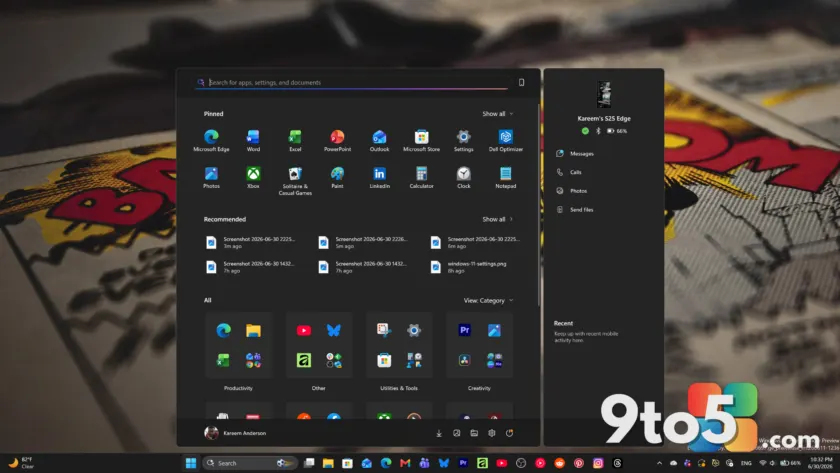
The current iteration addresses long-standing complaints about rigidity. The most noticeable change is a scrollable single-page layout for the “All apps” list, which now includes a category view to help you find programs faster. Additionally, Microsoft has added the ability to hide the “Recommended” section entirely if you prefer a cleaner look.
Under the hood, Microsoft has decoupled various sections like Pinned apps, Recent items, and AI app lists. This modular approach allows the interface to adapt its footprint based on your preferences rather than forcing a fixed grid structure. While this is not yet fully customizable for every element, it marks a shift away from the rigid design philosophy of previous builds.
Enterprise control via JSON and Group Policy
For IT professionals, this update brings significant improvements to fleet management. Microsoft has moved away from older XML-based layout definitions in favor of a more robust JSON configuration format. This change allows administrators to use Group Policy (GPO) or Configuration Service Providers (CSP) to push highly specific Start menu layouts across managed devices.
This is particularly useful for frontline workers, students, or kiosk setups where consistency and restricted access are priorities. Admins can now ensure that the interface matches exact workflow requirements without users accidentally altering critical settings. To apply these policies, administrators should navigate to User Configuration > Administrative Templates > Start Menu and Taskbar in the Local Group Policy Editor (gpedit.msc) and run gpupdate /force to refresh settings immediately.
Bigger changes coming in Windows 11 26H2
The current update is just the beginning. Microsoft has confirmed that more advanced features are currently testing in the Experimental Insider build 26300.8553, released on May 29, 2026. These features are expected to reach general availability with the 26H2 update later this year.
- Resizable Start Menu: Users will be able to choose between “Small” and “Large” presets. The Large option displays more columns of pinned apps, while the Small option offers a compact view suitable for lower-resolution screens.
- Granular Visibility Toggles: Beyond hiding the Recommended section, future updates will allow you to independently hide the Pinned section, the All Apps list, and your account profile picture. This is useful for presentations or screen sharing where privacy matters.
Performance fixes are also on the way
Alongside visual changes, Microsoft is addressing performance issues that have plagued the Start menu since Windows 11’s launch. The Low Latency Profile CPU boost, introduced in optional update KB5089573 in May 2026, prioritizes the Start menu engine to reduce micro-stutters and slow open times. This fix is rolling out widely with the June 2026 Patch Tuesday update.
Looking further ahead, Microsoft has confirmed it is rebuilding the Start menu using native WinUI frameworks. This replaces the current web-based components that have been responsible for sluggishness on lower-end hardware. While no public release date is set for the WinUI rebuild, it was highlighted at Build 2026 as part of a broader effort to improve core Windows performance.
What this means for you: If you’ve been frustrated by the inability to customize your Start menu, today’s update offers some relief with the option to hide recommendations and browse apps more efficiently. However, if you want full control over size and section visibility, you’ll need to wait for the 26H2 update later this year. In the meantime, ensure your system is updated to benefit from the performance boosts already rolling out.
Source: Windows Latest
Over to you: Will you hide the Recommended section in today’s update, or are you waiting for the resizable Start menu in 26H2?