Leaked documents from 2024 have shed light on Project Aion, a secret internal initiative at Microsoft to build a fully functional, platform-agnostic operating system centered entirely around Copilot. Unlike traditional Windows builds, this prototype is not a new kernel but rather a UI shell derived from the Microsoft Edge browser, capable of running atop both Windows 11 and Android (AOSP).
How Project Aion works
The core concept behind Aion is to replace the traditional desktop environment with a web-based interface. The leaked materials confirm that the code reached a functional stage where it could operate as a desktop shell replacement on Windows 11 or run natively on Android Open Source Project (AOSP) builds. There is also mention of a third compatible base called Win3, described in sources as a stripped-down version of the Windows codebase designed to remove legacy bloat for faster boot times, improved battery life, and enhanced security, though at the cost of supporting older applications.
Because Aion is built entirely with web technologies, it does not support legacy Windows executables directly. Instead, it focuses on web apps and websites. If a user requires access to traditional desktop software, the system integrates tightly with Windows 365, allowing users to stream a full Windows Cloud PC experience when needed.

A Copilot-first interface
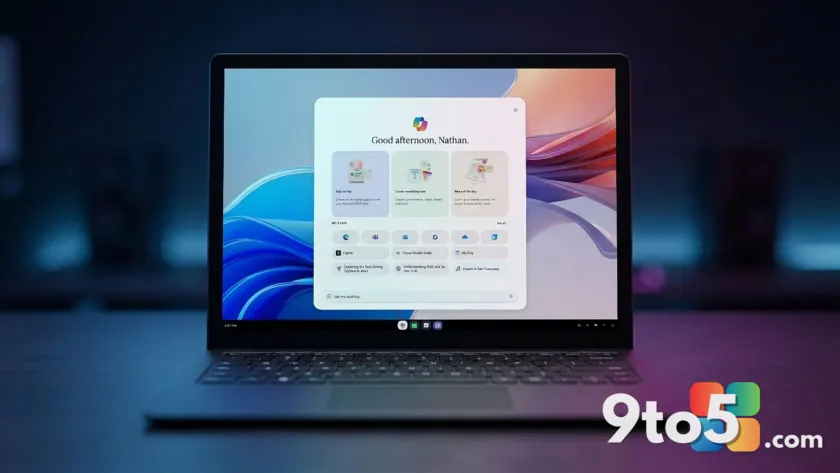
The visual design of Project Aion retains familiar elements like a taskbar and start menu, but reimagines them for an AI-driven workflow. The Start button is replaced by the Copilot icon, serving as the primary hub for launching tasks, browsing the web, or initiating AI chats. This interface features a multi-modal omnibox that allows users to search for files, browse the web, or start complex workflows through natural language commands.
Web applications run in floating windows that behave like native apps—they can be minimized, snapped, and cascaded across the screen. Copilot also introduces a feature called Spaces, which groups recent activities together. These Spaces appear on the taskbar as distinct buckets, highlighted in different colors to indicate that multiple related items are grouped by the AI for quick resumption of work.
Agentic capabilities and context awareness
The defining feature of Project Aion is its deep integration with agentic AI. Because every open window is a web element, Copilot has full context awareness of what you are viewing or working on. This allows the AI to act as an agent that can complete tasks on your behalf without leaving the chat interface.
For example, if you ask Copilot to summarize a webpage and email it to a colleague, the system can draft the email within the chat flow, allowing you to review and send it without switching applications. This seamless integration aims to reduce friction between browsing, working, and communicating.
What this means for you
It remains unclear if Project Aion will ever ship as a consumer product or remain an internal experiment. Microsoft has recently announced Project Solara, another agentic OS initiative that uses a just-in-time UI approach on Windows and Android, suggesting the company may be pivoting its strategy. However, the existence of Aion demonstrates Microsoft’s serious exploration of a future where the desktop is replaced by an intelligent, web-centric shell driven by AI.
For everyday users, this highlights a shift toward cloud-first computing and AI-mediated workflows. While legacy app support remains a hurdle, the ability to resume complex tasks via curated Spaces and have an agent handle routine actions could significantly change how we interact with our devices in the coming years.
Source: Windows Central
Over to you: Would you trust an AI agent to manage your email drafts and file searches automatically, or do you prefer manual control?
You may also like
 Rumor: GTA 6 may hit 60 FPS on Xbox Series S with dual performance modes
 Xbox reportedly pulled funding from Assassin’s Creed creator’s new game
 Cyberpunk 2077: Edgerunners 2 trailer drops, confirms Fall 2026 Netflix release
 Assassin’s Creed Black Flag Resynced: Xbox Series X hits 60 FPS, Series S stuck at 30