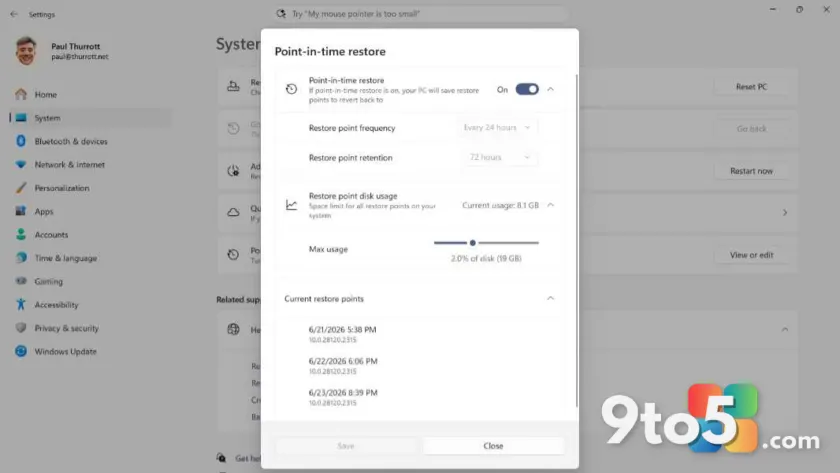
Microsoft has officially declared that Point-in-Time Restore is now generally available for Windows 11 users. This feature serves as a modern replacement for the legacy System Restore tool, allowing you to revert system files and settings to a previous state without affecting your personal data.
What is Point-in-Time Restore?
If you are familiar with older versions of Windows, you likely know System Restore. It creates snapshots of critical system files, drivers, and registry entries. If an update breaks something or a driver causes instability, you can roll back to a point before the issue occurred.
Point-in-Time Restore works on the same principle but is built into the modern Windows recovery stack. It integrates more seamlessly with Windows Update and other system components, aiming to provide a smoother experience than the older tool it replaces.
The “Sort of” Availability
While Microsoft labels this as “generally available,” the rollout is not universal. As noted by industry watchers, access to this feature depends heavily on your specific hardware and current Windows build. Not every device running Windows 11 will see the option immediately.
This staggered approach is common for major system-level features. Microsoft often tests these tools across different channels and device configurations before enabling them for everyone. If you do not see Point-in-Time Restore in your recovery options, it may simply be that your device has not been flagged for the feature yet.
What this means for you
For everyday users, this is a positive step toward more reliable system recovery. Having a robust way to undo bad updates or driver installs reduces the need for full factory resets when things go wrong. Keep an eye on your Windows Update settings and recovery options in case the feature appears on your machine in future builds.
Source: Thurrott
Over to you: Have you ever had to use System Restore on Windows 11, or do you prefer manual backups?