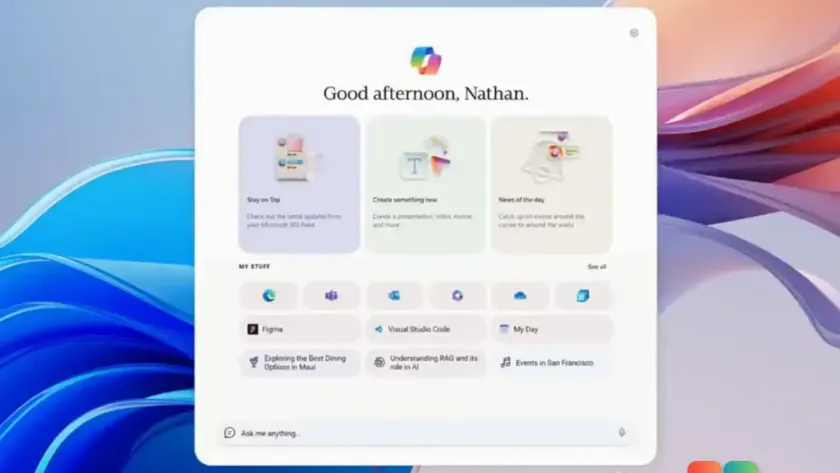
A leaked video has surfaced showing Project Aion, an internal Microsoft prototype that reimagines Windows as a web-based operating system centered entirely around Copilot. According to reports from Windows Central, the footage—verified by sources and believed to be about two years old—shows a radical departure from the traditional Windows desktop.
In this prototype, the familiar Start menu, taskbar, and desktop shell are gone. Instead, Microsoft built the interface on a codebase named Win3, using the Edge browser and Chromium’s layout engine as the core of the operating system experience.
How Project Aion works
The leaked clip demonstrates several distinct features that define this AI-first approach:
- Copilot as the shell: Users interact with the OS primarily through a multi-modal input box where they type commands for Copilot, rather than navigating folders or menus.
- ‘Spaces’ organization: Apps and websites are grouped into AI-managed ‘Spaces.’ Users can open, close, or recall these groups via an interface that loosely resembles a Start menu.
- Rich plugins: Copilot can perform actions across these spaces, such as drafting and sending Outlook emails based on content visible within a specific Space.
Perhaps the most significant change is how legacy software is handled. Because Aion is built on web technologies, it does not natively support Win32 applications. When a user attempts to open a traditional program like Microsoft Word, the system provides a link to a Windows Cloud PC instance. This mirrors Microsoft’s existing Windows 365 service, where legacy apps run in a remote cloud environment rather than locally on the device.

Why this prototype is raising concerns
While Project Aion appears to be an internal experiment or hacking project rather than a shipping product, it has sparked debate among tech enthusiasts. Reddit users and other observers have highlighted several potential issues with a Copilot-centric OS:
- Loss of local control: Relying on cloud instances for legacy apps means core functionality depends heavily on internet connectivity.
- Privacy implications: An AI assistant that can ‘read’ across different Spaces to perform actions raises questions about data handling and privacy.
- Reduced user agency: Replacing direct file and app management with AI-mediated commands could limit how users interact with their own systems.
Microsoft has not commented on the status of Project Aion. It is unclear if the project is still active, has been shelved, or if its concepts have been absorbed into other initiatives. However, recent moves by Microsoft suggest a more cautious approach to AI integration in Windows 11.
The company recently canceled plans to integrate Copilot into notifications and settings following user feedback about feature bloat. Additionally, Edge removed its AI-powered history search after backlash. These decisions indicate that while Microsoft is exploring ‘agentic’ AI features—such as those already appearing in Edge—they are listening to user concerns about forced integration.

What this means for you
For everyday Windows 10 and Windows 11 users, Project Aion has no immediate impact. Microsoft has not announced plans to replace the standard Windows shell with a Copilot-based interface, and the prototype is not available publicly.
If you are concerned about AI integration in your current OS, you can take steps to manage it:
- Disable Copilot: In Windows 11, go to Settings > Personalization > Taskbar to turn off the Copilot button if you do not use it.
- Review privacy settings: Check Settings > Privacy & security to control what data is accessible to AI features.
- Read the terms: Review Microsoft’s Copilot terms of use to understand how your data is handled when using the assistant.
Microsoft continues to offer options for users who prefer traditional workflows, including recent Insider builds that allow for a movable taskbar and dedicated taskbar size settings. While Project Aion shows how far Microsoft was willing to go in redesigning the Windows shell around AI, it remains an internal curiosity rather than a imminent threat to your current desktop experience.
Source: gHacks (via Windows Central)
Over to you: Would you trust an OS that requires cloud access for basic apps like Word, or do you prefer keeping everything local?
You may also like
 Rumor: GTA 6 may hit 60 FPS on Xbox Series S with dual performance modes
 Xbox reportedly pulled funding from Assassin’s Creed creator’s new game
 Cyberpunk 2077: Edgerunners 2 trailer drops, confirms Fall 2026 Netflix release
 Assassin’s Creed Black Flag Resynced: Xbox Series X hits 60 FPS, Series S stuck at 30