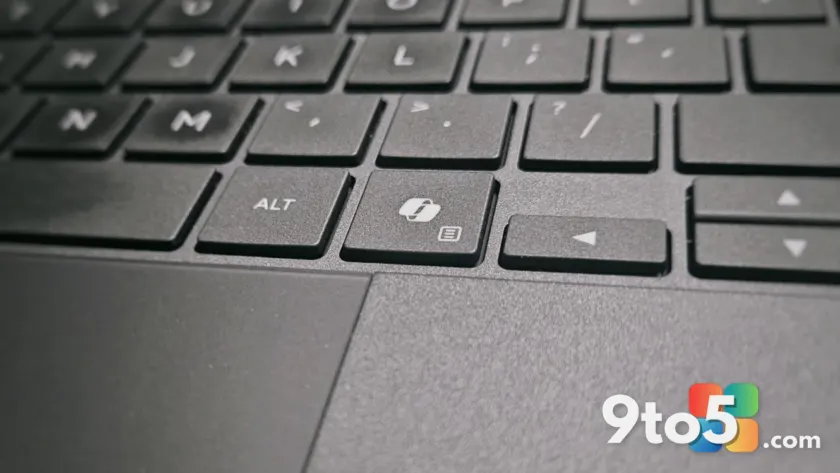
Microsoft is doubling down on marketing for the dedicated Copilot key found on many modern Windows 11 laptops, describing it in a recent social media campaign as having “main character energy.” The timing of this promotional push feels particularly awkward given that Microsoft recently acknowledged the key causes significant disruption to user workflows and has promised an update to allow remapping.
The ‘fix everything’ ad backfires
On June 29, Microsoft published a coordinated post across Facebook, Instagram, and X. The creative featured a text-message style graphic with the line: “Them: There’s no button you can press to fix everything. Me: Wanna bet?” The image zoomed in on the Copilot key, accompanied by the caption describing it as a button with “main character energy” and the hashtag #MicrosoftCopilot.
The reception was not what Microsoft hoped for. Comments sections quickly filled with criticism rather than engagement. Users pointed out the irony of calling the key a solution when many consider it a nuisance. One commenter noted they initially thought the post was a meme mocking Microsoft’s aggressive integration of Copilot, only to realize it was an official brand post.
Criticism ranged from mild annoyance to strong demands for change. Common sentiments included calls to “remove the Copilot button and bring Right Ctrl back,” labels like “most useless button ever,” and jokes about the key breaking workflows rather than fixing them. Some users even suggested alternative AI integrations, such as a “Claude button,” or stated they had already migrated their devices to Linux distributions like Zorin OS to avoid Windows 11’s current direction.

Microsoft admits the key hurts productivity
The promotional campaign clashes directly with Microsoft’s own support documentation released just weeks prior. In mid-June, Microsoft published a statement confirming that the Copilot key causes “disruption to productivity and accessibility workflows.” This specifically impacts users who rely on the Right Ctrl or Context menu keys for keyboard shortcuts and screen reader navigation.
Rather than removing the hardware feature from new devices, Microsoft’s solution is to provide software flexibility. A Windows 11 update planned for later this year will allow users to remap the Copilot key. This functionality will let the button act as Right Ctrl or the Context menu key again, effectively restoring its traditional behavior after years of user backlash.
The contradiction is stark: Microsoft is advertising the key as a magical fix-all while simultaneously rolling out tools that let users turn it into a standard modifier key because the original function was deemed harmful to productivity by the company itself.
A broader reputation problem for Copilot
This incident reflects a larger struggle for Microsoft’s AI ambitions. Throughout 2025 and into 2026, Microsoft integrated Copilot deeply into Edge, Notepad, Paint, File Explorer, Office, and the taskbar. This aggressive approach earned the company the nickname “Microslop” among critics, a label that persisted even as Microsoft attempted to scale back some integrations.
Office users faced similar friction when a floating Copilot button in Word, Excel, and PowerPoint began obstructing active cells and interrupting data entry. After user feedback indicated the feature made people dislike Excel itself, Microsoft allowed users to move the button back to the ribbon. Additionally, Microsoft quietly added Group Policy settings and Registry values that let administrators permanently remove the Copilot app—a contradictory move for a product marketed as essential.
Market adoption remains low. A former Microsoft VP noted that only 3.3% of Microsoft 365 users pay for Copilot services. Meanwhile, OEMs have invested heavily in Neural Processing Units (NPUs) for Copilot+ PCs, yet many users lack compelling use cases to justify the hardware cost. On the web, Copilot holds roughly 1% market share, trailing behind competitors like Google’s Gemini.

What this means for you
If you own a laptop with a dedicated Copilot key, you do not have to keep it as-is. The upcoming Windows 11 update will give you the option to remap the key to Right Ctrl or Context Menu, restoring familiar keyboard shortcuts. Until that update arrives, the key continues to launch the Copilot web app, which runs inside a full Microsoft Edge instance and consumes significant system resources.
For enterprise users, IT administrators can already use Group Policy or Registry edits to disable or remove the Copilot app entirely. For everyday users, the choice remains whether to tolerate the current integration or wait for the remapping feature to restore standard keyboard functionality.
Source: Windows Latest
Over to you: Will you use the upcoming update to remap your Copilot key, or do you find it useful as-is?