Microsoft has shipped a public preview of WSL Containers, a feature that allows Windows 11 users to build, run, and manage Linux containers directly from the command line. This means you no longer need Docker Desktop, Podman, or other third-party runtimes for basic container tasks.
The update introduces wslc.exe, a native command-line tool that mirrors Docker’s syntax, alongside a new API for developers to embed containers into Windows applications. Here is what we found after testing the preview build.
How WSL Containers works
WSL Containers is not a replacement for WSL 2, nor is it a new version of the subsystem itself. Instead, it adds a first-party front door to container management. The feature consists of two main components:
- wslc.exe: A command-line interface added to your system PATH after updating WSL. It uses familiar commands like
wslc run,wslc build, andwslc container list. - WSL Container API: A NuGet package for C, C++, and C# developers. This allows Windows apps to spin up isolated Linux containers in the background without user intervention.
Unlike Docker Desktop, which runs multiple containers inside a single shared virtual machine, WSL Containers creates a separate Hyper-V-backed VM for each container or application using the API. This design prioritizes strict isolation between workloads, making it suitable for enterprise environments where security boundaries are critical.
Installing the preview
To try WSL Containers, you must opt into the pre-release channel of Windows Subsystem for Linux. Here is how to get started:
- Open PowerShell or Windows Terminal as an administrator.
- Run
wsl --update --pre-releaseand wait for the download to complete. - Restart the subsystem with
wsl --shutdown. - Verify installation by running
wslc --version. You should see version 2.9.3.0.
The update typically takes under two minutes. If the command is not recognized, restart your terminal or PC. Note that while you do not need a Copilot+ PC, your CPU must support modern virtualization features enabled in BIOS/UEFI for the Hyper-V isolation to work correctly.
Building and running containers
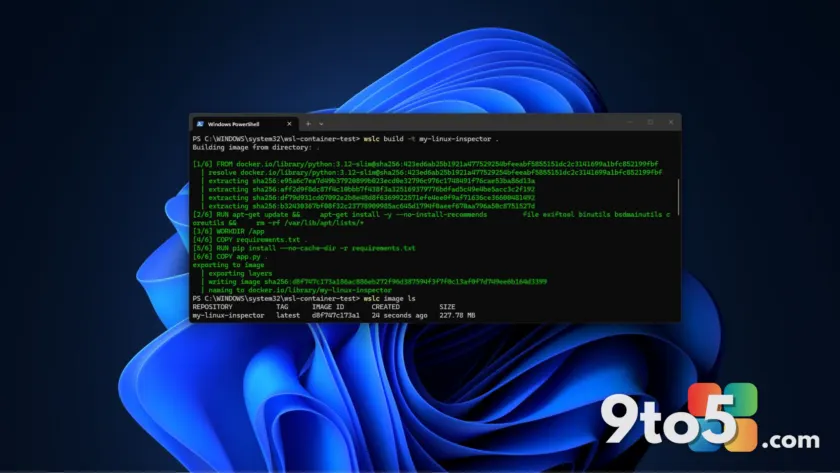
We tested the tool by building a custom image from a Containerfile (similar to a Dockerfile). The process felt familiar to anyone who has used Docker:
- Pull and Run: We pulled a Debian image with
wslc run -it debian:latest. Inside,uname -aconfirmed we were running on a real Linux kernel, not a translation layer. - Build Custom Images: Using
wslc build -t my-linux-inspector ., we packaged a Python-based inspection tool. The build process cached layers effectively, speeding up subsequent builds. - Networking: We exposed a Flask server on port 5000 using
wslc run -d -p 5000:5000 --name inspector my-linux-inspector. The service was immediately accessible via127.0.0.1:5000in a Windows browser without additional network configuration.
The CLI also supports standard operations like listing running containers with wslc ps -a and reattaching to detached sessions with wslc attach [container-name].
GPU support and enterprise features
For developers working with AI or machine learning, GPU passthrough is critical. WSL Containers supports this via the --gpus all flag. In our tests, a PyTorch container successfully accessed the GPU, showing significant performance gains over CPU-only execution.
Microsoft is also targeting IT professionals with several enterprise-ready features:
- Group Policy Control: Admins can restrict which container registries are allowed (e.g., blocking public Docker Hub in favor of internal registries) and control whether users can run distros, containers, or both.
- Defender Integration: Microsoft Defender for Endpoint’s WSL plugin now monitors container events, providing visibility into container activity without extra tooling.
- VS Code Support: The Dev Containers extension (version 0.462.0-pre-release) supports
wslc. You can switch the Docker Path setting towslcto use it seamlessly.
What is missing?
Despite its promise, WSL Containers is not yet a full replacement for Docker Desktop. Key omissions include:
- No Compose Support: There is no equivalent to
docker-compose. Multi-service applications requiring linked databases or caches must be started individually. - No GUI Dashboard: You cannot view container status, logs, or metrics in a visual interface like Docker Desktop provides.
- Limited Ecosystem: Tools like Docker Scout for image scanning are not available. The extensive plugin ecosystem of third-party runtimes is absent.
Microsoft has also introduced experimental networking improvements called Consomme, which routes Linux traffic through the Windows networking stack to fix VPN and proxy compatibility issues. This, along with faster file access via virtiofs, is currently exclusive to WSL Containers but may come to regular WSL distros later.
What this means for you
If you are a developer running simple containers for local testing, databases, or small services, WSL Containers offers a lightweight, native alternative that avoids the overhead and licensing costs of Docker Desktop. However, if your workflow relies on multi-container orchestration via Compose files or requires a graphical dashboard, Docker Desktop remains the more complete solution for now.
Microsoft plans to release WSL Containers generally in fall 2026. Given the familiar CLI syntax and solid performance in our tests, it is worth trying the preview alongside your current setup to prepare for when it becomes the default option.
Source: Windows Latest
Over to you: Will you switch to WSL Containers for your daily development work, or do you rely too heavily on Docker Compose to make the jump?