Microsoft spent the first few years of Windows 11 stripping away long-standing customization features from the Taskbar and Start menu in favor of a simplified, uniform design. That strategy is shifting. According to recent preview builds, Microsoft plans to reintroduce significant control over these core interface elements by 2026.
The changes are part of the broader Windows K2 initiative, which aims to improve performance and usability. Rather than reverting entirely to the Windows 10 experience, Microsoft is rebuilding these features to fit the modern Windows 11 design language while offering users the flexibility they requested.
Taskbar positioning returns
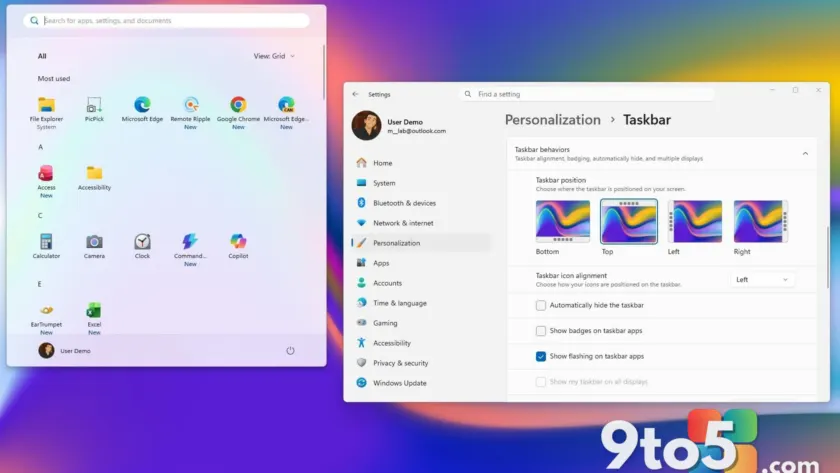
The most requested feature for many power users is the ability to move the Taskbar. In current versions of Windows 11, the bar is locked to the bottom of the screen. Starting in 2026, you will be able to position it at the top, left, or right edge again.
However, the method for changing this has changed. You cannot simply unlock and drag the Taskbar as you could in Windows 10. Instead, you will need to navigate to Settings > Personalization > Taskbar and adjust the position under the “Taskbar behaviors” section.
Taskbar resizing gets an update
Alongside positioning, Taskbar sizing is making a comeback. The existing “Show smaller taskbar buttons” option will be updated. Previously, this setting only reduced the size of the icons while keeping the bar height consistent. The new implementation will shrink both the buttons and the overall Taskbar height.
While this offers more screen real estate, it still does not provide the full manual resizing or multi-row layout options available in Windows 10. It is a step toward flexibility, but with limits.
Start menu customization expands
The Start menu is also receiving substantial updates. Users will gain the ability to choose between different menu sizes and layouts, moving away from the single automatic configuration currently enforced.
New toggles in the Settings app will allow you to show or hide specific sections independently. This means you can remove “Recommended” items without affecting your pinned apps or the “All apps” list. Microsoft is also separating recommendation settings from recent file history and activity tracking, giving you more granular privacy controls.
Privacy options for your profile
Another addition addresses user privacy concerns directly within the Start menu. A new option will let you hide your account name and profile picture from the Start menu interface. This gives users who prefer a cleaner or more private desktop experience another tool to tailor their view.
What this means for you
If you have stuck with Windows 10 or used third-party tools like StartAllBack to restore functionality, these native changes may reduce your need for workarounds. Microsoft is acknowledging that flexibility is a key strength of the Windows platform, even as it maintains its modern aesthetic.
These features are expected to roll out in 2026. Keep an eye on preview builds if you want to test them earlier.
Source: Windows Central
Over to you: Will you use the new Taskbar positioning options, or do you prefer it locked at the bottom?