Microsoft is actively rewriting the foundation of Windows 11, replacing aging interface frameworks with WinUI to cut memory overhead and speed up core operations. The work is real, but the rollout exposes a frustrating pattern: the most meaningful upgrades stay confined to Windows Insiders while the general release still runs on decades-old architectural decisions.
According to Marcus Ash, the corporate vice president of Design and Research on Windows, the engineering hurdles are substantial. Migrating a universal operating system means untangling components that were built for different eras, each with their own dependencies and compatibility requirements. That reality does not erase the core question: why did this work begin now instead of when Windows 11 launched?
WinUI Migration and Performance Gains
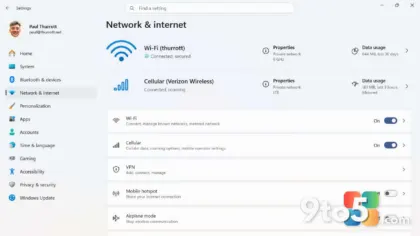
The immediate technical win is straightforward. WinUI 3 replaces older XAML and Win32 host processes with a unified rendering pipeline. That shift reduces the number of background threads Windows 11 must manage, which translates directly to lower RAM consumption and faster UI response times. Microsoft has confirmed that several system settings panels, the Start menu, and the taskbar are already being rebuilt on the new framework.
For users on devices with 8GB of RAM or less, the difference is measurable. Background processes that previously consumed dozens of megabytes each now share a single host, freeing resources for actual applications. The performance ceiling for low-end hardware has been raised without requiring new silicon.

The Enterprise Legacy Problem
Microsoft cannot simply delete old code. Enterprise customers rely on Group Policy templates, legacy registry keys, and older COM interfaces that third-party software still depends on. Removing those components would break workflows for organizations that cannot afford downtime during migration.
That constraint is valid, but it does not require maintaining legacy UI frameworks alongside modern ones. A proper abstraction layer could have allowed old components to run on top of WinUI without forcing every new feature to inherit the same architectural debt. Instead, Windows 11 shipped with a hybrid system where modern and legacy components coexist in the same codebase, creating maintenance overhead that compounds over time.
Why This Should Have Started Earlier
The Windows 11 launch in 2021 introduced a refreshed design language, but the underlying operating system still carried forward components from Windows 7, Windows 8, and even earlier. That decision was understandable at the time, given the need to maintain compatibility. However, treating modernization as a post-launch initiative rather than a launch requirement created a backlog that is now difficult to clear.
User feedback has been consistent for years. Insiders and general users alike reported that certain settings panels felt outdated, that the taskbar behaved inconsistently across resolutions, and that the Start menu lacked the responsiveness expected from a 2020s operating system. Microsoft’s current push addresses those complaints, but it validates the criticism that the initial release was incomplete.
What This Means for You
If you are running Windows 11 on a device with limited RAM, the WinUI migration will likely improve your experience within the next few feature updates. You do not need to take any action right now. The changes roll out automatically through Windows Update as Microsoft completes each component migration.
Enterprise administrators should monitor the upcoming compatibility reports from Microsoft. Legacy Group Policy objects and third-party integrations may require testing against the new WinUI host processes before deployment. Waiting for the general availability of each updated component will prevent unexpected breakage in production environments.
For everyone else, the modernization effort is a positive step, but it does not erase the years of deferred work. The operating system is finally catching up to its original design intent, and that is worth acknowledging. The question remains whether Microsoft will treat future updates as foundational priorities rather than cleanup projects.
Source: Latest from Windows Central
Over to you: Are you noticing the WinUI changes yet, or is your Windows 11 still running on older components?
You may also like
 Windows 11 Weather App RAM Usage Is Five Times Higher Than macOS, And Ads Persist
 Why Uninstalling Windows 11 Apps Might Not Free Up Storage
 Windows 11 UI modernization accelerates: WinUI overhauls coming to File Properties, Autoplay, and more
 Windows 11 26H2 Lands in October 2026: Why You Shouldn’t Skip the Enablement Package