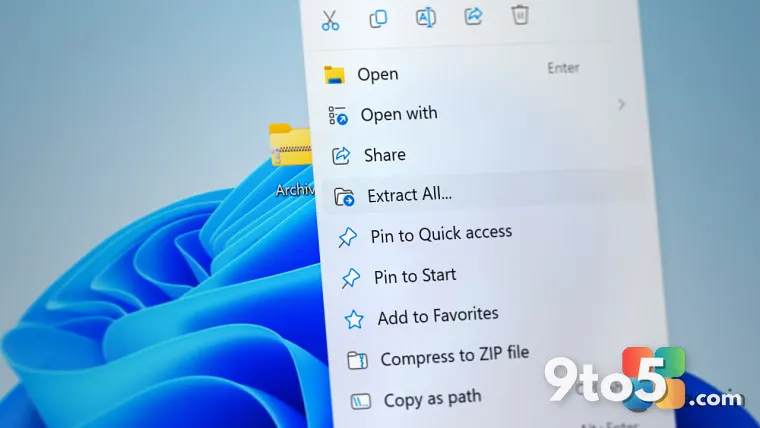
The right-click experience in Windows 11 has been a consistent talking point since the operating system launched, and Microsoft appears ready to address the most common complaints. According to reporting from Neowin, the company is actively developing a new Windows 11 context menu that will be noticeably faster to open and significantly more compact in its layout. The update targets one of the most frequently used touchpoints in the operating system, aiming to streamline how you access file operations, settings, and app-specific commands.
Why Microsoft Is Reworking the Right-Click Experience
The current right-click menu in Windows 11 relies on a hybrid rendering approach. While modern WinUI 3 elements handle the top-level container, many legacy Win32 commands still render through older subsystem code. In practice, that architectural split creates a measurable delay between clicking and the menu becoming interactive, especially on systems with slower storage or heavier startup loads. Microsoft has acknowledged performance bottlenecks in various components over the past two years, and the context menu sits at the top of the list for daily friction.
Beyond raw speed, the visual design has drawn consistent criticism. The default menu expands vertically, pushing frequently used commands like Copy, Paste, and Rename toward the bottom of the list. Users who rely on keyboard navigation or mouse precision often find themselves scrolling through dozens of items to reach the basics. A more compact, vertically condensed layout aligns with Microsoft’s broader push toward space-efficient interfaces across File Explorer, the Start menu, and the Settings app.
What Changes to Expect in the New Windows 11 Context Menu
While Microsoft has not published an official changelog for this specific overhaul, the reported direction points toward two primary adjustments: rendering optimization and layout compression. The speed improvement likely stems from consolidating the WinUI and Win32 rendering pipelines, allowing the menu to draw all commands in a single pass. If that approach mirrors how Microsoft handled the new File Explorer ribbon and the updated taskbar context menus, you can expect the menu to appear almost instantly after the click, with minimal input lag.
The compact design will probably group related commands and reduce padding between items. Based on the reporting, the new layout will surface the most common actions at the top while pushing less frequently used options into a secondary section or a “Show more options” toggle. This mirrors the behavior already implemented in folder-specific right-click menus, where legacy commands are separated from modern WinUI actions. The visual result should be a menu that occupies less screen real estate and reduces the distance your cursor needs to travel.
It is worth noting that any redesign of this nature will likely roll out gradually. Microsoft typically tests interface changes through the Windows Insider program before pushing them to stable builds. Early builds often include placeholder elements, incomplete command mappings, or temporary performance regressions as the team fine-tunes the rendering pipeline. If you encounter missing commands or inconsistent spacing during testing, that is standard for pre-release UI work and does not necessarily reflect the final shipped experience.
What This Means for You
For everyday users, the shift should translate to a noticeably snappier right-click experience. If you frequently work with files, use keyboard shortcuts, or rely on the context menu to launch app-specific tools, the reduced latency and condensed layout will save small amounts of time that add up over a workday. The change also reduces the visual clutter that has frustrated power users since the Windows 11 launch, making it easier to scan for the exact command you need without scrolling past a long list of rarely used options.
For IT administrators managing enterprise deployments, the architectural shift toward a unified rendering pipeline may simplify Group Policy and Intune configuration. When context menus rely on fewer legacy subsystems, policy overrides and custom shell extensions tend to behave more consistently across different folder types and file formats. You will still need to validate third-party shell extensions against the new layout, but the underlying consistency should reduce support tickets related to broken or misaligned right-click commands.
How to Get It
Microsoft has not announced a specific release date or build number for this update. Based on the typical rollout pattern for Windows 11 interface changes, the new context menu will likely debut in a future Windows Insider Preview build before moving to the Release Preview channel and eventually the stable Windows 11 release. If you want to test the change early, you can join the Windows Insider program through Settings > Windows Update > Windows Insider Preview, select the Dev or Beta channel, and check for updates after the next cumulative patch drops.
Until the update reaches your device, you can mitigate the current performance friction by disabling unnecessary shell extensions. Tools like ShellExView or the built-in Context Menu Manager in PowerToys allow you to remove third-party right-click entries that contribute to the rendering delay. This will not replicate the new layout, but it will help the existing menu load faster on systems with heavy extension usage.
Source: Neowin
Over to you: Will you welcome the more compact layout, or do you prefer the current menu’s expanded command list?