- Status: Active
- Affected Areas: Xbox Store, Games, Online Services
- Reported By: Neowin
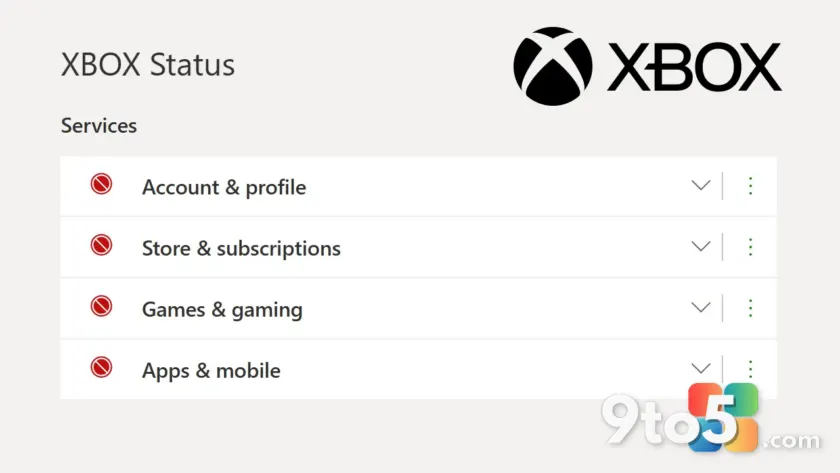
Microsoft’s Xbox ecosystem is currently experiencing a significant Xbox services outage that is disrupting access to the platform’s core features. According to reporting by Neowin, the outage is heavily affecting the Xbox store, games, and other essential services. This widespread disruption means users across Xbox consoles, Windows PCs, and mobile devices may be unable to purchase titles, access their library, or connect to online multiplayer. The scope of the issue points to a platform-wide infrastructure problem rather than an isolated device failure.
The unavailability of the Xbox store prevents users from buying new games, downloading updates, or managing subscription services like Xbox Game Pass. Without store access, players cannot redeem codes or adjust payment methods. Similarly, the impact on games likely hinders the ability to launch titles, sync cloud saves, and access the full library. Even locally installed games may fail to start if they require online verification or cloud authentication. Online multiplayer functionality is also at risk, as connecting to Xbox Live servers is essential for competitive play and social interactions.
The ‘and more’ mentioned in initial reports suggests that peripheral services such as the Xbox app on Windows, streaming features, or authentication servers could also be involved. This level of disruption is relatively rare for Microsoft’s gaming division, which typically maintains high availability. When outages do occur, they often stem from server maintenance issues, unexpected traffic spikes, or underlying network faults. Users experiencing these issues should not immediately assume their accounts are compromised or that their hardware is faulty. Instead, the widespread nature of the report indicates a backend infrastructure challenge.
Understanding the Xbox Services Outage
Microsoft’s gaming infrastructure relies on a complex network of authentication servers, content delivery networks, and cloud databases. When one critical component fails, it can cascade across multiple user-facing applications. During this incident, the simultaneous failure of store and game launch functions suggests that the core identity and authentication systems may be experiencing instability. This means that even if you can open the Xbox app, you might not be able to verify your license or sync your profile. The outage also impacts the Xbox network’s social layer, which handles friend requests, party chat, and activity feeds. Players attempting to join multiplayer sessions will likely be blocked at the matchmaking stage, as the server cannot verify your online status.
What This Means for You
For everyday players, this outage means temporary loss of connectivity to digital purchases and social features. If you are trying to buy a game or join a friend’s session, you will likely encounter error messages or loading failures. Offline gameplay may still be possible for some titles depending on their specific DRM requirements, but any feature requiring an internet connection will be non-functional until the issue is resolved. The interconnected nature of the Xbox ecosystem means that problems in one area can sometimes ripple across Windows and mobile apps as well. Users with active Game Pass subscriptions should note that while the subscription remains valid, accessing the catalog of games will be impossible until the store and library services recover.
How to Check Status and Troubleshoot
While Microsoft works to restore services, you can verify the scope of the disruption by checking the official Xbox status page. This resource provides real-time updates on which services are operational and which are experiencing issues. Following the official Xbox support account on social media is another reliable way to stay informed about progress and estimated resolution times. Once services are restored, restarting your device or clearing the local cache may help ensure a smooth reconnection to the network. It is also advisable to avoid repeatedly attempting to access the store, as this can sometimes trigger additional error prompts or temporary account locks. If you experience persistent issues after the outage is resolved, contacting Xbox Support with your error codes will help them diagnose any lingering account or license verification problems.
Historically, Microsoft’s engineering teams prioritize rapid restoration of gaming services to minimize user impact. While the timeline for this specific outage remains unclear, past incidents of similar scale have typically been resolved within a few hours. The situation serves as a reminder of the heavy reliance on cloud-based services in modern gaming. Until the fix is deployed, players may need to rely on offline modes or alternative entertainment options. Microsoft usually issues a follow-up statement once stability is fully restored, confirming that all systems are back to normal operations.
Source: Neowin
Over to you: Are you currently unable to access the Xbox store or play online due to this outage?
You may also like
 Open Secure AI Alliance Launched by Nvidia, Microsoft, and Tech Giants to Boost AI Safety
 S.T.A.L.K.E.R. 2 DLC Release Date Confirmed: Cost of Hope Arrives August 2026
 Microsoft Expands Xbox Backward Compatibility, Console Sales Surge 86%, and More
 Xbox Live Outage Hits Multiple Services: What We Know So Far