Microsoft has openly acknowledged that Windows 11’s native applications and the underlying WinUI framework are consuming more memory than they should. In a recent developer-focused update, the company outlined a comprehensive optimization push aimed at tightening RAM usage and improving responsiveness before rolling out a rewritten Start menu and other core shell components. The announcement, detailed by Windows UI engineer Chris Anderson, signals a clear shift in priority: stabilize the foundation before expanding the feature set.
Why WinUI Needs a Performance Tune-Up
For years, Windows 11 has relied on WinUI to power its built-in experiences, from the Start menu to the notification center’s Agenda view. While the framework was designed to provide a modern, consistent look across the operating system, it has consistently drawn criticism for its resource footprint. Anderson confirmed that Microsoft is now prioritizing memory management and overall stability across the framework. This internal push was first hinted at during Build 2026, where developers were shown early performance improvements tied directly to WinUI. The company is now moving those optimizations from experimental branches into broader testing, acknowledging that framework overhead can directly impact how sluggish Windows feels on everyday hardware.
Memory Optimization and the System Compositor Shift
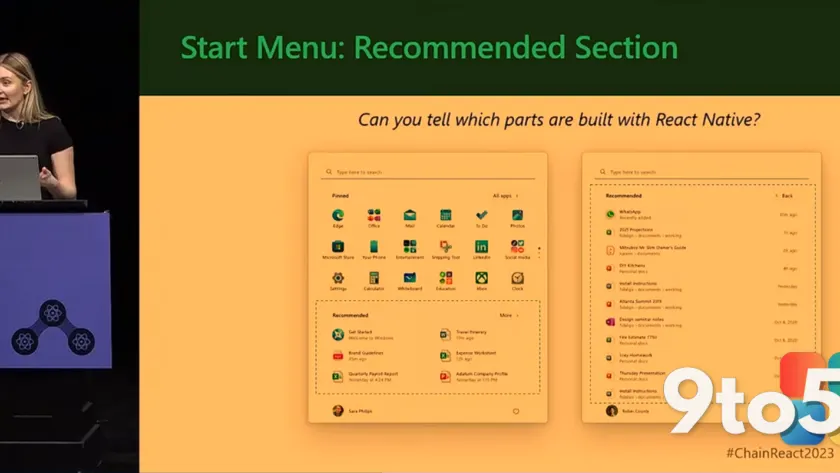
One of the most technical but impactful changes involves migrating WinUI to the Windows system compositor. By routing rendering through a unified compositor, Microsoft expects to reduce overhead and deliver smoother interactions for both the operating system and third-party applications built on the framework. Anderson noted that these performance, fundamentals, and quality adjustments are already available in Microsoft’s public Git repository for developers to test. Internally, the company is running extensive memory, performance, and reliability tests before tying these improvements to the upcoming Start menu overhaul. The visual design of the Start menu will remain largely unchanged, but users on lower-end hardware should notice fewer stutters and a lighter overall memory footprint. In practice, this means background processes tied to WinUI will release resources faster, leaving more headroom for your actual workloads.
New DataGrid and Charting Controls for Enterprise
Beyond performance, Microsoft is tackling a major barrier to WinUI adoption: missing enterprise-grade components. Anderson revealed that built-in DataGrid and Charting controls are currently in development and will ship as part of the core WinUI distribution. These additions aim to reduce developer dependency on third-party libraries for common data visualization tasks. The strategic goal is clear. If enterprise developers can build complex business applications using only native WinUI tools, Microsoft can justify further investment in the framework. More legacy applications would eventually migrate to the native codebase, strengthening Windows 11’s overall ecosystem. Microsoft did clarify, however, that adopting these new controls will not automatically reduce an application’s RAM usage, keeping the focus strictly on developer convenience and framework completeness.
Drop the Version Number and Address Feature Gaps
Perhaps the most telling signal of Microsoft’s long-term commitment came when Anderson announced that the company is dropping the version number from the framework’s name. WinUI 3 will simply be called WinUI moving forward. This branding shift comes after years of developer skepticism about whether Microsoft would abandon the framework for something new. Anderson explicitly stated there are no plans to introduce a competing UI platform. Alongside the rebranding, Microsoft is acknowledging a backlog of missing capabilities that have historically pushed developers toward open-source alternatives. Issues like incomplete system tray support and limited window management options are being addressed, with the new DataGrid and Charting controls serving as the first wave of fixes. According to Microsoft’s developer documentation, the framework is now treated as a continuous platform rather than a versioned product, which should simplify long-term support and patch management.
What This Means for You
If you are running Windows 11 on a budget or mid-range PC, the memory optimizations should translate to a noticeably smoother daily experience. Applications that rely on WinUI will consume less background RAM, leaving more resources available for your actual workloads. The rewritten Start menu will feel more responsive without forcing you to adapt to a redesigned interface. For developers, the built-in DataGrid and Charting controls will streamline enterprise app development, while the framework rebranding should ease concerns about long-term support. Microsoft is clearly signaling that WinUI is here to stay, and the coming updates will focus on making it production-ready rather than just conceptually modern.
How to Get It
The memory and compositor improvements are currently being tested internally ahead of the Start menu rollout. Microsoft has published the early performance patches in its public Git repository, allowing developers and enthusiasts to apply them manually. For the average Windows 11 user, these optimizations will arrive through a standard Windows Update once they pass internal reliability checks. Keep an eye on the Windows Insider Program for early access, as performance-focused builds typically move through the Dev and Beta channels before reaching the Stable release. Admins managing enterprise fleets should monitor the upcoming Windows Update for Business (WUfB) announcements, since framework-level changes often require coordinated deployment schedules to avoid unexpected resource shifts across managed devices.
Source: Windows Latest
Over to you: Will you stick with your current Windows 11 setup, or are you waiting for the WinUI memory optimizations to land in the Stable channel?