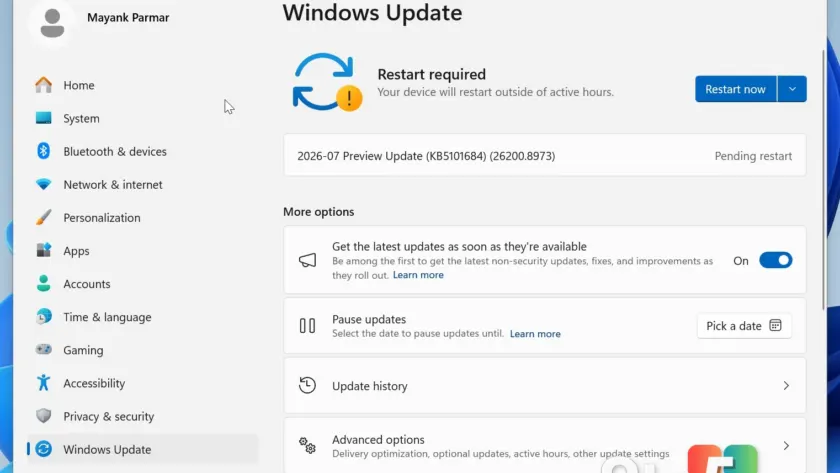
Windows 11 KB5101684 is now rolling out as an optional update, delivering a suite of quality improvements with a particular focus on performance. This release, internally classified as a ‘D’ update due to its timing in the final week of the month, brings long-awaited enhancements to Windows Search and overall system responsiveness. Unlike previous major releases, this optional patch is not packed with groundbreaking new features but instead refines the experience for everyday users.
The update is available via Windows Update but will only download when you manually tap the ‘Download’ button, unless you have enabled the ‘Get the latest updates…’ toggle. Microsoft has previously warned that this toggle can force-install optional and out-of-band updates, so users preferring control over their update schedule should be aware of this behavior. For those who prefer offline installation, Microsoft has also published direct download links for the .msu files.
What’s New in Windows 11 KB5101684?
Based on the details released, the update targets several core areas of the operating system. In practice, this means you will notice smoother interactions across the board, from search results to file management. Below is a breakdown of the key changes included in this release.
#1 Smarter Windows Search
Windows Search is receiving a significant upgrade, part of the broader ‘K2’ improvements Microsoft has been working on. While this does not yet include the ability to disable Bing results entirely, it brings much-needed intelligence to how you find apps and settings. The most notable addition is improved support for typos, allowing you to locate settings even if you misspell them.
For example, typing ‘xetting’ will now correctly guide you to the Settings app, and ‘otlook’ will open Outlook. This addresses a common frustration where minor spelling errors would previously yield no results. Additionally, the search index now better reflects the Settings hierarchy. Searching for ‘Bluetooth audio’ will now surface the exact audio page rather than a jumble of unrelated Bluetooth and audio options, making navigation significantly more intuitive.
#2 File Explorer Improvements
File Explorer gets several quality-of-life enhancements in this update. One of the most practical changes is the introduction of appropriate units for file sizes in the Details view. Previously, large files were often displayed in kilobytes, which could be confusing when dealing with gigabyte-sized content. Now, files will correctly display in MB or GB depending on their size, providing a clearer picture of your storage usage at a glance.
Power users will appreciate the ability to open a folder in a new tab by middle-clicking it, a feature previously reserved for web browsers. This streamlines navigation and reduces the need to constantly open new windows. Microsoft has also addressed visual glitches, removing the unusual gray flash that occurred when scrolling on the ‘Home’ tab or loading File Explorer in dark mode. Thumbnails in the ‘Recommended’ section have also been improved for better clarity.
#3 Reliability Fixes for Start Menu and Taskbar
Stability is a major focus of this release, particularly for the Start menu and explorer.exe. Microsoft has patched a bug where the Start menu would fail to remember customizations, such as preferred views and pinned apps, reverting them to default settings upon restart. Your preferences should now persist as expected.
Performance on low-end hardware has also been addressed. The Start menu no longer stutters on less powerful PCs, and the overall experience feels smoother. For explorer.exe, improvements are noticeable when using Task View and switching between multiple desktops, with reduced lag and lower memory consumption. Jump lists are now more reliable and less prone to closing unexpectedly, and the ‘recent files’ list in File Explorer is more stable. Additionally, the Windows sign-in process is less buggy, and the lock screen no longer impacts performance on systems with limited memory.
How to Get Windows 11 KB5101684
To install this update, open Settings > Windows Update and click the Download & Install button when the update appears. If Windows Update fails to install the patch, you can use the Microsoft Update Catalog to download the offline installer directly.
The update is available for both Windows 11 25H2 and 24H2. Below are the specific build numbers and file sizes:
| Build Number | Size | OS Version | Architecture |
|---|---|---|---|
| 26200.8973 | 5423.6 MB | Windows 11 25H2 | x64-based |
| 26200.8973 | 5423.6 MB | Windows 11 25H2 | arm64-based |
| 26100.8973 | 4835.9 MB | Windows 11 24H2 | x64-based |
| 26100.8973 | 4835.9 MB | Windows 11 24H2 | arm64-based |
For direct download links, visit the Microsoft Update Catalog and search for KB5101684.
What This Means for You
For most users, this optional update is a worthwhile install. The improvements to Windows Search and File Explorer address long-standing usability issues, while the reliability fixes should result in a smoother experience, especially on older hardware. If you have been waiting for a reason to update, the performance gains and typo-tolerant search make this a compelling choice. However, if you are currently stable and not experiencing the issues mentioned, there is no urgent need to rush, as this is an optional release.
Source: Windows Latest
Build details:
- Build 26100.8973
- Build 26200.8973
Over to you: Are you planning to install KB5101684 for the search improvements, or will you wait for the next cumulative update?
You may also like
 Microsoft Rolls Out Major Excel Copilot Updates in July 2026
 Nvidia 610.88 Driver Drops With Optimized Support for Halo: Campaign Evolved and Gears E-Day
 Windows 11 August 2026 Patch Tuesday: Top Changes and New Features
 Windows 11 In-Box App Updates Roll Out to Insiders for Calculator, Clock, Media Player, and Notepad