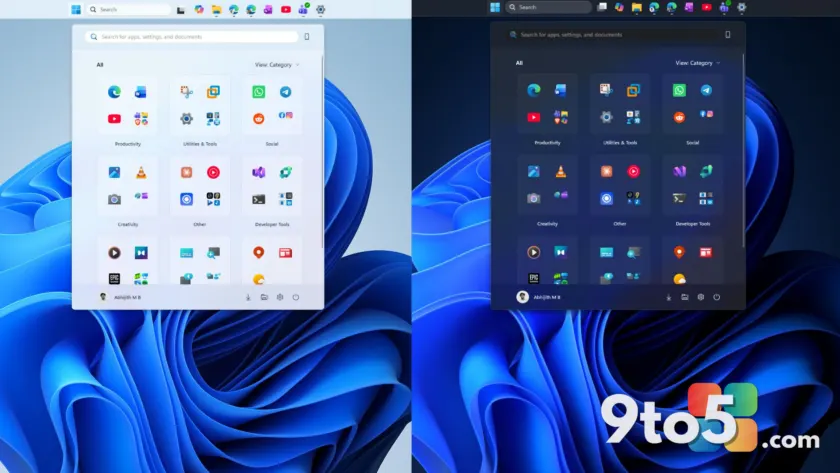
Windows 11’s latest Experimental Insider builds contain strings and a dedicated system file that point to a long-requested feature: automatic dark mode. If this ships, you could schedule Windows to switch between light and dark themes on a set timeline without reaching for PowerToys or a third-party utility.
What’s hiding in the experimental builds
Windows enthusiast phantomofearth first spotted the evidence, noting that recent Experimental 26xxx Insider builds include various strings for an auto dark mode feature. The strings let you set a sunset-to-sunrise schedule or fixed hours, and even have the mode only change when the PC is idle.
According to Windows Latest, the strings found in the builds read as follows:
- “Schedule auto mode”
- “Mode only changes when PC is idle”
- “This prevents the mode from changing while you’re working or in meetings”
- “Turn on location services to automatically schedule dark mode. When location services are turned off, dark mode is active from [START] to [END].”
There’s also a dedicated file named Windows.Shell.AutoDarkMode.dll sitting in System32, which strengthens the case that Microsoft is genuinely building this. But a file in System32 doesn’t prove the feature is finished testing, and phantomofearth confirmed the feature IDs to actually enable the feature aren’t yet available in Insider builds.
In other words, this is real development work, but it’s still early. Treat it as a feature in progress rather than something you can turn on today.
How Windows 11’s automatic dark mode would work
The “sunset to sunrise” option would use location services to calculate when the sun goes down and comes back up where you live, much like how Windows Night light already lets you schedule brightness changes on the same schedule.
If you keep location services turned off, the feature would fall back to fixed start and end hours instead. So you could still set dark mode to kick in at 7 PM and switch back at 7 AM without giving Windows your location at all.
The most interesting string is “Mode only changes when PC is idle.” This is designed to stop the theme from flipping in the middle of whatever you’re doing. Microsoft isn’t tracking your calendar or meetings here — more likely, a scheduled transition that lands while you’re actively using the PC gets held back until the machine goes idle. That would keep your screen from suddenly flipping from white to black mid-presentation or during a video call.
Third-party apps already do this
Windows 11 already supports Light, Dark, and Custom modes under Settings > Personalization > Colors, with Custom letting you set the Windows UI and apps independently. What it never had was a built-in way to schedule those changes by time.
That gap has been filled by tools Microsoft itself ships. PowerToys’ Light Switch feature can already schedule dark mode, offering three options — Sunset to Sunrise, Fixed hours, and Follow Night Light — plus a choice of applying the dark theme to system UI, apps, or both.
There’s also the open-source Auto Dark Mode utility, which adds extra conditions like pausing switches during gaming. Microsoft is essentially bringing to Windows natively what power users have been installing for years.
When Light Switch shipped, we noted that automatic theme switching was already one of the most requested Windows features and may eventually arrive natively. These experimental strings suggest that’s finally happening.
Part of a bigger dark-mode overhaul
This scheduling feature is arriving amid a larger cleanup of Windows 11’s dark mode. It’s become a running joke that Windows 11’s dark mode still has older Win32 dialogs that flash bright white when you accidentally open them at night.
Microsoft made its first push to fix legacy file-operation dialogs in 2025, covering copy, move, and delete prompts. That change briefly caused a white-flash bug before Microsoft patched it.
Since then, Microsoft confirmed a larger overhaul instead of simply painting old dialogs dark. The Windows 95-era Properties dialog is being rebuilt in native WinUI 3 with dark mode support, part of a broader effort to bring more of Windows’ UI to WinUI 3 rather than patching legacy code piece by piece. AutoPlay is next in line, with dark mode built in from the start.
The dark theme itself dates back to Windows 10, which introduced the modern dark theme with the 2016 Anniversary Update. Automatic scheduling was never part of it, which is what makes this native scheduling feel so long overdue.
What This Means for You
For most users, this means very little today — the feature isn’t available and there’s no confirmed date. But if you’ve been using PowerToys Light Switch or the Auto Dark Mode utility to keep your screen from blasting you with white at midnight, you can expect these native options to eventually match or exceed what those tools offer.
The “only change when idle” behavior is the standout addition. If you regularly present, take calls, or share your screen, having the theme hold its transition until you’re idle is a genuinely thoughtful touch that most scheduling tools don’t offer.
It’s also worth noting that macOS already does this natively, including waiting for the Mac to go idle before switching. Microsoft is several years behind here, but at least it’s arriving.
How to Get It
Right now, there’s nothing to install. The evidence comes only from strings and a file in Experimental 26xxx Insider builds, and the enable feature IDs aren’t live yet.
If you want dark mode scheduling today, PowerToys Light Switch remains the official route. Otherwise, keep an eye on the Windows Insider channel — this feature would likely roll out to broader Experimental or Beta builds before reaching stable Windows 11.
Source: Windows Latest
Over to you: Would you use the ‘only change when idle’ option to avoid mid-presentation theme flips, or would you prefer instant scheduled switches?
You may also like
 Windows 11 Release Preview Gets Emoji 17.0 and File Explorer Changes
 Windows 11’s last Secure Boot deadline is weeks away — here’s what you must do
 Windows 11’s Bizarre LinkedIn Shortcut, Explained (and Why You Can’t Turn It Off)
 Microsoft is polishing Windows 11 Family Safety to make parental controls more reliable