Every year, chip and laptop manufacturers rely on the same comparison playbook: take the newest processor and run it against a device that is roughly five years old. The formula works because generational leaps in silicon almost always translate to faster numbers on paper. But when you start factoring in the current cost of hardware and the reality of how most people actually use a computer, the math behind a standard PC upgrade cycle starts to look very different.
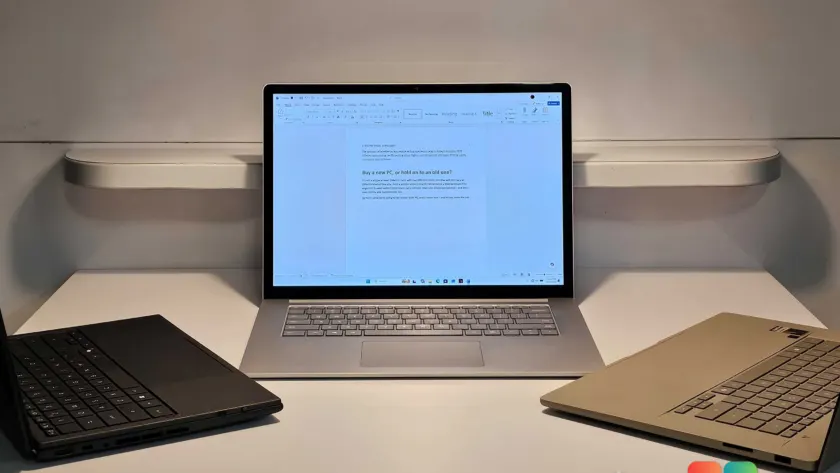
To find out whether the performance gap justifies the price tag, I ran a seven-year-old Microsoft Surface Laptop 3 against two 2026 flagships: the Asus ZenBook (UX3607OA) powered by a Snapdragon X2 Elite Extreme processor running Windows on Arm, and the Asus ZenBook Duo equipped with a top-tier Intel Core Ultra 300 (Panther Lake) chip. The goal was not to sell you new hardware or convince you to keep an aging machine. The goal was to measure exactly what you gain, what you lose, and where the real tradeoffs sit in 2026.
The Surface Laptop 3 in question runs a stock installation of Windows 11 24H2 (build 26100.8328). It ships with an Intel Core i7 processor from the Ice Lake generation, 16GB of RAM, a 256GB NVMe SSD, and a 45Wh lithium-polymer battery. The modern competitors represent the current state of Windows computing, featuring advanced power management, dedicated neural processing units, and significantly larger battery cells. Here is what the data actually shows when you put these machines side by side.
Boot Times and the SSD Reality
The first test was cold boot time. We have moved well past spinning hard drives, so boot speed is now a direct reflection of SSD controller efficiency, firmware initialization, and how many services Windows starts before handing control to the user. To keep the test fair, I disabled every startup application except the ones that ship with the device, leaving Microsoft Defender, Edge, OneDrive, and Teams enabled. I also turned off third-party VPN clients and ran five consecutive cold boots, measuring the time from power press to a responsive Windows desktop with Windows Hello login complete.
The results went in the exact opposite direction of what most people expect. The 2019 Surface Laptop 3 booted roughly ten seconds faster than the modern Asus devices. The older machine went from a complete power-off to a usable desktop with startling speed. Only the Microsoft Surface Laptop Studio 2 came close, though its average was skewed by occasional outliers that pushed past forty seconds.
This is not a fluke. It is the result of how Windows 11 handles modern hardware initialization. Newer platforms run through more complex power delivery sequences, initialize additional I/O controllers, and load drivers for features like Wi-Fi 7, Thunderbolt 5, and advanced power states. Meanwhile, the Ice Lake platform in the Surface Laptop 3 has a much simpler initialization path. If you care about the moment you press the power button and reach your desktop, an older machine with a healthy SSD will often beat a brand-new one.
That said, boot time is only the opening act. A faster desktop does not automatically mean a faster computer for sustained workloads. The real question is how those machines handle the tasks you actually run every day.
Everyday Performance and Browser Efficiency
I spent several days using all three laptops for actual work: writing, switching between applications, managing files, and browsing. Subjectively, the Surface Laptop 3 felt slightly slower when navigating between apps and launching programs, but the difference was nowhere near the stuttery, unusable lag you would see on a machine that is truly struggling. The 16GB RAM configuration kept everything in memory, which is the minimum I would ever recommend for modern Windows.
The hidden constraint on older machines is rarely raw processing power. It is storage capacity. The 256GB SSD on the Surface Laptop 3 left almost no breathing room after a clean Windows installation. When I attempted to reset the machine by downloading a fresh copy of Windows 11, the drive was already nearly full from cached files and local media. If you are keeping an older laptop, checking free storage and running a disk cleanup is a mandatory maintenance step.
Browser performance is where the generational gap becomes measurable. Modern websites run complex APIs, heavy JavaScript frameworks, and dynamic content that older silicon was never designed to parse at scale. Using the Speedometer and MotionMark benchmarks, which simulate real-world web interactions like social media feeds and graphic rendering, the new laptops processed those workloads roughly twice as efficiently as the Surface Laptop 3. Subjectively, the older machine handled thirty tabs without crashing, but you could feel the delay when switching between heavily loaded pages.
Office Workloads and the Cumulative Delay
For professional tasks, I turned to UL’s PCMark and Procyon benchmarks, which measure actual time spent on Word, Excel, and PowerPoint operations. The Surface Laptop 3 averaged a score of 3,696 in the Office Productivity benchmark. The Asus ZenBook Duo with the Intel Core Ultra 300 processor scored 7,296, and the Snapdragon X2 Elite Extreme ZenBook reached 7,824. The gap is substantial, but the individual task times tell a more practical story.
Adding a watermark in Word took 0.9 seconds on the older laptop versus 0.36 seconds on the new machine. Inserting an image took 2 seconds compared to under 1 second. Exporting a PDF took 26 seconds versus 11 seconds. Formatting a complex Excel table took nearly 3 seconds on the Surface Laptop 3, compared to 0.4 seconds on the Snapdragon device. Copying and pasting large datasets actually took 4 seconds on the older machine versus 7 seconds on one of the newer configurations, which highlights how different workloads interact with varying architectures.
These numbers might look small in isolation, but they accumulate. If you export PDFs, format spreadsheets, or manage large documents daily, those seconds add up to minutes over the course of a week. For casual users who only open Office a few times a day, the difference is negligible. For power users, it is the clearest indicator that an older machine is working harder to complete the same tasks.
Graphics, AI Tasks, and the Modern Divide
I kept graphics and gaming out of the primary comparison, since this test focuses on productivity. But the gap in integrated graphics performance is too large to ignore. In UL’s 3DMark Time Spy benchmark, the Surface Laptop 3 scored 990. The Asus ZenBook Duo with the Intel Core Ultra 300 processor scored 7,666. Even a 2024 Asus Vivobook S14 managed 4,209. If you do any photo editing, video rendering, or light creative work, modern silicon is not just faster. It is in a completely different category.
The Essentials benchmark, which simulates a heavy workday, also highlights where newer hardware pulls ahead. The test runs a video call while keeping thirty browser tabs open, then measures how quickly the system handles file compression, CRM navigation, and AI summarization. Navigating an online CRM took 5.75 seconds on the older laptop versus 1.2 seconds on the new machines. Summarizing a chat using built-in AI features took 69 seconds on the Surface Laptop 3, compared to 15 to 18 seconds on the devices with dedicated neural processing units. Decompressing a ZIP file was roughly five times faster on the newer hardware.
These are not abstract benchmarks. They reflect the shift in how Windows 11 handles modern workloads. The older Ice Lake processor relies entirely on traditional CPU cores, while the newer platforms leverage hybrid architectures and dedicated AI accelerators. If your workflow includes AI tools, heavy multitasking, or cloud-based applications, the generational divide is no longer a question of speed. It is a question of capability.
Battery Life: The One Area Where Age Really Shows
There is one category where modern laptops hold a decisive advantage, and it has nothing to do with processing power. Battery capacity has grown significantly because manufacturers can now pack more cells into the same chassis dimensions. The Asus ZenBook Duo contains a 99Wh battery, which sits at the maximum allowed on U.S. commercial flights. It lasted 22 hours and 15 minutes in a standard video playback test. The Snapdragon ZenBook ran for 578 minutes, roughly 9.6 hours, under a stricter office workload test.
The Surface Laptop 3 originally shipped with a 45Wh battery. According to Windows system reports, that battery has already completed 70 charge cycles. Lithium-polymer cells degrade with use, and that degradation is measurable. The current full-charge capacity sits at 36.7Wh, an 18 percent loss. That drops the real-world battery life to an estimated 8 hours and 12 minutes. It is still usable, but it will not carry you through a full workday without a charger.
That said, the ecosystem around portable power has evolved. Power banks, airplane power outlets, and conference center charging stations are now standard. The battery gap matters less if you have reliable access to power, but it still matters if you work remotely, travel frequently, or attend long meetings without guaranteed outlets.
What This Means for You
The data makes one thing clear: a seven-year-old Windows laptop is not obsolete. It is simply operating in a different performance tier. If your daily routine consists of web browsing, email, video calls, and light Office work, the Surface Laptop 3 handles those tasks without breaking a sweat. The boot time is fast, the display remains sharp, and the keyboard is still comfortable. You are not losing productivity by keeping it.
Where the older machine falls short is in sustained workloads, AI acceleration, and battery longevity. If you regularly export large files, run complex spreadsheets, use AI features, or work away from a power source for extended periods, the newer hardware is not just an upgrade. It is a necessity. The difference between 26 seconds and 11 seconds for a PDF export might seem minor, but it compounds across hundreds of tasks per year.
For IT administrators managing a fleet, this is also a useful data point. Device refresh cycles do not need to be dictated by manufacturer marketing. A well-maintained machine with adequate RAM and a healthy SSD can easily serve business users for seven years if the workload does not demand modern silicon. Battery replacement or storage upgrades can extend that timeline even further.
How to Decide Whether to Upgrade
If you are weighing a purchase right now, start with three questions. First, does your current laptop handle your daily applications without constant frustration? Second, does the battery last through your typical workday? Third, do you use AI features, heavy creative software, or cloud-based tools that rely on modern accelerators?
If the answer to all three is yes, you can safely keep your current machine. Run a disk cleanup, check your battery health in Windows Settings, and consider adding an external SSD if storage is tight. If the answer to any of those is no, a new laptop will deliver a measurable improvement in both speed and endurance. The modern Snapdragon and Intel Core Ultra 300 platforms are not just faster. They are built for the way Windows 11 operates in 2026.
The technology industry will always push you toward the next generation. FOMO is real, and marketing departments are well funded. But the reality is that a seven-year-old Windows laptop is still a fully capable productivity machine for most users. The upgrade cycle is no longer a fixed timeline. It is a decision based on your actual workload, your battery health, and your tolerance for cumulative delays. Measure those factors, and the right choice becomes obvious.
Source: PCWorld
Over to you: What is the oldest Windows laptop you currently use as your daily driver, and what finally pushed you to consider an upgrade?
You may also like
 AMD Ryzen Chipset Driver Update: 8.05.01.516 Now Available for Windows 11 and 10
 Microsoft Plans Major Windows 11 Context Menu Overhaul for Speed and Customization
 Microsoft Releases Windows 11 KB5101684 Preview Update With 42 Fixes
 Outlook Classic Copilot Gets a Ribbon Button and Compose Box Integration