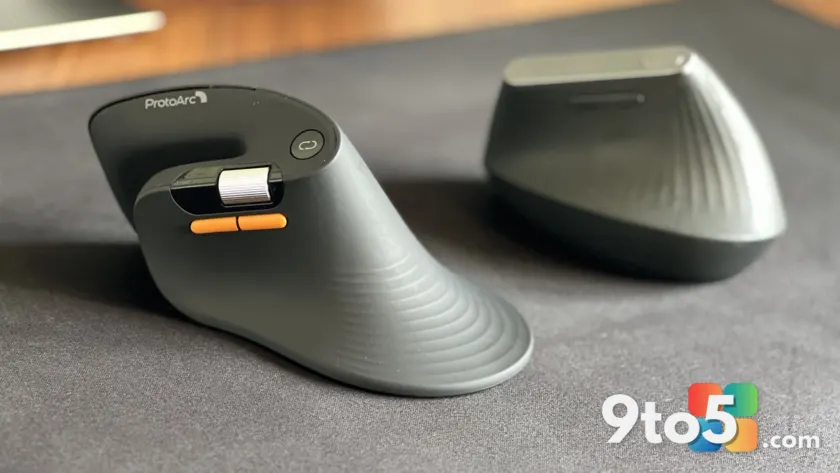
For years, the Logitech MX Vertical has been the default recommendation for anyone looking to reduce wrist strain while working at a computer. But a newer, budget-friendly option from ProtoArc is forcing a conversation about what actually makes an ergonomic mouse effective. According to a recent hands-on evaluation by Windows Central, the ProtoArc EM11 Pro exposes specific design gaps in Logitech’s long-running flagship while proving that premium features no longer require a premium price tag.
The comparison isn’t entirely apples to apples. The MX Vertical sits in the high-end category with a proven track record, while the ProtoArc EM11 Pro targets value-conscious buyers. Still, both are angled mice designed to keep your forearm in a handshake position. Using the ProtoArc side by side with the Logitech model highlights exactly where the industry has been resting on its laurels.
The Design Gap: Palm Fit vs. Button Reach
Logitech’s MX Vertical has always prioritized a flat, flush front profile. That design keeps the mouse body aligned against your palm as your hand contours around it. The tradeoff, however, is a noticeable gap between your fingertips and the primary buttons. Over long work sessions, that gap can force your fingers to stretch slightly, which defeats part of the ergonomic purpose.
The ProtoArc EM11 Pro takes the opposite approach. It features an elongated base that tapers downward at a sharper angle. While this means the mouse doesn’t sit completely flush against the palm, the curved front panel brings the buttons closer to your natural resting position. The result is a more secure grip behind the clickers, even if the overall silhouette feels less uniform.
Neither design is flawless. The ideal mouse would merge the MX Vertical’s palm-hugging contour with the ProtoArc’s button-forward curvature. Until manufacturers bridge that gap, your preference will likely come down to hand size and how you naturally rest your fingers.
Dual Scroll Wheels Change Spreadsheet Navigation
Perhaps the most immediately useful feature on the ProtoArc EM11 Pro is the second scroll wheel. Located on the left side, it handles horizontal scrolling without requiring you to hold down the Shift key or fight with trackpad gestures. For anyone who spends hours in Excel, Google Sheets, or wide-angle photo editors, this single addition fundamentally changes the workflow.
Horizontal scrolling is one of those features that feels redundant until you actually use it. Once you get used to a dedicated wheel for lateral movement, going back to a single scroll wheel feels like an unnecessary friction point. It also reduces hand movement, which is a core principle of ergonomic design. Less reaching means less fatigue over time.
Silent Switches for Shared Workspaces
Acoustic feedback in computer peripherals has become a major talking point in recent years, and the ProtoArc EM11 Pro leans heavily into the quiet side of the spectrum. The left-click and right-click buttons operate almost completely silently, a stark contrast to the audible, tactile clicks of the MX Vertical.
If you work from a home office, the noise level might not matter. But for open-plan offices, co-working spaces, or shared desks, silent switches are a practical necessity. You can work through a full day without disturbing anyone nearby, and the reduced tactile feedback also means less physical impact on your fingertips during rapid clicking.
What This Means for You
Ergonomic mice are notoriously personal. A design that completely eliminates pain for one user might feel awkward for another. The ProtoArc EM11 Pro proves that budget peripherals are finally catching up to flagship models in terms of thoughtful feature integration. If you primarily work with spreadsheets, share a workspace, or simply want a quieter clicking experience, the ProtoArc delivers genuine value.
However, the MX Vertical still holds an edge in overall palm comfort and natural hand alignment. The ProtoArc’s flared base can encourage your hand to rotate slightly more than ideal, and the curved front may require a brief adjustment period. If you have smaller hands or prefer a neutral wrist angle, the Logitech model remains the safer default.
How to Get It
The ProtoArc EM11 Pro is available through major online retailers at a fraction of the cost of the MX Vertical. It connects via a wireless USB dongle or Bluetooth, giving you flexibility depending on your available ports. The Logitech MX Vertical remains available through the same channels, backed by Logitech’s longer warranty and software ecosystem for customization.
Neither mouse requires a subscription to unlock core functionality. If you are currently experiencing wrist discomfort or simply want to modernize your desk setup, testing a budget ergonomic mouse first is a low-risk way to see if the angled design actually suits your workflow.
Source: Latest from Windows Central
Over to you: Are dual scroll wheels a must-have for spreadsheet work, or do you prefer keeping your setup simpler?
You may also like
 Tears of Metal Is the Roguelike Hack-and-Slash That Saved My Gaming Soul
 Halo: Campaign Evolved Review: A 25-Year-Old Classic Gets a Modern Makeover and Third-Person Camera
 ASUS ExpertBook Ultra Review: A Near-Perfect Business Laptop Held Back by Price
 Razer Seiren V3 Chroma Review: 32-Bit DSP Brings Broadcast Clarity to RGB Mics