For years, the corporate laptop category has been synonymous with compromise. Buyers are handed a plastic chassis, a dim display, and a keyboard that feels like an afterthought, all wrapped in a design language that screams “expense account.” I have never been particularly drawn to business machines for this exact reason. They actively drag down the reputation of the broader Windows laptop ecosystem. However, after spending a month with the new ASUS ExpertBook Ultra, I am forced to reconsider that stance. This is the first ASUS ExpertBook Ultra review that has genuinely surprised me, proving that enterprise-grade hardware can actually be exciting to use.
ASUS has clearly aimed this machine at executives and power users who refuse to sacrifice aesthetics for durability. The result is a device that feels more at home on a high-end consumer flagship than in a boardroom. It features a magnesium-aluminum alloy chassis, a stunning 3K Tandem OLED panel, and Intel’s latest Core Ultra X processor. But excitement alone does not make a purchase recommendation. When the starting price sits at $3,599.99, buyers need to understand exactly what they are getting and whether the premium is justified. Let us break down the design, performance, display, and real-world implications of this ambitious machine.
Design and Build Quality
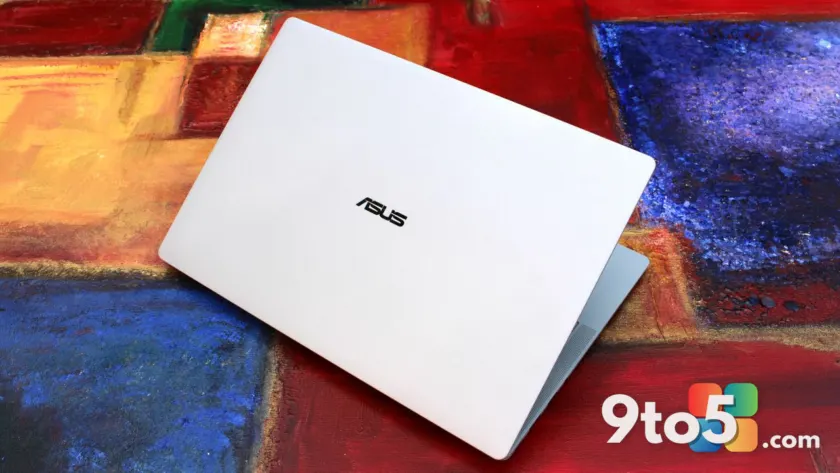
The first thing you notice when picking up the ExpertBook Ultra is how impossibly light it is. ASUS lists the weight at just 0.99 kg (2.18 lbs), and it genuinely feels that way. You can maneuver it with one hand, and it vanishes into almost any backpack without demanding attention. The thickness measures a razor-thin 10.9 mm, a figure that usually requires sacrificing ports or cooling capacity. ASUS managed to keep both intact, which speaks to the engineering precision behind the chassis.
The build material is where ASUS differentiates itself from competitors like Dell and HP. Instead of standard aluminum or carbon fiber, ASUS uses an aviation-inspired magnesium-aluminum alloy treated with what they call Nano Ceramic Technology. This gives the lid and palm rest a distinct, silky matte texture. It is not just a visual choice; the finish provides excellent grip, resists fingerprints, and claims 9H durability against scratches. In practice, this means the laptop ages gracefully. Smudges wipe away easily, and the surface does not show the wear patterns that plague glossy black devices after a few weeks of daily use.
One of the more unexpected design choices is the ExpertLumi lighting system. A thin light bar sits just below the display bezel and illuminates whenever the laptop boots, wakes from sleep, or shuts down. It provides a soft ambient glow that signals the device’s status without requiring you to look at the screen. ASUS allows you to disable this feature, but doing so feels counterintuitive. It is subtle enough to avoid distraction in a meeting room, yet it adds a layer of personality to a device category that desperately needs it. It is a small detail, but it is exactly the kind of thoughtful touch that separates a corporate tool from a personal device.
The 14-inch display is the centerpiece of the visual experience. ASUS equipped it with a 3K Tandem OLED touchscreen that supports a variable refresh rate from 30 to 120 Hz. Tandem OLED technology stacks two OLED panels to double the brightness while cutting power consumption. The result is a peak HDR brightness of 1400 nits, which makes the screen highly visible even in bright office environments or near windows. Color accuracy hits 100% DCI-P3 and 100% sRGB, ensuring content looks consistent across creative and professional workflows.
To protect the panel, ASUS applied Corning Gorilla Glass Victus with a matte anti-reflective coating. This combination significantly reduces glare, making the ExpertBook Ultra one of the best laptops for outdoor use or brightly lit spaces. The trade-off is a slight softening of text and image edges compared to glossy displays. It is not a dealbreaker, but users accustomed to the razor-sharp clarity of glass-covered OLEDs may notice the difference. ASUS should ideally offer a glossy variant for those who prioritize pure pixel definition over anti-reflective performance.
Input devices are where the ExpertBook Ultra truly shines. The trackpad is a 110 cm² glass haptic unit with six force sensors. It is tuned to feel natural, with precise actuation points that mimic a physical click without the mechanical noise. The trackpad extends to the very edge of the chassis, which doubles as a convenient finger rest when opening the lid. Typing on the backlit, smudge-resistant keyboard is equally satisfying. Keys offer a quiet yet tactile response, making long writing sessions comfortable. The lid also opens with one hand, a minor convenience that signals attention to detail.
Port selection is comprehensive for a device this thin. You get two Thunderbolt 4 Type-C ports supporting 40Gbps data and DisplayPort output, a USB 3.2 Gen 2 Type-A port, a full-sized HDMI 2.1 TMDS port, and a 3.5mm audio combo jack. The absence of an Ethernet port might disappoint some IT professionals, but WiFi 7 with Laser Direct Structuring (LDS) antenna ensures wireless speeds will likely outpace older wired connections in most office environments. Security features include a discrete TPM 2.0, Microsoft Pluton, Secured-core PC certification, and NIST SP 800-193 compliant ASUS ExpertGuardian hardware.
Performance and Battery Life
Under the hood, the review unit is powered by an Intel Core Ultra X7 358H processor, 32GB of LPDDR5x RAM, and an Intel Arc B390 GPU. This configuration targets productivity, multitasking, and light creative work rather than heavy gaming or 3D rendering. The Intel Core Ultra X series represents a shift in Intel’s mobile strategy, focusing on sustained performance and efficiency rather than raw clock speed spikes. For business users running dozens of browser tabs, streaming 4K video, compiling code, or executing local AI tasks, this chip delivers consistent responsiveness without thermal throttling.
ASUS equipped the ExpertBook Ultra with the ExpertCool Pro cooling system, which allows the CPU to boost up to 50W TDP in Turbo mode. In balanced mode, the system stays remarkably quiet, operating under 28 dB. This acoustic profile is critical for open-plan offices and conference rooms. You will not hear the fans ramp up during video calls or presentations, which maintains professionalism and reduces listener fatigue. The 50 TOPS NPU handles local AI workloads efficiently, offloading tasks from the main CPU and extending battery life during AI-assisted workflows.
The Intel Arc B390 GPU deserves special mention. It is not a dedicated graphics card, but it balances efficiency with surprising graphical capability. At 1080p medium settings, it can handle older titles and lighter modern games without breaking a sweat. However, judging this laptop by gaming standards misses the point. It is engineered for productivity, and the GPU allocation reflects that priority. Creative professionals will find it adequate for light photo editing and video export, but heavy 4K timeline scrubbing or GPU-accelerated effects will still benefit from a dedicated workstation.
Battery life is where the ExpertBook Ultra justifies its premium positioning. ASUS claims up to 26 hours of battery life, and real-world testing aligns closely with that figure for standard productivity tasks. Light usage, involving document editing, email, and web browsing, yields 18 to 20 hours. A heavy workday with video conferencing, multiple applications, and moderate brightness still comfortably clears 12 to 14 hours. This means leaving the charger at home is entirely feasible for most professionals. Fast charging via USB PD 3.0 restores 50% capacity in approximately 30 minutes, which is useful for quick top-ups between meetings.
The 6-speaker audio system, featuring two dual-magnetic woofers and two tweeters with AI noise cancellation, rounds out the multimedia experience. Video calls come through with crisp audio, and the microphone effectively isolates your voice from background noise. For a business laptop, the audio setup is above average, reducing the need for external headsets during casual calls or media consumption.
What This Means for You
The ASUS ExpertBook Ultra review highlights a device that successfully bridges the gap between enterprise durability and consumer-grade luxury. For IT managers and procurement officers, this machine addresses a growing demand: executives and knowledge workers who refuse to carry boring, utilitarian devices. The magnesium-aluminum alloy chassis, NIST-compliant security, and long battery life make it a viable replacement for aging Dell Latitude or HP EliteBook fleets. The 50 TOPS NPU also future-proofs the device for Windows 11 and 12 AI features, which will increasingly rely on local processing.
For individual buyers, the decision hinges entirely on budget. At $3,599.99, the ExpertBook Ultra sits in a highly competitive space. Laptops from Lenovo, Dell, and Apple offer similar premium builds and displays at lower price points. The ASUS premium is paid for the Nano Ceramic finish, the ExpertLumi system, and the specific tuning of the input devices. If those features resonate with you, the device delivers a cohesive, high-quality experience. If you prioritize raw specs per dollar, you will find better value elsewhere.
The matte display coating is another personal preference factor. While it excels at reducing glare, it softens text clarity compared to glossy OLED panels. Users who spend hours reading documents or coding may prefer a glossy option. ASUS should consider offering both variants in future SKUs to accommodate different visual preferences without forcing a compromise.
From a practical standpoint, the loose hinge issue reported on early units is worth noting. ASUS confirmed it was a pre-production defect and has resolved it in retail units. If you purchase one, verify the hinge tension before accepting delivery. A properly tensioned hinge should hold the lid at any angle without sliding down. This is a minor quality control point, but it matters for a device at this price tier.
How to Get It
The ASUS ExpertBook Ultra is available now directly from ASUS at $3,599.99 for the configured model reviewed here. It comes in black and light-gray colorways, with the light-gray finish offering the best contrast against the Nano Ceramic texture. Third-party retailers like Best Buy may occasionally stock the device, which can provide access to corporate discounts or seasonal promotions.
Given the current component shortage driving up prices across the laptop market, ASUS has not lowered the MSRP. However, waiting for sales events such as Black Friday, back-to-school promotions, or corporate clearance cycles can reduce the cost significantly. If you can secure the ExpertBook Ultra for under $2,500, it becomes a much stronger recommendation. At that price point, the premium materials, display quality, and performance justify the investment for professionals who value build quality and portability.
For enterprise buyers, ASUS likely offers volume pricing and extended warranty options through their business sales channel. Contacting ASUS Enterprise directly can unlock discounts that are not visible on the consumer storefront. Additionally, checking for educational or professional discounts may provide modest savings. The device ships with Windows 11 Pro preinstalled, which includes the security and management features required for most corporate environments.
Ultimately, the ASUS ExpertBook Ultra proves that business laptops do not have to be boring. It delivers a near-perfect blend of durability, display excellence, and portability. The only barrier is the price. If your budget allows, or if you can catch it on sale, this is one of the best thin-and-light Windows laptops available today.
Source: Latest from Windows Central
Over to you: Would you pay over $3,500 for a business laptop, or does that budget belong in the enterprise procurement category?