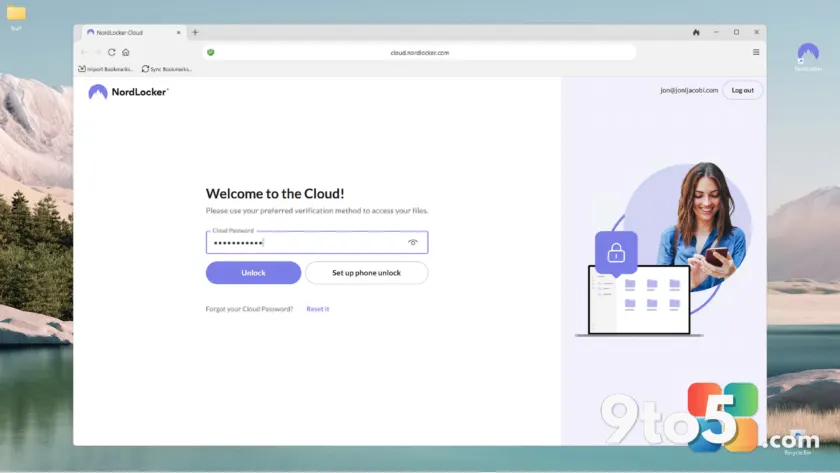
Cloud storage services constantly chase a balance between convenience and security, but NordLocker has always leaned heavily toward the latter. In this updated NordLocker review, we examine how a recent infrastructure overhaul has shifted the platform from a niche encrypted vault into a more conventional sync service, while keeping its zero-knowledge security model intact. The changes are substantial, the pricing remains competitive, and the encryption defaults are still stricter than almost any competitor in the consumer space. If you prioritize data protection over collaborative features, this platform deserves a closer look.
The Latest Overhaul and Interface Changes
The most visible shift in this release is the abandonment of NordLocker’s original locker system. Previously, users had to manually create encrypted containers before storing anything, a workflow that felt cumbersome and unintuitive for anyone accustomed to mainstream cloud platforms. That architecture has been replaced with a free-form, virtual file and folder interface that mirrors the behavior of OneDrive, Dropbox, and Google Drive. The change aligns NordLocker with industry standards, reducing the learning curve for new users while preserving the underlying encryption layer.
On Windows, the desktop client now mounts a virtual drive that behaves like a standard folder. Files dragged from the same physical drive are moved rather than copied, while items pulled from external or secondary drives are duplicated into the NordLocker directory. Inside that folder, a right-click menu lets you toggle whether a file stays locally cached or exists in the cloud only. Small status icons appear beside each filename, indicating whether the item is synced, secured, uploading, or available online. Double-clicking an online-only file triggers an immediate download so you can edit it locally.
The browser interface remains fully functional and has been refined for smoother navigation. However, the macOS desktop client has been removed from the current release cycle. NordLocker has indicated that a new macOS build is in development, but until then, Mac users must rely on the web interface. The company notes that the browser experience is fully featured, though it lacks the background sync capabilities of a native client. For users who already prefer web-based access, this limitation is unlikely to matter.
Beneath the interface changes lies a completely rebuilt sync engine. NordLocker has switched to a journaling architecture, where file system changes are logged sequentially before being pushed to the cloud. According to internal benchmarks, this approach delivers roughly a tenfold improvement in multi-file transfer speeds. The shift also reduces the overhead of tracking individual file states, which should stabilize performance during large batch operations. While the previous engine was already reliable, the new journaling system addresses long-standing complaints about sync latency when handling thousands of files.
Security Architecture and Encryption Defaults
Security remains the core differentiator, and NordLocker continues to enforce a strict dual-password requirement. Unlike services that offer optional two-key protection, NordLocker makes it mandatory. During initial setup, you must define both an account login password and a separate storage encryption password. The encryption key never leaves your device, meaning NordLocker operates under a true zero-knowledge model. Even if a server breach occurred, the stored data would remain unintelligible without that secondary key.
One notable departure from earlier versions is the removal of local file encryption within the NordLocker folder. The company explains that modern Windows systems now encrypt drives by default through BitLocker, making redundant local encryption unnecessary for most users. While that rationale holds weight for enterprise-managed devices, it overlooks the fact that BitLocker is optional on consumer hardware. Users on unencrypted systems should note that NordLocker no longer provides an additional layer of at-rest protection on the local drive itself.
Recovery options have been handled thoughtfully. NordLocker provides a downloadable recovery key during setup, which can restore access if you forget the storage encryption password. This is a meaningful advantage over services that lock users out entirely after credential loss. The key should be stored offline in a secure location, such as a hardware wallet or encrypted external drive, since losing it means permanent data loss. The web interface also disables browser auto-fill for the secondary password, forcing manual entry to prevent keyloggers from capturing it.
Auto-lock functionality allows you to define a timeout period after which the application requires re-authentication. This is particularly useful for shared workstations or laptops that travel frequently. The Android and iOS clients now support both light and dark themes, and both platforms use the device browser to authenticate with the account. This design choice is intended to prevent credential caching within the app itself, though it requires users to set Chrome as their default browser on Android for reliable operation.
Sync Performance and Cross-Platform Experience
Performance testing across multiple upload scenarios shows a marked improvement over previous iterations. Initial syncs complete faster than most competitors, and the browser interface handles bulk uploads with noticeable efficiency. The journaling engine appears to reduce the lag between local changes and cloud availability, which is critical for users who switch between devices throughout the day. While I did not encounter the large-file bottlenecks some users reported in earlier builds, those running heavy sync workloads should monitor the new engine during extended transfers.
Mobile clients have been updated with practical improvements. The Android app now supports multi-select photo uploads, which streamlines backup workflows for users who rely on their phones for documentation. Both iOS and Android apps remain stable and responsive, though the reliance on the system browser for authentication can feel slightly fragmented. Screen capture restrictions on Android prevent users from sharing interface screenshots, a security measure that occasionally frustrates those trying to document troubleshooting steps.
File sharing has been tightened with the addition of security codes and custom expiration dates for shared links. This gives users finer control over how long recipients can access files, which is valuable for temporary collaborations. Preview capabilities remain limited to static formats like PDFs, Word documents, and common image types. Audio and video playback are not supported in the browser, and text file previews are conspicuously absent. These limitations are consistent with NordLocker’s positioning as a storage platform rather than a document collaboration suite.
One persistent gap in the feature set is the absence of version history and a recycle bin. If you delete a file from a two-way sync folder, it is permanently removed from all connected devices. NordLocker has acknowledged this limitation and indicated that versioning is in development, but no timeline has been provided. For users who frequently overwrite or accidentally delete files, this remains a significant workflow risk. Pairing NordLocker with a dedicated backup solution that includes versioning is strongly recommended for critical data.
What This Means for You
The interface overhaul and sync engine rebuild make NordLocker considerably more approachable without compromising its security foundation. If your primary goal is to store sensitive files with minimal exposure to third-party access, this platform delivers a robust zero-knowledge environment at a competitive price point. The mandatory dual-password system and recovery key provide a solid safety net, while the auto-lock and browser-based authentication reduce the attack surface on mobile devices.
However, the missing version history and recycle bin make NordLocker less suitable as a sole storage solution for users who rely on file recovery or collaborative editing. It functions best as a secure vault for documents, archives, and media you want protected from cloud providers and potential breaches. Pairing it with a traditional backup service that offers versioning will cover the gaps left by NordLocker’s streamlined design.
From a practical standpoint, Windows users will find the virtual folder integration seamless, though those on unencrypted drives should be aware that local data no longer receives redundant protection. Mac users will need to wait for the native client or adapt to the web interface. Mobile users will appreciate the improved upload workflows, even if the browser-based authentication adds an extra step to the login process.
How to Get It and Pricing Breakdown
NordLocker offers a free tier that provides 3GB of encrypted storage, which is sufficient for testing the platform or backing up a small collection of documents. For users who need more capacity, the monthly plans are priced at $8 for 500GB and $20 for 2TB. Annual subscriptions provide a significant upfront discount, dropping the 500GB plan to $35.88 and the 2TB plan to $83.88 for the first year. After the initial term, renewal rates increase to $83.88 and $179.88 respectively, which aligns with industry averages for encrypted cloud storage.
The pricing structure rewards long-term commitment, but users should calculate the renewal cost before committing to the annual tier. If you prefer flexibility over savings, the monthly options avoid lock-in while remaining reasonably priced for the security features included. NordLocker does not offer a family or team tier in the current lineup, which keeps the platform focused on individual users and small-scale personal backups.
To get started, visit the official NordLocker website and create an account using your preferred email address. During setup, you will be prompted to generate both the account password and the storage encryption key. Download the recovery key immediately and store it in a secure offline location. Once configured, install the Windows, Android, or iOS client and begin syncing files through the virtual folder or mobile upload interface. The browser version requires no installation and works across all operating systems.
For users who prioritize encryption defaults and are willing to work around the absence of versioning, NordLocker remains a compelling option in a crowded cloud storage market. The recent overhaul has smoothed out friction points while keeping security non-negotiable. As long as you understand the trade-offs between convenience and control, this platform delivers exactly what it promises: obsessively secure, delightfully affordable cloud storage.
Source: PCWorld
Over to you: Will the mandatory dual-password setup and missing version history make you stick with NordLocker, or are you trading it for a more flexible alternative?
You may also like
 ProtoArc EM11 Pro Review: What a Budget Ergonomic Mouse Teaches the MX Vertical
 Tears of Metal Is the Roguelike Hack-and-Slash That Saved My Gaming Soul
 Halo: Campaign Evolved Review: A 25-Year-Old Classic Gets a Modern Makeover and Third-Person Camera
 ASUS ExpertBook Ultra Review: A Near-Perfect Business Laptop Held Back by Price