Microsoft is laying out a broader family-safety strategy for Windows, headlined by a new Windows Age API that lets apps and services determine a user’s age group without exposing sensitive personal data. This is the first in a series of posts on the topic, and it signals where Microsoft wants age-appropriate protections to travel over the coming months.
The core idea is straightforward: safety should be built into the platform rather than bolted on app by app, and it should start with the account a child uses. Microsoft frames the goal as making safety easier for families to understand and easier for developers to build in.
From account to safer experiences
Every experience on Windows begins with identity, and for consumers that foundation is the Microsoft account (MSA). Microsoft says the account lets the operating system understand key context about a user in a consistent, privacy-conscious way:
- Whether the user is a child, teen, or adult
- Whether parental controls or consent apply
- Whether age verification has been completed
That produces a simple model Microsoft describes as User account → age signal → age-appropriate experience and controls.
Because the foundation is tied to the account rather than a single feature, protections are meant to follow the user across Windows and apps. In practice, that means a child’s account should unlock safer, more age-appropriate experiences wherever they use the system, rather than requiring parents to reconfigure settings inside each individual app. Microsoft notes this work ties into a wider push to improve Windows quality, referencing Pavan’s earlier update on the commitment made in March, and says it will “build in the open” by shipping capabilities, listening to families, and refining as it learns.
The Windows Age API explained
The centerpiece of the announcement is the Windows Age API, a new platform capability that extends age awareness beyond the operating system into the broader Windows ecosystem. The goal is to let apps and services deliver age-appropriate experiences using the same trusted account foundation, rather than shifting the burden onto families to manage protections in every app.
The API offers three functions:
- GetUserAgeRangeAsync: Returns non-personally identifiable age-group categories so apps can tailor experiences while protecting date-of-birth data. Available groupings are under 10, 10-12, 13-15, 16-17, and 18+.
- GetAgeVerificationStatusAsync: Provides verified age status for scenarios where self-reported age isn’t sufficient.
- CheckAgeStatusAsync: Extends the legacy CheckUserAgeConsentGroupAsync API, offering child, minor, or adult classification globally and as defined by regional policies.
Microsoft emphasizes that these signals are privacy-protective. Apps receive only the age-related signal they need, not sensitive data like a full date of birth. Users retain control through consent and platform-level settings, and age information is handled at the platform level to reduce unnecessary sharing and fragmentation. The approach is also aimed at emerging experiences such as AI, where age-appropriate safeguards are becoming harder to skip. Developer guidance is available at aka.ms/windows-age-api.
Microsoft Age Verification: verify once, use everywhere
Understanding a user’s age range is often not enough — certain experiences need high confidence that a user is an adult. To support that, Microsoft is expanding age assurance through the Microsoft account using Microsoft Age Verification (MAV), a centralized platform that lets users verify their age once and reuse that status across Microsoft experiences.
Developers can access this verified status through the Windows Age APIs. Age verification is currently available in Microsoft Storefronts in Singapore, Brazil, and Australia, with Microsoft saying it will add support for more geographies and product scenarios as regulatory requirements grow. The model is summarized as Verify once → use everywhere: verified status is stored with the Microsoft account and can be used across Windows and apps, reducing friction while improving safety.

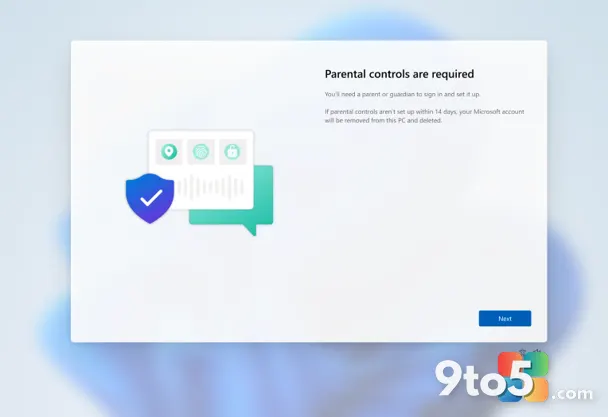
Parental controls made clearer during setup
Microsoft is also improving how parental controls are surfaced during device setup, so families can understand available protections and make informed choices from the start.
In regions including France and others, Windows is raising the visibility of parental controls and consent experiences during setup. The intent is to increase awareness of what’s available and enable parents to apply protections early, rather than discovering them later. This is a regional change, not a global one, so whether you see it depends on where you live.
Family Safety improvements
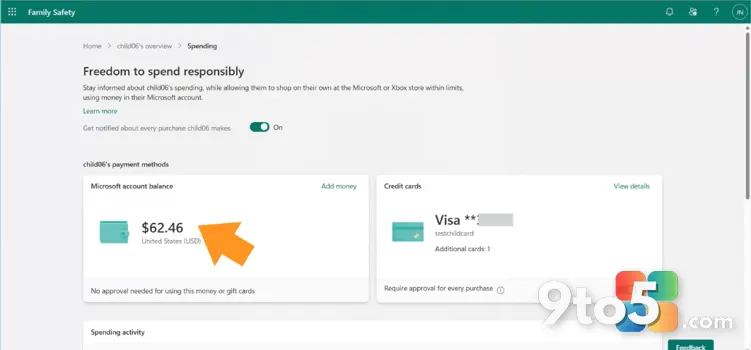
Family Safety is built into Windows, letting parents set up a child’s device and manage screen time, apps, and content in one place. Over the past six months, Microsoft says it has focused on making everyday features more dependable — faster parental approvals, clearer activity reporting, and broader control. Those improvements and upcoming changes are detailed in a companion post, “Listening to families. Improving Microsoft Family.”
What This Means for You
For parents, the practical takeaway is that protections should increasingly come preconfigured for a child’s account, reducing the need to hunt through settings in every app your kid uses. For teens and adults, the change is mostly invisible: you’ll continue to get experiences matched to your age without extra setup.
For developers, the Windows Age API offers a standardized, privacy-preserving way to tailor content and features without storing sensitive personal data. The biggest shift is that age-appropriate safeguards can be built in from the start rather than added as an afterthought, and the same account foundation should make those safeguards more consistent across apps.
How to Get It
The Windows Age APIs are broadly available to Windows Insiders now and will roll out to all Windows users soon. The CheckAgeStatusAsync API will arrive with a future update, so developers targeting that classification should plan accordingly.
Age verification via Microsoft Age Verification is live in Singapore, Brazil, and Australia, with broader regional support expected as requirements expand. Parents wanting to explore current controls can look at Family Safety settings and the companion Microsoft Family post for what is already available today.
Source: Windows Blog
Over to you: As a parent, would you prefer age protections preconfigured on a child’s account, or the current model where you configure them per app?
You may also like
 Microsoft Family Safety Rolls Out Faster Approvals and Better Activity Reports
 Microsoft Edge Extension Reviews Get Faster, Featured Badge Refreshes More Often
 Windows Phone nostalgia: 5 things fans still miss years after its demise
 Switzerland Tests Alternatives to Microsoft 365 in Government Migration Pilot