Microsoft has officially confirmed the end of an era for one of its most recognizable collaborative tools. The company has detailed the Whiteboard retirement timeline, giving users and organizations a clear window to transition their work before the service is permanently shut down. This announcement brings clarity to a long-standing question for teams who relied on the digital canvas for brainstorming and project planning.
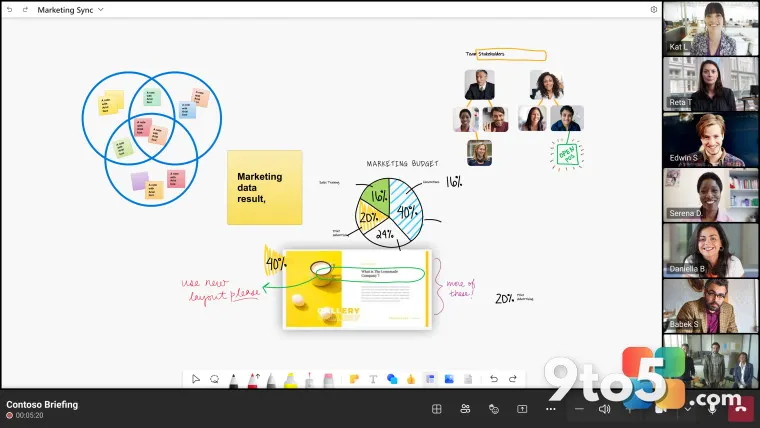
Whiteboard, originally launched as a standalone app and later integrated into Microsoft Teams, has been a staple for visual collaboration. However, shifting strategic priorities have led to the decision to retire the product. The new schedule outlines specific phases for deprecation, ensuring that existing data remains accessible for a limited period while alternatives are evaluated.
Key Dates in the Retirement Schedule
The confirmed timeline breaks down the retirement into distinct phases. Initially, the app will enter a ‘deprecation’ state where no new features are developed. During this period, users can still access their existing boards and export data. Microsoft emphasizes that this phase is critical for organizations to assess their needs and plan the migration.
Following the deprecation phase, there will be a ‘sunset’ period where the app becomes read-only. Users will no longer be able to edit or create new boards. This gives teams a final opportunity to review their content and ensure all necessary information has been captured elsewhere. The final shutdown date marks the complete removal of the service from Microsoft’s ecosystem.
Enterprise Migration and Data Handling
For enterprise customers, the migration process involves moving content from Whiteboard to other Microsoft-approved solutions. Microsoft has provided guidance on how administrators can facilitate this transition across their organizations. The focus is on minimizing disruption to workflows while ensuring data integrity during the move.
Organizations are encouraged to identify key users and stakeholders who rely heavily on Whiteboard. These individuals can be prioritized for training on alternative tools. Microsoft also offers export options that allow users to download their boards in various formats, preserving the visual layout and content for future reference.
Impact on Individual Users
For individual users, the retirement means a shift in how they approach visual collaboration. While Whiteboard offered a familiar interface, the move to alternative tools may require some adjustment. Users are advised to explore the available options and choose a solution that best fits their specific needs, whether for personal projects or team collaboration.
Existing boards will remain accessible during the deprecation phase, allowing users to review and export their work. It is crucial to take advantage of this window to ensure no valuable content is lost. Microsoft recommends regularly checking for updates on the retirement process to stay informed about upcoming changes.
What This Means for You
The Whiteboard retirement timeline signals a significant change for users who depend on this tool for daily collaboration. It highlights the importance of having a robust backup and migration strategy in place. Users should start evaluating alternative whiteboarding solutions now to ensure a smooth transition.
For those in enterprise environments, this is an opportunity to standardize on a more comprehensive collaboration platform. Engaging with IT administrators early can help streamline the migration process and minimize downtime. Staying informed about the specific dates and steps outlined by Microsoft is essential for a successful transition.
How to Get It
To prepare for the Whiteboard retirement, users should begin by exporting their existing boards. This can typically be done through the app’s settings or export options. Once the content is safely stored, explore alternative tools such as Miro or Microsoft’s own Whiteboard alternatives within Teams.
For enterprise users, working closely with IT departments to coordinate the migration is recommended. They can provide specific instructions on data handling and access permissions. Regularly checking Microsoft’s official announcements will ensure you are up to date with any changes to the retirement schedule.
Source: Neowin
Over to you: Which alternative whiteboarding tool are you considering as you prepare for the Whiteboard retirement?