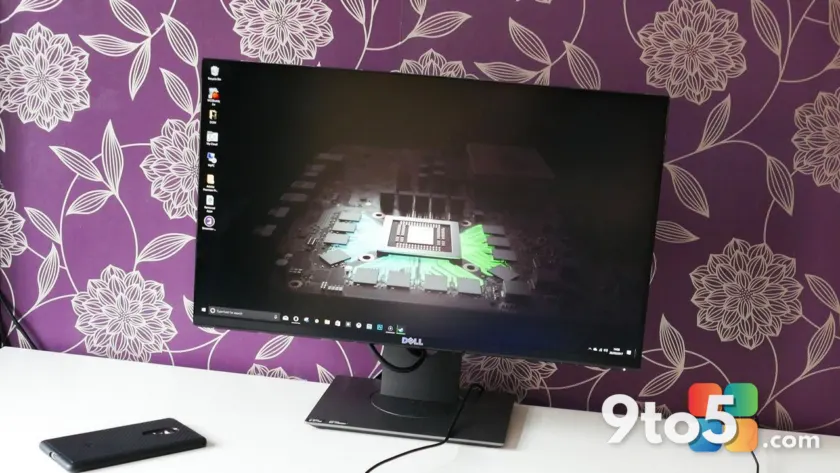
Technology rarely stands still, and covering the Windows ecosystem means constantly evaluating newer, faster, and more efficient hardware. Yet, through a decade of upgrades, one piece of gear has remained firmly anchored to my desk. It is not the most cutting-edge display on the market, nor does it sport the latest panel technology, but it has consistently delivered everything required for both productivity and gaming. After nine years of daily use, the Dell S2417DG has earned a permanent spot as my primary display, and I have absolutely no intention of replacing it.
When I originally purchased this monitor, the goal was straightforward: secure a high-refresh-rate panel that could keep up with a high-end GPU without breaking the bank. Back then, the $430 price tag represented exceptional value for a 1440p TN panel with NVIDIA G-Sync support. Today, that same monitor continues to perform flawlessly, challenging the industry’s relentless push toward annual refresh cycles and convincing me that the sweet spot for display technology has not moved as much as we are told.
The Dell S2417DG: A 9-Year Veteran
Launched in 2015, the Dell S2417DG was built around a 23.8-inch QHD TN panel. At the time, TN (Twisted Nematic) panels were the go-to choice for competitive gamers because they offered the fastest pixel response times, even if they suffered from narrower viewing angles compared to IPS alternatives. The combination of a 2560 x 1440 resolution and a 144Hz refresh rate (overclockable to 165Hz via DisplayPort) made it a standout in a market dominated by 1080p 60Hz displays.
The specifications that initially drew me to this model remain relevant today:
- Screen Size & Panel: 23.8″ QHD (2560 x 1440) TN
- Refresh Rate: 144 Hz (Overclockable to 165 Hz via DP)
- Response Time: 1 ms (GtG)
- Adaptive Sync: NVIDIA G-Sync
- Inputs: 1x DisplayPort 1.2, 1x HDMI 1.4, 4x USB 3.0
- Ergonomics: Height, Tilt, Swivel, Pivot (90°), 100×100 VESA
The inclusion of NVIDIA G-Sync was a major selling point, eliminating screen tearing and stuttering without the input lag penalties associated with V-Sync. Coupled with the 1ms gray-to-gray response time, the S2417DG delivered a buttery-smooth experience that set a new standard for PC gaming monitors. The ergonomic stand, offering full adjustability and VESA mounting compatibility, ensured it could adapt to any desk setup, a feature that has proven invaluable over nine years of shifting workspace configurations.
Why 1440p and 165Hz Still Hit the Sweet Spot
Nine years later, the display landscape has shifted dramatically. OLED panels, mini-LED backlighting, and refresh rates exceeding 360Hz are now commonplace. Yet, when I sit down to game or work, the S2417DG’s 1440p resolution and 165Hz refresh rate feel entirely sufficient. The argument for 4K gaming often hinges on pixel density and visual fidelity, but at a 23.8-inch screen size, the difference is marginal for most users, especially when factoring in the massive GPU performance tax required to drive 4K at high frame rates.
Even with modern hardware like the NVIDIA RTX 5090 at my disposal, I have found that pushing beyond 165Hz yields diminishing returns for my specific use case. Competitive titles like Call of Duty: Black Ops 7 benefit from higher refresh rates, but the jump from 165Hz to 240Hz or 360Hz is subtle enough that it rarely translates to a tangible advantage in fast-paced shooters. For day-to-day productivity, I actually find 120Hz to be the optimal balance between smoothness and power efficiency, but since the S2417DG offers a factory overclock to 165Hz, I take full advantage of it without any additional configuration.
The color performance, rated at 98% sRGB coverage, is more than adequate for general use and gaming. While it lacks the contrast ratios and infinite black levels of OLED panels, the TN panel’s consistent brightness and lack of backlight bleed mean it performs reliably in various lighting conditions. The 1ms response time, once a cutting-edge spec, remains perfectly capable of handling fast-motion sequences without noticeable ghosting or trailing artifacts.
The One Area Where It Shows Its Age
Despite its enduring performance, there is one specific limitation that has become increasingly apparent over time: the HDMI 1.4 port. This older interface is hard-capped at 60Hz, regardless of the resolution. Even when outputting a native 1440p signal, the HDMI connection cannot exceed 60Hz, and dropping to 1080p does not unlock higher refresh rates on this particular panel.
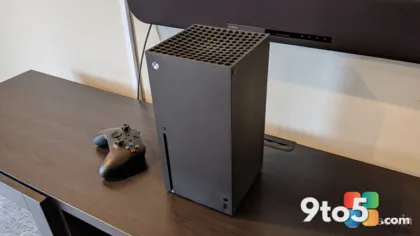
This limitation directly impacts console gaming. When I connect an Xbox Series X to the S2417DG, I am unable to utilize the 120Hz capabilities supported by many modern titles. While 60Hz remains perfectly playable, the inability to leverage the console’s full potential is a noticeable drawback. As a result, I have migrated the Xbox Series X to a newer 1080p monitor equipped with an HDMI 2.1 connection, prioritizing frame rate over resolution for console gaming. This workaround highlights how connector standards can age faster than the panel technology itself.
The HDMI 1.4 limitation is not a dealbreaker for PC gaming, where DisplayPort 1.2 easily handles the 165Hz overclocked refresh rate at 1440p. However, it serves as a reminder that while the core display technology can remain viable for nearly a decade, peripheral standards and connectivity options may require periodic upgrades to keep pace with evolving hardware.
Why I’m Not Tempted by OLED or 4K Upgrades
The current monitor market is saturated with technically impressive options. OLED panels offer perfect blacks and near-instant response times, 4K resolutions provide sharper text and imagery, and refresh rates above 240Hz cater to competitive esports enthusiasts. Yet, when evaluating these upgrades against my actual usage patterns, I struggle to justify the expense. The S2417DG continues to deliver a seamless experience for both work and play, and the perceived benefits of newer technology do not align with my daily needs.
Space constraints also play a significant role in my decision. A 23.8-inch form factor fits perfectly on my desk without overwhelming the workspace, and larger panels would require a more substantial desk setup and potentially a different viewing distance. Furthermore, the economic reality of upgrading cannot be ignored. With the cost of living rising and hardware prices remaining elevated, extending the lifespan of functional electronics is a practical choice. The S2417DG’s robust build quality and continued performance demonstrate that well-engineered products can remain relevant far beyond their initial launch window.
Beyond the financial considerations, there is a strong environmental argument for holding onto working hardware. The electronics industry generates substantial e-waste, and replacing fully functional devices contributes to this growing problem. By continuing to use the Dell S2417DG, I am reducing demand for new manufacturing processes and minimizing my digital footprint. This approach aligns with a broader shift toward sustainable technology consumption, where longevity and repairability are valued over frequent upgrades.
What This Means for You
The longevity of the Dell S2417DG offers a valuable lesson for consumers navigating the ever-evolving display market. Before rushing to upgrade, evaluate whether your current hardware genuinely limits your experience or if the allure of newer specifications is outpacing your actual needs. For many users, 1440p and 165Hz remain the optimal balance between visual fidelity and performance, especially when paired with a reliable adaptive sync solution like NVIDIA G-Sync.
If your existing monitor handles your primary tasks without frustration, extending its lifespan is both economically and environmentally sound. Focus on optimizing your current setup through proper calibration, ergonomic adjustments, and driver updates rather than chasing incremental improvements that may not translate to a tangible benefit. The technology you already own is likely more capable than you realize, and sometimes the best upgrade is simply making the most of what you have.
Source: Latest from Windows Central
Over to you: Have you held onto a monitor for over five years, or does your current display feel like it’s holding you back?