Windows 11 users are waking up to a familiar sight that is not quite familiar at all. Microsoft has begun silently delivering a second photo management application to PCs through routine OneDrive updates, and the new entry point carries a feature set that goes well beyond simple image viewing. The application in question is OneDrive Photos, a stripped-down gallery client that introduces a dedicated People section designed to catalog and label the faces in your library.
What Just Changed: The Quiet Rollout of OneDrive Photos
The new client arrived without a public launch event, a dedicated press page, or a formal Windows Insider preview cycle. According to Microsoft, the application is currently being distributed through a standard OneDrive update rather than a separate install package. The company has stated that OneDrive Photos is generally available today, with a new gallery experience labeled Photos (Preview) currently being tested by Windows Insiders in the Experimental channel.
That Insider distinction matters, because the rollout has clearly crossed the boundary of the preview program. Multiple users have reported the application appearing on non-insider machines, including work laptops running standard enterprise builds. The distribution method bypasses the Microsoft Store entirely, which means the app registers directly in the system without triggering the usual store verification prompts or user consent dialogs.
This is not the first time Microsoft has experimented with splitting the Windows photo experience. The original Photos app launched as a Universal Windows Platform replacement for the legacy Windows Photo Viewer, and it has undergone several major redesigns since then. Each iteration has pushed the application further toward cloud integration, but the current move represents a structural separation rather than a feature addition. You now have two distinct gallery clients sitting side by side, each pulling from the same local storage but offering different menus and different privacy expectations.
The decision to ship the application through a background OneDrive update rather than a standalone installer reflects Microsoft’s broader strategy of embedding cloud services deeper into the operating system. OneDrive already syncs files, manages backups, and handles version history. Adding a photo gallery client that prioritizes cloud indexing and facial recognition keeps users inside the Microsoft ecosystem without requiring them to open a web browser or visit a storefront.
Inside the New App: Features, Layout, and the People Tab
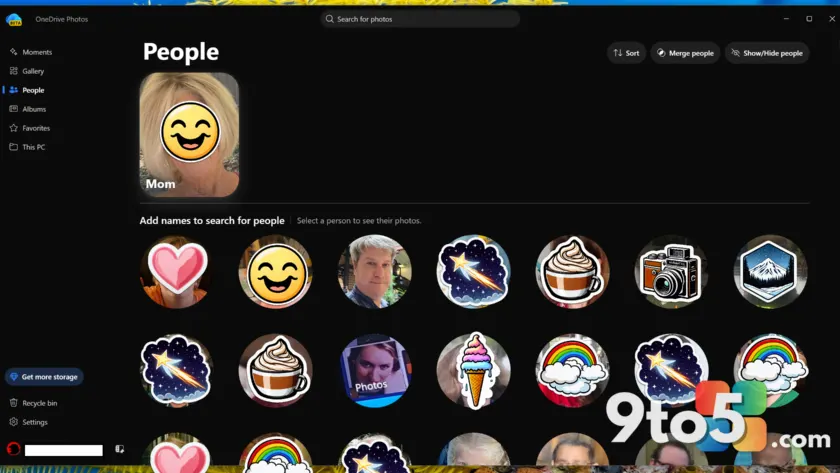
The interface of OneDrive Photos follows a simplified navigation model that replaces the traditional editing-focused workflow with a content-first layout. The left-hand menu lists Moments, Gallery, People, Albums, Favorites, and This PC. Each section serves a specific organizational purpose, though the implementation details vary in clarity.
Moments continues the calendar-based approach that Windows Photos introduced years ago, surfacing photos taken on the same date in previous years. Gallery functions as the default roll, pulling from your local folders and synced OneDrive storage. Albums groups images by month and theme, while Favorites provides a manual bookmarking system for images you want to return to. This PC acts as a direct link to your local OneDrive folder, which raises questions about redundancy since Gallery already indexes the same directory.
The People section is where the application diverges most sharply from its predecessor. Rather than relying on automatic face grouping that runs silently in the background, OneDrive Photos actively prompts you to identify the individuals in your library. The algorithm extracts the most frequently appearing faces across your photos, screenshots, and shared files, then presents them in a ranked list. You can assign a name to each face, merge duplicate entries, highlight specific individuals, or hide faces you would rather not see indexed.
That prompt changes the user experience from passive organization to active participation. The traditional Photos app has always allowed face grouping without requiring manual labeling, and it has long supported scene-based search queries like beach or white car. OneDrive Photos retains those search capabilities, but it shifts the primary workflow toward identity management. The application also includes a subset of the AI editing tools found in the main Photos client, along with a shortcut to Image Creator, though the full editing suite has been deliberately pared back.
From a technical standpoint, the People tab relies on local facial recognition processing. Microsoft has confirmed that the face grouping data remains visible only to the account owner and is never shared across accounts. The company also states that facial scan data is deleted after thirty days and is not used to train external AI models. Users retain the ability to opt out of the feature entirely, which addresses the most immediate privacy concerns around automatic biometric indexing.
Privacy and Data Handling: What Microsoft Says
The privacy implications of a gallery client that actively requests identity information deserve careful examination. Microsoft’s position is clear: facial recognition runs locally, data retention is capped at thirty days, and the information is never fed into broader AI training pipelines. The company emphasizes that users can disable the People section at any time, and that the grouping data stays isolated within the account owner’s environment.
Those statements align with Microsoft’s broader privacy framework for Windows 11, which has shifted toward local processing for sensitive biometric data. The thirty-day deletion window is shorter than the indefinite storage model used by some competing services, and the opt-out mechanism provides a straightforward escape hatch for users who prefer not to participate. However, the silent installation method complicates informed consent. Users are not presented with a clear privacy notice before the application begins indexing their library, which means the opt-out becomes a reactive step rather than a proactive choice.
It is also worth noting that the traditional Windows Photos app has been drifting toward similar identity-focused features. The current Photos client includes an Identity section that surfaces Notes, Receipts, and Screenshots, alongside a blank People placeholder that has not yet been populated. Neither the legacy Photos app nor OneDrive Photos provides a direct link to OneDrive Personal Vault, the encrypted storage tier designed for sensitive documents and personal files. That omission is notable, since users managing identity data often expect seamless access to secure storage for related documents.
Industry comparisons are inevitable. Google Photos has long offered face grouping with explicit permission prompts, and it recently introduced family tree features that extend beyond simple image organization. Microsoft’s approach is less aggressive in terms of social graph integration, but the underlying data collection model shares similarities. Both companies are building identity layers over personal photo libraries, and both rely on local processing to mitigate cloud storage concerns.
What This Means for You
The immediate impact of this rollout depends on how you currently manage your photo library. If you rely on the traditional Photos app for quick edits, background removal, and AI-powered cleanup, you will notice a reduced feature set in OneDrive Photos. The application prioritizes organization over creation, which suits users who want a clean viewing experience but frustrates those who treat the gallery as a lightweight editing workspace.
For users concerned about privacy, the People tab is optional but not invisible. The application will still run its initial scan and present the identification prompt unless you disable the feature through the settings menu. If you choose to participate, you retain control over which faces are labeled, which entries are merged, and which individuals are hidden from search results. The thirty-day data retention policy applies to the raw facial scan data, not the labels you manually assign, which means your named contacts will persist as long as you keep the feature enabled.
Enterprise administrators should note that the silent distribution method bypasses standard software inventory controls. If your deployment policy requires explicit approval for all installed applications, OneDrive Photos may appear as an unapproved client until Microsoft provides official documentation or a Group Policy exclusion path. Monitoring your OneDrive update logs will help you track when the application lands on managed devices.
How to Check If It Is On Your PC
Verifying whether OneDrive Photos has been installed on your system is straightforward. Open Windows Search and type OneDrive Photos. If the application appears in the results, it has been deployed to your machine. You can also check the installed applications list under Settings > Apps > Installed apps, where it will appear alongside the standard Photos client.
If you prefer not to use the new client, you can disable the People section from within the application settings. Navigate to the People tab, locate the identity indexing toggle, and switch it off. The application will continue to function as a basic gallery viewer, but it will stop requesting face identification and stop running the associated local scans. You can also choose to uninstall the application through the Apps settings if you want to remove it entirely, though future OneDrive updates may reinstall it unless Microsoft introduces a permanent exclusion option.
The broader takeaway is that Microsoft is treating photo management as a cloud-first service rather than a local utility. The dual-app approach gives users a choice between a feature-rich editing client and a streamlined gallery focused on organization and identity. Whether that split serves the average Windows 11 user remains an open question, but the rollout method itself will likely draw continued scrutiny from privacy advocates and IT administrators alike.
Source: PCWorld
Over to you: Are you letting OneDrive Photos index your library, or have you already disabled the People tab?
You may also like
 Microsoft Admits Windows 10 End of Support Was the Real Windows 11 Sales Driver
 Dungeons & Dragons Meets Azeroth: Everything We Know About the WoW Crossover TTRPG
 Gears of War E-Day Multiplayer Modes, Maps, and Launch Details Revealed
 Truck Simulator Games Just Fixed My Gaming Burnout After Years of Live-Service Fatigue