Microsoft Edge is now the first browser to take advantage of a new Windows capability called accelerated app launches, and the payoff is a noticeably quicker start-up. According to the Microsoft Edge team, most Windows users will see roughly a 15% launch speed improvement, with gains of up to 33% during heavy multitasking.
The feature is already rolling out, and it works best when Edge is already running in the background. Here is exactly what changed, who benefits, and how to make sure you have it enabled.
What accelerated app launches actually do
The core idea is simple: stop Windows from doing redundant homework every time you open Edge. In practice, Edge is frequently already running on your PC. You may have a visible Edge window open, or the browser may be sitting in the background thanks to a feature called Startup Boost.
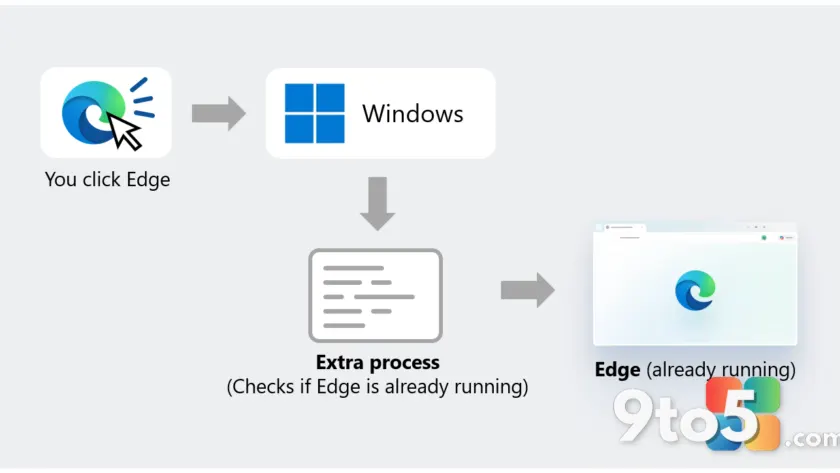
Without accelerated app launches, clicking a link or tapping the Edge icon on your taskbar forces Windows to first figure out whether an Edge process is already alive. To do that, Windows spins up an intermediary process whose only job is to search for the running browser and, if it finds one, forward your request to it.
On a freshly booted PC you probably won’t notice the extra step. But in real-world multitasking, that additional lookup can make Edge feel sluggish when you’re trying to jump back into a tab.

How the new path works
With the feature in place, the process changes. As soon as an Edge process starts, it sends a registration request to Windows, which checks and accepts it. Later, when you launch Edge again, Windows can use that registration to notify the already-running process directly, skipping the intermediary lookup entirely.
Microsoft says the accelerated-launch path is wired into the three most common ways you reach Edge: the Start menu, the Taskbar, and clicking links that open in Edge by default. If any of those is your normal routine, you should benefit automatically.
The speed gains in numbers
The headline figure is a 15% launch speed improvement for most users, measured against launching Edge without the feature when the browser is already running. Under heavy multitasking conditions, Microsoft reports wins of up to 33%.
Those numbers are relative to the old behavior, so the real-world feel depends on your hardware and how many other apps are working in the background. The multitasking figure is where the optimization pays off most, since that is exactly when the extra process check hurts the most.
What this means for you
If you use Edge on Windows 11, you should already be getting faster starts without changing anything. There is no toggle to turn on and no setting to tweak — the behavior is baked into the browser and the OS update that enables it. The trade-off is that you need both pieces current, which is why the details below matter.
The main thing to watch is that both software pieces need to be current. Microsoft Edge version 150 or later is required, and your Windows 11 install needs the October 2026 non-security update (KB5127936) or later. If you’re on an older Edge or haven’t installed that Windows update, you won’t see the benefit yet.
How to get it
To make sure you have accelerated app launches, keep both Edge and Windows up to date. Edge 150 and later ships automatically through the browser’s normal update cycle. On the Windows side, install the October 2026 non-security update (KB5127936) or a later release via Windows Update.
The feature is supported on Windows 11, versions 25H2, 26H2, and 26H1, paired with that October 2026 update or later. Once both are current, the faster launch path activates automatically — no manual steps required.
The bigger picture
Microsoft frames this as part of a broader effort to make Edge “work great on Windows,” and it says the team is already exploring other uses for the capability, such as opening PDF files. That suggests more scenarios could gain the same optimization down the line.
Notably, the Edge and Windows teams are also contributing this work to Chromium, the open-source project that Edge is built on. That means other Chromium-based browsers could eventually benefit from accelerated app launches on Windows too, even though Edge is the first to ship it.
For developers interested in bringing the same behavior to their own Windows apps, Microsoft has published guidance on Microsoft Learn titled “Register your application for accelerated app launches.”
Source: Windows Blog
Over to you: Do you notice browser start-up speed at all, or have you already gotten used to Edge’s current launch times?
You may also like
 Xbox Free Play Days returns for Halloween weekend with five free-to-keep games
 Microsoft Copilot harness now available via Foundry, powers all Copilot AI
 UK Council Accuses Microsoft of ‘Blackmail’ Over Rising Software Fees
 Microsoft Garage Is Being Shut Down as Employees Voice Frustration Over AI Spending