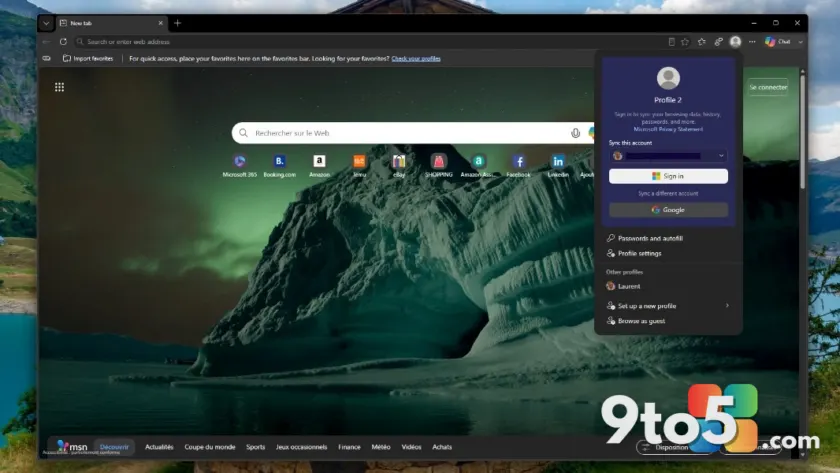
Microsoft is expanding how you can access your browsing data in its flagship web browser. Starting with version 150, Microsoft Edge will allow users to sign in using a Google account directly within the app settings.
A broader range of sync options
Historically, syncing bookmarks, passwords, and history in Edge required a Microsoft account. While this works well for those deep in the Windows ecosystem, it has been a friction point for users who prefer Google services or simply do not have a Microsoft ID.
This update changes that dynamic. By supporting Google credentials, Microsoft is acknowledging that many users manage their digital lives primarily through Google Workspace or personal Gmail accounts. This feature is currently rolling out to Windows and macOS devices.
What this means for you
If you are a Windows user who has resisted using Edge because you didn’t want to create or maintain another Microsoft account, this is a significant step toward making the browser more accessible. You can now leverage your existing Google identity to sync your browsing preferences without needing to manage separate credentials.
For IT professionals and enterprise users, this also simplifies deployment scenarios where users are managed via Google Workspace but required to use Edge for specific web applications or security features. It reduces the administrative overhead of provisioning Microsoft accounts solely for browser synchronization purposes.
To get this feature, ensure your browser is updated to version 150. You can check your current version by navigating to edge://settings/about.
Source: Thurrott.com
Over to you: Will you switch to signing in with your Google account, or do you prefer keeping your Microsoft and Google identities separate?
You may also like
 Rumor: GTA 6 may hit 60 FPS on Xbox Series S with dual performance modes
 Xbox reportedly pulled funding from Assassin’s Creed creator’s new game
 Cyberpunk 2077: Edgerunners 2 trailer drops, confirms Fall 2026 Netflix release
 Assassin’s Creed Black Flag Resynced: Xbox Series X hits 60 FPS, Series S stuck at 30