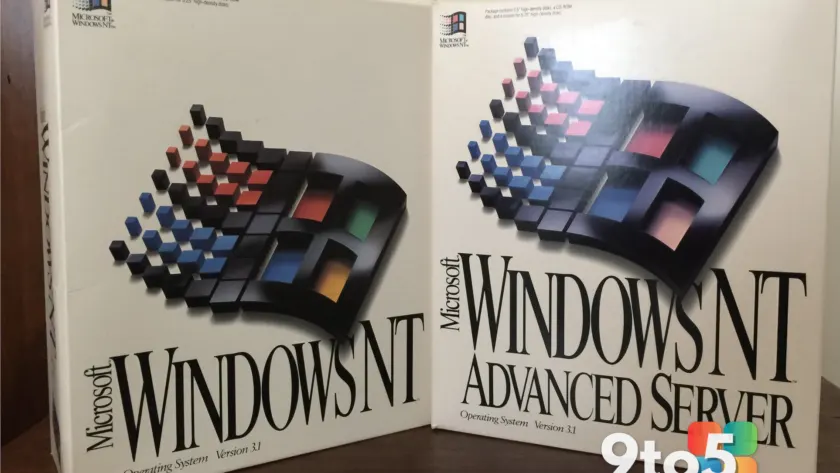
For over a quarter century, the trajectory of Microsoft Windows has been shaped by a constant tension between protecting its desktop dominance and chasing new revenue streams. A recent retrospective from a former Microsoft employee who spent more than twenty-five years inside the company offers a clear-eyed look at how those priorities shifted, and why the current wave of Windows 11 updates feels like a deliberate course correction. The narrative traces a path from early Windows 3.x deployments and Windows NT rollouts in the 1990s, through the explosive growth of Exchange and Active Directory, into the aggressive cloud-first strategy that defined the Ballmer era, and finally to the present day, where the operating system is receiving renewed engineering attention.
What stands out is not just the historical overview, but the acknowledgment that Windows client revenue, which once accounted for roughly forty percent of Microsoft’s total income in 1997, now represents less than ten percent of the company’s overall financial picture. That economic reality drove a strategic pivot toward subscription-based services and cloud infrastructure. Yet, as the analysis points out, the recent shift in product philosophy suggests that Microsoft has recognized a growing disconnect between its corporate priorities and the actual experience of desktop users. The current Windows 11 updates are no longer about forcing AI features into every corner of the interface, but about restoring fundamentals that long-time users expect.
The Enterprise and Cloud Pivot
The transformation began in earnest during the early 2010s, when Microsoft started treating Software-as-a-Service as the default delivery model rather than a supplementary option. CEO Steve Ballmer officially launched Office 365 in mid-2011, positioning it as the primary method for organizations to handle email, collaboration, and document management without maintaining on-premises server infrastructure. The move was initially met with resistance from channel partners whose business models relied on perpetual licensing and multi-year upgrade cycles, but the strategic direction was firmly set. Sales teams were instructed to lead with the cloud, even when customers expressed hesitation about abandoning traditional licensing.
Azure followed closely behind, expanding Microsoft’s footprint beyond productivity software into virtual machines, container orchestration, and native cloud services. The goal was clear: reduce the need for customer data centers entirely. Microsoft’s internal metrics eventually showed that many enterprise deployments contained only the bare minimum of on-premises hardware, with Active Directory, file services, and Exchange workloads migrating to Azure Active Directory and Microsoft 365. This shift fundamentally changed how Windows Server and Windows client operated together. The desktop was no longer the center of the corporate technology stack; it became a thin client for a broader ecosystem.
From an engineering standpoint, this meant that Windows development cycles began to prioritize compatibility with cloud identity systems, conditional access policies, and device management frameworks like Intune. Features that improved local performance or refined the graphical user interface took a backseat to telemetry, security compliance, and subscription management. The result was an operating system that functioned reliably but rarely felt like it was being actively refined for the end user. For years, the primary value proposition of Windows shifted from a polished desktop experience to a managed endpoint within a larger Microsoft 365 subscription.
Decades of Desktop Evolution
Windows has never operated in a vacuum, and its development history is deeply intertwined with competitive pressure. The late 1990s antitrust case with the United States Department of Justice stemmed partly from Microsoft’s aggressive tactics to protect its desktop monopoly, including bundling Internet Explorer and pressuring original equipment manufacturers to remove competing browsers. That same protective instinct drove internal projects like MS Money, Encarta, AutoRoute, and even the ill-fated Zune media player. Each was designed to close gaps that competitors could exploit, but most were eventually discontinued as market dynamics shifted.
The desktop operating system itself underwent several painful transitions. Windows XP, released in 2001, unified consumer and business platforms and introduced a rigorous security review process that culminated in Windows XP Service Pack 2. The ambitious Longhorn project, which aimed to deliver a completely modernized client and server platform, ran into severe technical debt and was ultimately abandoned. Windows Vista inherited much of that unfinished architecture and launched to widespread criticism over performance, driver compatibility, and the introduction of User Account Control. Windows 7 was then positioned internally as a return to form, smoothing out Vista’s rough edges and establishing a stable foundation that would last nearly a decade.
Windows 8 attempted to address the rise of touchscreens and tablets, but the heavy emphasis on the Start screen and Metro-style apps alienated traditional desktop users. Windows 10 corrected that course, delivering a refined version of Windows 7 with modernized underpinnings. Windows 11, now approaching its fifth anniversary, introduced a redesigned interface with centered taskbar elements and rounded corners, but faced similar pushback regarding layout changes and hardware requirements. The pattern is clear: each major release attempts to balance innovation with familiarity, and the most successful iterations are those that prioritize stability and user control over experimental design.
The Current Windows 11 Direction
The most notable shift in recent months is a deliberate retreat from the previous strategy of embedding AI and cloud features into every application. Microsoft has been quietly removing Copilot panels from native tools like Notepad and the Snipping Tool, streamlining the interface rather than expanding it. The Start menu has received structural updates that prioritize pinned applications and reduce clutter, while the removal of sponsored content and aggressive widget promotions signals a return to a cleaner desktop experience. Taskbar customization options, including vertical alignment, have been restored after years of user requests.
These changes are not cosmetic. They reflect a broader engineering decision to treat Windows as a standalone product worth refining, rather than merely a delivery mechanism for Microsoft 365 and Azure services. The focus has shifted toward performance optimization, reliability improvements, and interface consistency. Background telemetry collection has been adjusted to reduce unnecessary network traffic, and system resource allocation is being tuned to prioritize active applications over background services. For users who have experienced the cumulative effect of years of feature additions without corresponding cleanup, these adjustments feel like a necessary reset.
The timing of these updates also aligns with Microsoft’s broader acknowledgment that desktop computing remains relevant despite the rise of mobile devices and cloud-based workflows. A significant portion of the workforce still relies on Windows for productivity, development, and creative tasks. By restoring core functionality and reducing interface friction, Microsoft is attempting to rebuild trust with power users and enterprise administrators who previously felt neglected during the cloud-first era. The updates are incremental rather than revolutionary, but they address long-standing pain points that have accumulated over multiple release cycles.
What This Means for You
If you are running Windows 11 on a supported device, the immediate impact is a cleaner, more responsive desktop environment. Applications will load faster, background processes will consume less memory, and the interface will feel less cluttered. The removal of forced AI integrations means you will no longer encounter persistent Copilot prompts in tools that do not require them. Widget feeds will display less promotional content, and the Start menu will prioritize your pinned applications over suggested tiles. These changes are being rolled out through standard Windows Update channels, so no manual intervention is required to receive them.
For enterprise users and IT administrators, the shift signals a return to prioritizing device management and local performance alongside cloud integration. Group Policy templates and Intune configuration profiles will continue to function as expected, but the underlying operating system is being optimized for stability rather than feature expansion. If you manage a fleet of devices, you will notice fewer forced reboots and reduced background telemetry traffic. The focus on reliability means that patch deployment cycles will likely become more predictable, with cumulative updates emphasizing quality over new functionality.
For consumers who have been hesitant to upgrade from Windows 10, the current direction does not change the end-of-support timeline for the older operating system. Windows 10 will continue to receive security updates until October 2025, after which it will no longer be supported. If you are considering moving to Windows 11, the recent improvements make it a more viable option than it was during its initial launch. The operating system now feels like a polished product rather than a beta environment for cloud services. However, you should still verify hardware compatibility, particularly if you are using older peripherals or specialized drivers that may not have been fully tested with the latest builds.
How to Get It
The improvements described in this analysis are being distributed through the standard Windows Update pipeline. Open Settings and navigate to Windows Update to check for the latest cumulative updates. If your system is already on Windows 11, you will receive these adjustments automatically as part of regular patch cycles. Users on Windows 10 will see incremental refinements as well, though the most significant interface changes are specific to the Windows 11 codebase.
For those who want to manually verify their update status, open the Update History page in Settings and confirm that you are running the most recent build. If you are managing devices through a corporate environment, your IT department will push these updates through WSUS or Microsoft Endpoint Configuration Manager. Enterprise customers should review the latest release notes in the Microsoft Learn documentation to understand which components have been modified and how they interact with existing Group Policy configurations. The shift toward a cleaner desktop experience is now the default, and Microsoft has indicated that future development will continue to prioritize stability and user control over aggressive feature expansion.
Source: Windows Latest
Over to you: Which recent Windows 11 change has improved your daily workflow the most?
You may also like
 Major Xbox Services Outage Disrupts Store, Games, and Online Play
 Open Secure AI Alliance Launched by Nvidia, Microsoft, and Tech Giants to Boost AI Safety
 S.T.A.L.K.E.R. 2 DLC Release Date Confirmed: Cost of Hope Arrives August 2026
 Microsoft Expands Xbox Backward Compatibility, Console Sales Surge 86%, and More