If you recently purchased an HP laptop running Windows 11, you may have noticed HP Support Assistant is pushing Bing through persistent system notifications. According to recent reporting from Windows Latest, the OEM utility is serving aggressive pop-ups that ask users to set Microsoft’s search engine as their default, a campaign that Microsoft is refusing to block despite its recent crackdowns on third-party bloatware. This HP Support Assistant Bing pop-up represents a notable shift in how OEMs can monetize Windows devices without facing immediate intervention from Redmond.
HP Support Assistant Bing Pop-up: What Users Are Reporting
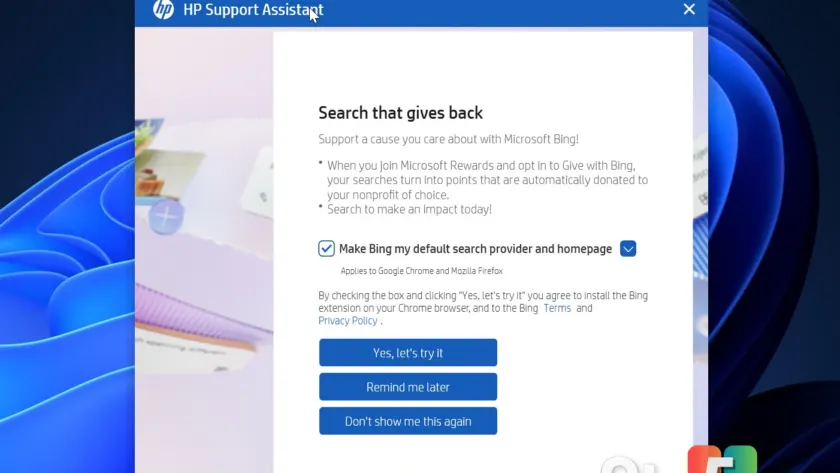
The notification arrives without warning, typically interrupting normal desktop activity on devices ranging from budget models to flagship laptops priced near $2,000. The message prominently features the tagline “Search that gives back,” urging users to switch their default search provider and homepage to Bing. The interface pre-selects the option to “Make Bing my default search provider and homepage,” making it the path of least resistance. Users are presented with three choices: confirm the switch, set a reminder for later, or dismiss the prompt permanently. However, repeated testing shows that selecting the dismissal option fails to stop the notifications from returning, creating a loop that frustrates even tech-savvy buyers.
Why HP Claims Bing “Gives Back”
HP justifies the campaign by pointing to Microsoft’s Rewards program, specifically a feature called Give with Bing. The company explains that joining the program and opting into the donation feature converts regular searches into points that are automatically forwarded to selected nonprofits. HP notes that these organizations include environmental groups focused on tree planting and other sustainability initiatives. The messaging implies that switching your search engine is a charitable act, though it glosses over the commercial mechanics behind the scenes. Microsoft confirmed that the program requires users to actively opt in, meaning the donation process is not truly automatic despite the wording in the notification.
How the Installation Process Unfolds
Accepting the prompt triggers a multi-step installation sequence that reaches beyond the Windows desktop. HP Support Assistant immediately launches both Google Chrome and Mozilla Firefox to deploy a Bing browser extension. Once the extension is in place, it attempts to override your default search engine and homepage settings. Modern browsers typically block these automated changes, but the extension compensates by opening a new tab with a step-by-step guide for manually updating your preferences. The campaign also sidesteps covert background installation, relying instead on the initial click to trigger the browser modifications, which technically keeps it within Microsoft’s current distribution guidelines.
Microsoft’s Reluctance to Intervene
The timing of this campaign stands in stark contrast to Microsoft’s recent actions against other hardware partners. Just days ago, Microsoft confirmed it worked directly with LG to remove a McAfee installer from its Monitor App Installer after users complained about unwanted bloatware. Pavan Davuluri, Microsoft’s executive vice president for Windows and Devices, publicly stated that LG agreed to disable the pop-up as an immediate next step. Despite that precedent, Microsoft is allowing HP to continue its Bing promotion. The distinction likely hinges on disclosure: HP frames the initiative as a voluntary user choice tied to a rewards program, whereas LG’s approach was widely viewed as covert bundling disguised as a security update.
What This Means for You
For everyday Windows 11 users, the distinction between covert bundling and disclosed commercial promotion matters less than the actual desktop experience. You will notice repeated interruptions while working or gaming, and the dismissal option proves unreliable. The campaign also highlights a broader trend where OEMs leverage pre-installed utilities to drive traffic to partner services. While HP frames the initiative as a charitable opportunity, it functions primarily as a revenue-sharing arrangement between the hardware maker and Microsoft. Users who value their default search settings will need to take manual action to preserve them, especially since Windows Update may reinstall the utility after major feature updates.
How to Stop the HP Support Assistant Bing Pop-up
The most reliable workaround involves completely removing HP Support Assistant from your system. Navigate to Settings, open Installed Apps, locate the utility, and select Uninstall. After removal, you should also check Windows Update settings to prevent the app from reinstalling automatically. Microsoft typically treats HP Support Assistant as a recommended optional update, meaning it can reappear after major feature updates or driver rollouts. If you rely on the utility for warranty checks or driver management, consider using HP’s web-based support portal instead of the desktop application. You can also disable the Bing extension manually through your browser settings to prevent it from overriding your search preferences.
Source: Windows Latest
Over to you: Have you noticed the HP Support Assistant notification on your device, and did the dismiss option actually stop it from returning?