- Status: Resolved/Fixed
- Affected Versions: Windows 11 Build 26200.8737 and Build 26100.8737
- Update ID: KB5095093
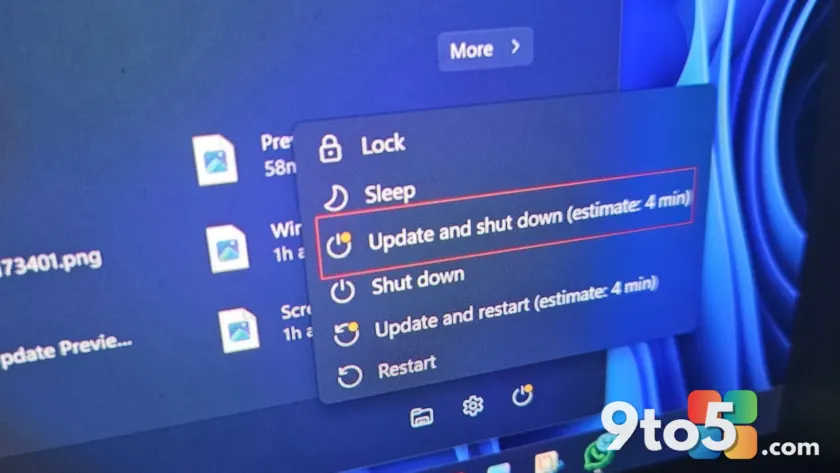
If you have been staring at the “Shutting down” screen for longer than expected, Microsoft has confirmed it is not your hardware or third-party software causing the delay. The company has officially admitted that a bug in Windows 11 was responsible for these slow shutdowns and restarts.
Alongside this admission, the latest cumulative update includes significant fixes for explorer.exe reliability, specifically targeting issues where taskbar icons appear as blank gray placeholders after signing in. Here is what changed in the recent Windows 11 update cycle.
#1 The BITS service was holding up your shutdown
Microsoft identified that the Background Intelligent Transfer Service (BITS) was the culprit behind the delayed power-off process. BITS handles background tasks such as downloading updates, deploying Microsoft Store apps, and managing other data transfers.
In previous builds, Windows would attempt to check for or finalize these downloads even after you clicked “Shut down.” This caused the system to hang on the shutdown screen while it tried to stop the BITS service. With KB5095093, Microsoft has reduced the time required to stop this service during shutdown. While this may not make every PC shut down instantly, it should eliminate the unnecessary delays for users experiencing hangs.
#2 Blank taskbar icons and explorer.exe stability
A separate but equally frustrating issue involved explorer.exe, the process that powers the Windows shell, including the Start menu, File Explorer, and the taskbar. Microsoft noted a reliability issue where taskbar icons would render as blank or gray placeholders, particularly after a user signed in.
Previously, affected users had to manually restart explorer.exe via Task Manager or wait for the system to self-correct. The release notes for Build 26200.8737 and Build 26100.8737 state that this update reduces the probability of these blank icons appearing. It also addresses related issues on login and lock screens involving third-party credential providers.
#3 Improved File Explorer and desktop performance
The fixes for explorer.exe extend beyond just visual glitches. Microsoft reports that the update improves performance when opening the “Home” tab in File Explorer, especially when OneDrive files are actively syncing. Users should also notice smoother transitions when switching between virtual desktops.
Additionally, the update addresses inconsistencies with Acrylic blur effects in the Start menu and other shell areas. Previously, these blur effects might disappear and reappear unexpectedly due to shell bugs. The patch aims to provide a more consistent visual experience and faster launch times for apps that rely on shell interactions.
What this means for you
If you have been experiencing slow shutdowns or missing taskbar icons, installing KB5095093 should resolve these specific issues. This update is part of the broader July 2026 Patch Tuesday cycle, which also includes Bluetooth improvements and greater control over Windows Update settings. As always, ensure you have a backup before applying major cumulative updates.
Source: Windows Latest
Build details:
- kb5095093
Over to you: Have you noticed faster shutdown times since installing KB5095093, or are you still experiencing delays?
You may also like
 Windows 11 Canary builds bring targeted audio driver and settings improvements
 Microsoft drops new Windows 11 builds for June 19, including version 26H2 for Experimental
 Windows Insider builds for June 12: New unified update experience, typo-tolerant search, and 26H1 updates
 Windows 11 Insider builds for June 12: Unified updates, smarter search, and new inbox app notes