Microsoft and NVIDIA recently unveiled NVIDIA RTX Spark, a new line of thin-and-light Windows PCs built on the Arm architecture. According to the Windows Blog, these devices—arriving in fall of 2026 from Microsoft Surface, ASUS, Dell, HP, Lenovo, and MSI—become the most powerful and efficient Windows on Arm PCs to date. NVIDIA’s entry into the silicon market joins the already-established Qualcomm Snapdragon X series, and Microsoft says growing customer demand is pulling more chipmakers and OEMs into the platform.
But chips alone don’t sell PCs. The real draw for most buyers is what runs on them, and Microsoft’s latest App Assure progress report focuses squarely on that. The company says the Windows on Arm app catalog now lists more than 7,000 verified apps and games, tracked on the Works on Windows on Arm site using compatibility data compiled by Microsoft. This roundup covers some of the most notable new additions since the team’s previous update, spanning the workloads customers actually depend on.
#1 STEM and education apps
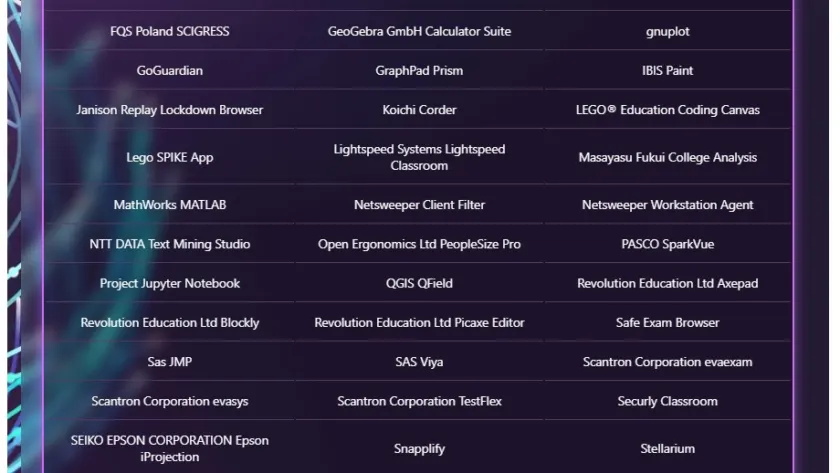
Microsoft set Science, Technology, Engineering, and Mathematics (STEM) and education tools apart with their own section, calling it a “rapidly expanding category.” The reasoning is straightforward: as Windows on Arm devices show up in more classrooms, labs, and home-study setups, developers in this space are recognizing a chance to reach learners who want portable, power-efficient machines without giving up performance.
The blog doesn’t name specific new titles in this category, but the accompanying chart lists recent STEM and education apps that have been verified for the platform. For educators and students, the signal is that the category is maturing fast enough to warrant dedicated attention from Microsoft’s compatibility team.

For readers, this matters because STEM and education software has historically been one of the weaker areas on ARM-style platforms. Getting lab tools, math applications, and classroom platforms verified for Arm means schools investing in these devices won’t have to fall back on emulation or workarounds.
#2 Security apps
Security is framed as foundational, spanning more than any single tool. Microsoft notes that modern environments need layered protection across endpoints, consistent device management, and secure connectivity—especially as work happens across hybrid, mobile, and distributed setups.
Arm-based devices are built with security at the core, combining hardware, firmware, and software protections. Microsoft says strong third-party support rounds out that foundation, listing the vendors it has already brought onboard: Norton, CrowdStrike, and McAfee for endpoint protection; VMware, Beyond Trust, and Cisco for endpoint management; and Nord, Zscaler, and Palo Alto Networks for VPN and Zero Trust solutions.
The new chart shows that roster continuing to grow, which Microsoft reads as software vendors aligning with customer expectations for secure, manageable Arm deployments. For IT teams evaluating these machines for enterprise use, that breadth is the point: you can deploy Arm-based devices without leaving behind the security stack your organization already relies on.

#3 Productivity apps
Productivity software is described as the “cornerstone” of how people get work done on Windows—project management, collaboration, information organization, and team communication. Microsoft says the growing list reflects both customer demand and developer momentum from teams building with Arm as a first-class Windows platform rather than an afterthought.
The new additions join previously announced support from industry leaders including Google, Adobe, Slack, Trello, and Dropbox. Again, Microsoft points to a chart for the specific names rather than spelling them all out in prose, but the category is clearly positioned as core to the platform’s appeal.
For everyday users, the implication is that the apps you already use to manage your workday—email, docs, chat, task boards—have native or verified Arm versions, which typically means better battery life and faster performance than running x86 apps through emulation.
#4 Creativity, social media, and entertainment apps
Microsoft argues that Windows devices matter for expression and entertainment just as much as for work, from creative tools to social platforms to media consumption. The company says developers keep bringing rich experiences to Arm-based devices so users don’t have to choose between being productive and being entertained.
The previous update highlighted brands like Camtasia, Blender, and Figma releasing Arm apps. This roundup points to a chart of the latest creativity, social media, and entertainment additions, continuing the pattern of naming a few headline titles while leaving the full list to the visual.

For creators and casual users alike, this category has historically been the biggest question mark for Arm PCs. Seeing tools like Blender and Figma get native support is meaningful because those are performance-sensitive applications that previously ran poorly or not at all on the architecture.
What this means for you
The big picture is that Windows on Arm is being positioned as a complete platform rather than a niche. With silicon from both NVIDIA and Qualcomm, devices from six major OEMs arriving in fall 2026, and an app catalog now exceeding 7,000 verified titles, the platform is aiming to cover the workloads that actually decide whether a PC purchase makes sense.
For most buyers, the practical takeaway is simple: before you commit to an Arm-based Windows PC, check the Works on Windows on Arm site for the specific apps you need. If your workflow software shows up as verified, you’re in good shape. If it doesn’t, the App Assure program exists precisely to help developers bring those apps over.
How to find what’s available
Microsoft points readers to two resources. The Works on Windows on Arm site (worksonwoa.com) maintains a continuously updated list of all apps verified for the platform. Meanwhile, the App Assure program—backed by the Arm Advisory Service—offers developers expert guidance, technical workshops, code samples, and a direct escalation path to Microsoft engineers who can help port their software.
If you’re a developer interested in bringing your app to Windows on Arm, Microsoft says you can request assistance through its App Assure portal. For buyers, bookmarking the app catalog site is the fastest way to verify compatibility before spending money on hardware.
Source: Windows Blog
Over to you: Which workload matters most to you on an Arm PC—security and productivity tools, or creativity apps like Blender and Figma?